







Question: Writing a script which checks for an active Internet connection and adding a cronjob entry Ping is a computer network administration software utility used to
Writing a script which checks for an active Internet connection and adding a cronjob entry
Ping is a computer network administration software utility used to test the reachability of a host on an Internet Protocol network.
If you type ping -c 1 website/IP, the ping command will send 1 ICMP packet (since you set -c to 1) originated from your computer to the destination website/IP. Then, it will receive an ICMP response packet and display details about the round trip.
Test this command with the IP address 8.8.8.8 in your terminal and observe the output. The IP 8.8.8.8 is the primary DNS server for Google DNS.
In the results, you should see the number of packets sent and received along with a percentage of packets that were lost. If you have an active internet connection (also assuming the server responds), you should observe 0.0% packet loss meaning that you were able to receive the response packet from the server. If you do not have an active connection, you will observe 100.0% packet loss in your output or a percentage greater than 0.0% assuming that some of the packets were lost.
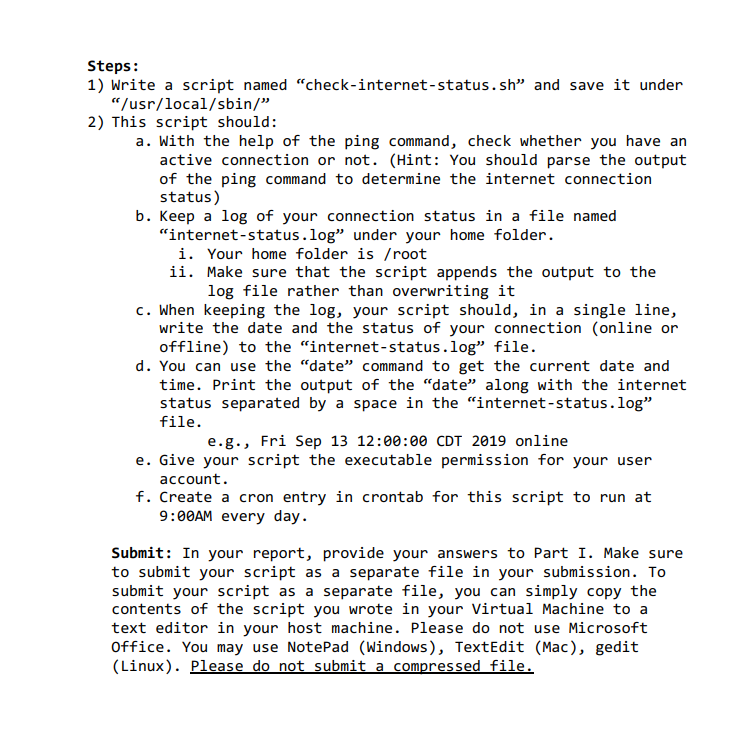
eps: Write a script named "check-internet-status.sh" and save it under "/usr/local/sbin/" This script should: a. With the help of the ping command, check whether you have an active connection or not. (Hint: You should parse the output of the ping command to determine the internet connection status ) b. Keep a log of your connection status in a file named "internet-status.log" under your home folder. i. Your home folder is /root ii. Make sure that the script appends the output to the log file rather than overwriting it c. When keeping the log, your script should, in a single line, write the date and the status of your connection (online or offline) to the "internet-status.log" file. d. You can use the "date" command to get the current date and time. Print the output of the "date" along with the internet status separated by a space in the "internet-status.log" file. e.g., Fri Sep 13 12:00:00 CDT 2019 online e. Give your script the executable permission for your user account. f. Create a cron entry in crontab for this script to run at 9:00AM every day. Submit: In your report, provide your answers to Part I. Make sure to submit your script as a separate file in your submission. To submit your script as a separate file, you can simply copy the contents of the script you wrote in your Virtual Machine to a text editor in your host machine. Please do not use Microsoft Office. You may use NotePad (Windows), TextEdit (Mac), gedit (Linux). Please do not submit a compressed file
Step by Step Solution
There are 3 Steps involved in it

Get step-by-step solutions from verified subject matter experts
 Study Help