







Question: # Written by Christopher Mar # For use with ASU CST 250 Project 3 only bcd_storage_p3: .space 10 #creates 10 words here invalid_char_p3: .asciiz ERROR:
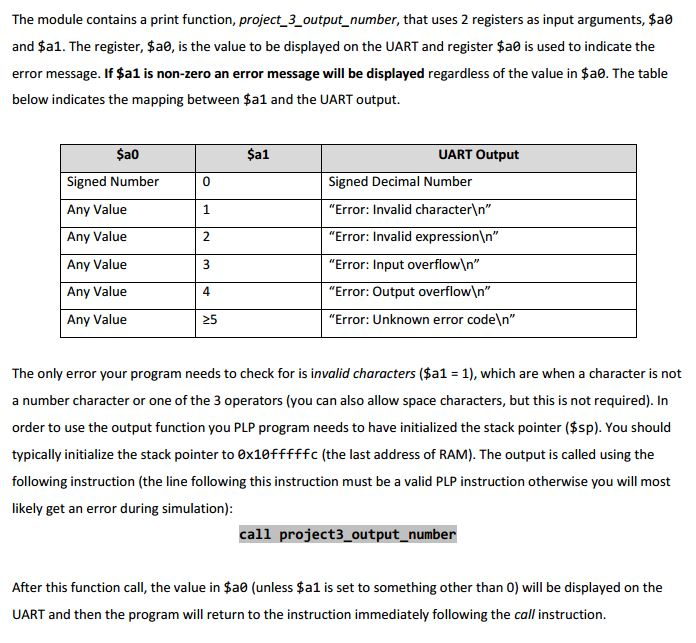
# Written by Christopher Mar # For use with ASU CST 250 Project 3 only bcd_storage_p3: .space 10 #creates 10 words here invalid_char_p3: .asciiz "ERROR: Invalid character " invalid_expression_p3: .asciiz "ERROR: Invalid expression " input_overflow_p3: .asciiz "ERROR: Input overflow " output_overflow_p3: .asciiz "ERROR: Output overflow " unknown_error_p3: .asciiz "ERROR: Unknown error code " project3_output_number: push $ra # Check for error beq $a1, $0, UART_no_error_p3 nop addiu $t0, $0, 1 li $a0, invalid_char_p3 beq $a1, $t0, display_error_message_p3 nop addiu $t0, $t0, 1 li $a0, invalid_expression_p3 beq $a1, $t0, display_error_message_p3 nop addiu $t0, $t0, 1 li $a0, input_overflow_p3 beq $a1, $t0, display_error_message_p3 nop addiu $t0, $t0, 1 li $a0, output_overflow_p3 beq $a1, $t0, display_error_message_p3 nop li $a0, unknown_error_p3 display_error_message_p3: jal libplp_uart_write_string_p3 nop pop $ra return UART_no_error_p3: #INITIALIZATIONS # Saved Values lui $s0, 0xF000 #UART li $s1, 0x1 #mask for bit 0, used by put_char li $s2, 0x2 #mask for bit 1, used by get_char li $s3, 10 #used by decimal_to_binary li $s4, 48 #subtract from ascii for decimal, used by decimal_to_binary # Temporary Values li $t0, 0 #counter in subroutines li $t1, 0 #x: used for UART character reads and writes # check if 0 bne $a0, $0, non-zero_input_p3 nop addiu $t1, $0, '0' # set UART output value to '0' jal put_char_p3 nop addiu $t1, $0, 10 # set UART output value to ' ' jal put_char_p3 nop pop $ra return non-zero_input_p3: # Get sign bit move $t2, $a0 srl $t2, $t2, 31 beq $t2, $0, non_negative_output_p3 nop jal handle_negative_p3 nop non_negative_output_p3: jal to_bcd_p3 nop jal display_bcd_p3 nop pop $ra return #=======================================FUNCTIONS======================================= #Description: places number result ($s7) into the space at the label bcd_storage #Resources: #uses $t0, t2, $t3, $t4 to_bcd_p3: push $ra li $s5, bcd_storage_p3 #set 10's place followed call subtract function to store bcd li $s6, 1000000000 #10 jal base10_subtract nop li $s6, 100000000 #9 jal base10_subtract nop li $s6, 10000000 #8 jal base10_subtract nop li $s6, 1000000 #7 jal base10_subtract nop li $s6, 100000 #6 jal base10_subtract nop li $s6, 10000 #5 jal base10_subtract nop li $s6, 1000 #4 jal base10_subtract nop li $s6, 100 #3 jal base10_subtract nop li $s6, 10 #2 jal base10_subtract nop li $s6, 1 #1 jal base10_subtract nop pop $ra jr $ra nop #Description: repeats $s7 - $s6 as many times as possilbe, where s6 is a multiple of 10 #Resources: #uses $t0, t2, $t3, $t4 base10_subtract: li $t5, 0 # bcd place value sltu $t6, $a0, $s6 # determine if number less than decimal place subtract_loop_p3: bne $t6, $0, exit_sub_loop_p3 nop subu $a0, $a0, $s6 addiu $t5, $t5, 1 #incriment bcd sltu $t6, $a0, $s6 # determine if number less than decimal place j subtract_loop_p3 nop exit_sub_loop_p3: sw $t5, 0($s5) # store bcd value addiu $s5, $s5, 4 # increment BCD pointer to next word jr $ra nop #Description: places number result ($s7) into the space at the label bcd_storage #Resources: #uses $t0, t2, $t3, $t4 display_bcd_p3: push $ra li $t3, bcd_storage_p3 li $t2, 10 #count down for prints # for 10 starting at bcd_storage, add 48 and put char lw $t1, 0($t3) remove_preceeding_zeros_p3: bne $t1, $0, display_bcd_loop_p3 # branch if non-zero nop addiu $t3, $t3, 4 # increment BCD pointer subu $t2, $t2, $s1 # decrement $t2 lw $t1, 0($t3) j remove_preceeding_zeros_p3 nop display_bcd_loop_p3: # convert to ascii and print addu $t1, $t1, $s4 jal put_char_p3 nop addiu $t3, $t3, 4 # increment BCD pointer subu $t2, $t2, $s1 # decrement $t2 lw $t1, 0($t3) bne $t2, $0, display_bcd_loop_p3 nop addiu $t1, $0, 10 # set UART output value to ' ' jal put_char_p3 nop pop $ra jr $ra nop #Description: outputs negative sign and converts from 2's compliment # Resources: $s0 = UART, $s1 = 1, $a0 = number to convert, $t1 = character to print handle_negative_p3: push $ra # save return address addiu $t1, $0, '-' # set UART output value to '-' jal put_char_p3 nop pop $ra # restore return address # 2's compliment conversion nor $a0, $a0, $a0 addu $a0, $a0, $s1 jr $ra nop #Description: Writes $t1 to UART #Resources: $s0 = UART, $s1 = 1, $t0 = temp put_char_p3: lw $t0, 4($s0) # load status register and $t0, $t0, $s1 # mask for clear to send bne $t0, $s1, put_char_p3 nop sw $t1, 12($s0) # store in send buffer sw $s1, 0($s0) # command register: send jr $ra nop
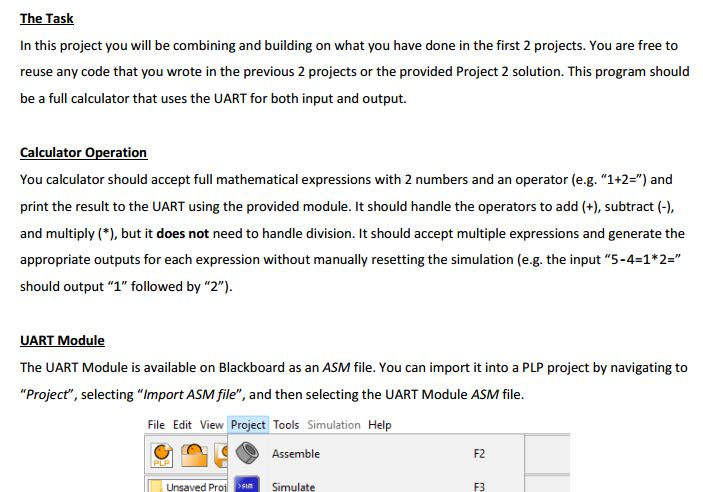
The Task In this project you will be combining and building on what you have done in the first 2 projects. You are free to reuse any code that you wrote in the previous 2 projects or the provided Project 2 solution. This program should be a full calculator that uses the UART for both input and output. Calculator Operation You calculator should accept full mathematical expressions with 2 numbers and an operator (e.g. "1+2-" and print the result to the UART using the provided module. It should handle the operators to add (+), subtract and multiply (*), but it does not need to handle division. It should accept multiple expressions and generate the appropriate outputs for each expression without manually resetting the simulation (e.g. the input "5-4-1*2-" should output 1" followed by "2"). UART Module The UART Module is available on Blackboard as an ASM file. You can import it into a PLP project by navigating to "Project", selecting "Import ASM file", and then selecting the UART Module ASM file. File Edit View Project Tools Simulation Help Assemble F2 Unsaved Pro Simulate F3
Step by Step Solution
There are 3 Steps involved in it

Get step-by-step solutions from verified subject matter experts
 Study Help