







Question: Written in Visual studio C# Create a Windows application that can be used to input a user's name. Include an appropriate label indicator for the
 Written in Visual studio C#
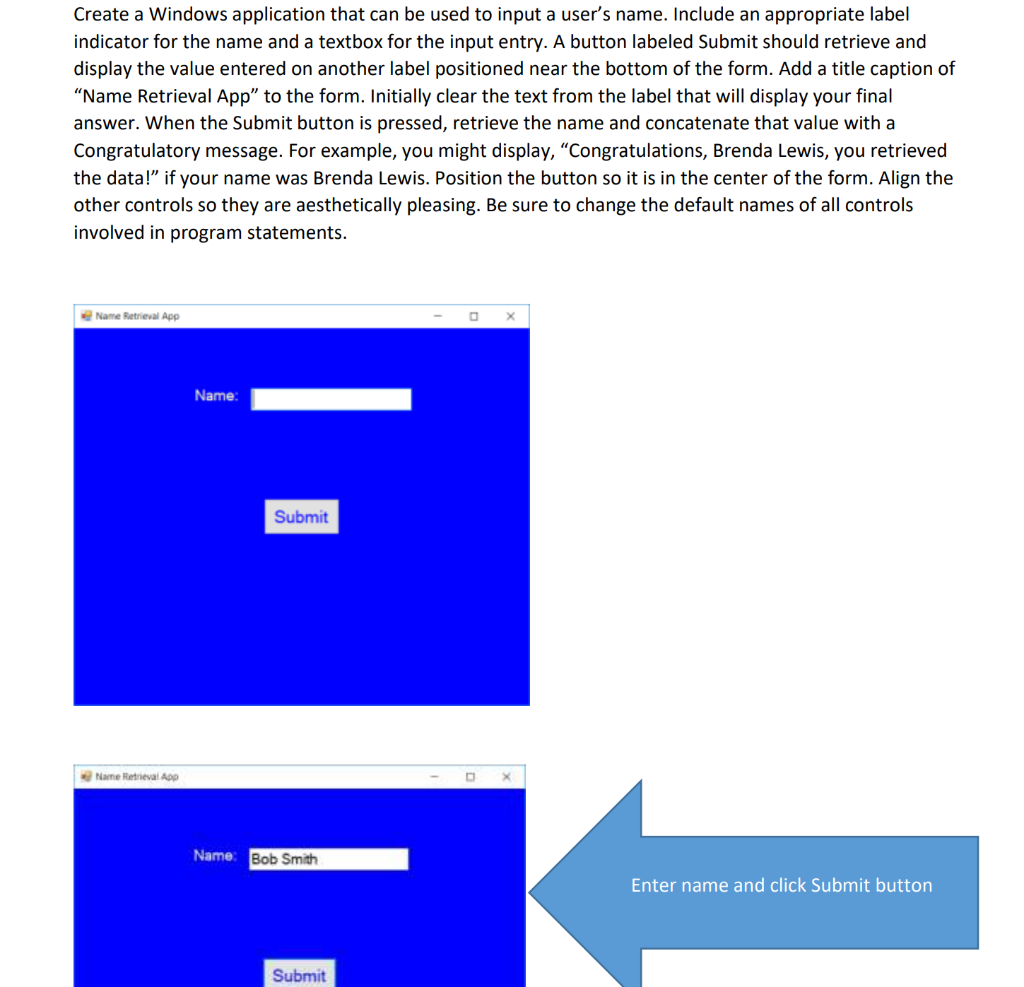
Create a Windows application that can be used to input a user's name. Include an appropriate label indicator for the name and a textbox for the input entry. A button labeled Submit should retrieve and display the value entered on another label positioned near the bottom of the form. Add a title caption of "Name Retrieval App to the form. Initially clear the text from the label that will display your final answer. When the Submit button is pressed, retrieve the name and concatenate that value with a Congratulatory message. For example, you might display, "Congratulations, Brenda Lewis, you retrieved the data!" if your name was Brenda Lewis. Position the button so it is in the center of the form. Align the other controls so they are aesthetically pleasing. Be sure to change the default names of all controls involved in program statements. Name Retrieval App - OX Name: Submit Name Retrieval App Name: Bob Smith Enter name and click Submit button Submit Create a Windows application that can be used to input a user's name. Include an appropriate label indicator for the name and a textbox for the input entry. A button labeled Submit should retrieve and display the value entered on another label positioned near the bottom of the form. Add a title caption of "Name Retrieval App to the form. Initially clear the text from the label that will display your final answer. When the Submit button is pressed, retrieve the name and concatenate that value with a Congratulatory message. For example, you might display, "Congratulations, Brenda Lewis, you retrieved the data!" if your name was Brenda Lewis. Position the button so it is in the center of the form. Align the other controls so they are aesthetically pleasing. Be sure to change the default names of all controls involved in program statements. Name Retrieval App - OX Name: Submit Name Retrieval App Name: Bob Smith Enter name and click Submit button Submit
Step by Step Solution
There are 3 Steps involved in it

Get step-by-step solutions from verified subject matter experts
 Study Help