







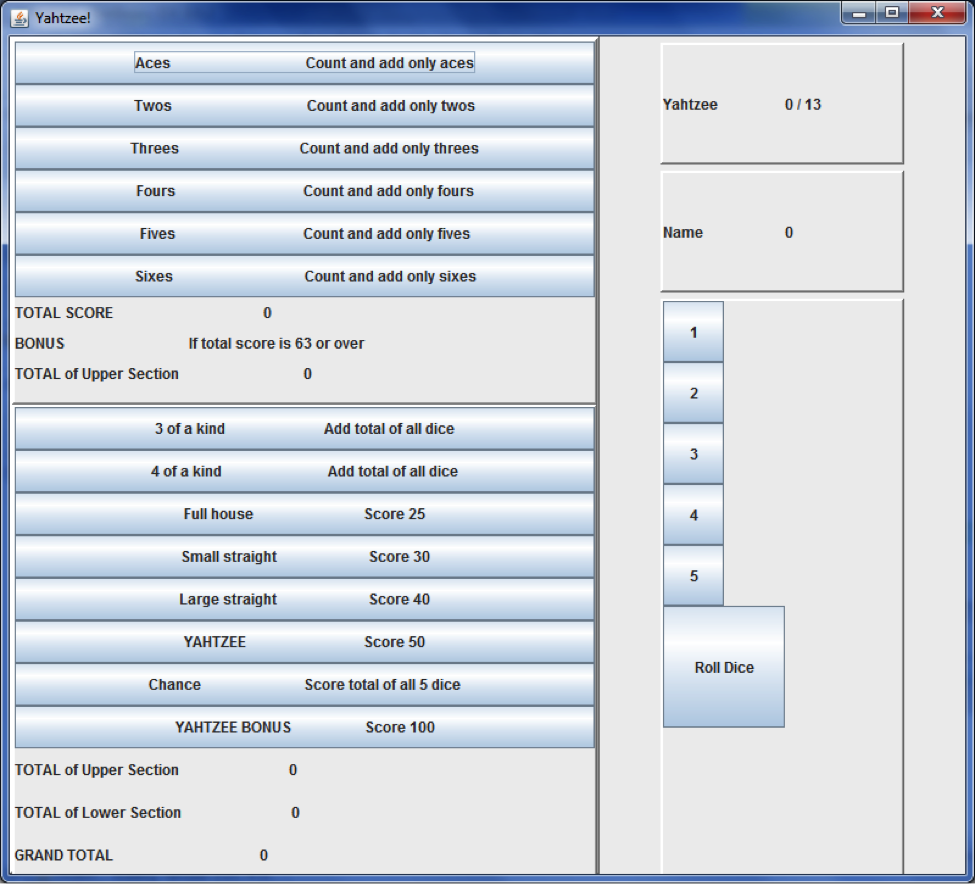
Question: Yahtzee in Java - Creating the UI - Please execute the instructions in the table, (output images below) Physical objects to model: two players, scorecard,
Yahtzee in Java - Creating the UI - Please execute the instructions in the table, (output images below)
Physical objects to model: two players, scorecard, dice, the game
Relationship between the objects: A game which has two players (scorecard, name), five dice, and thirteen rounds
| userInterface package | Includes these classes already created: GameUi, LowerSectionUi, PlayerUi, RollUi, ScoreCardUi, UpperSectionUi, YahtzeeUi |
| GameUi.java | 1. Extend class JPanel 2. Declare member variables: JLabel round, JLabel gameTurn, JLabel logo, A layout manager3. Override default no-argument constructor; it should call method initComponents(); 4. Define method initComponents (); it should do the following: void return type, empty parameter list, instantiate instances of the member variables, add UI components to the class |
| LowerSectionUi.java | 1. Extend class JPanel 2. Declare member variables: JLabel round, ArrayList categories or seven individual JButtons for the categories of the lower section, ArrayList scores or seven individual JLabels for the score of the categories of the lower section, JLabel totalLower; JLabel totalUpper; JLabel grandTotal; A layout manager3. Override default no-argument constructor; it should call method initComponents(); 4. Define method initComponents (); it should do the following: void return type, empty parameter list, instantiate instances of the member variables, add UI components to the class |
| PlayerUi.java | 1. Extend class JPanel 2. Declare member variables: JLabel playerName; JLabel playerScore; A layout manager3. Override default no-argument constructor; it should call method initComponents(); 4. Define method initComponents (); it should do the following: void return type, empty parameter list, instantiate instances of the member variables, add UI components to the class |
| RollUi.java | 1. Extend class JPanel 2. Declare member variables: ArrayList dice or five individual JButtons for the dice, JButton roll; A layout manager3. Override default no-argument constructor; it should call method initComponents(); 4. Define method initComponents (); it should do the following: void return type, empty parameter list, instantiate instances of the member variables, add UI components to the class |
| ScoreCardUi.java | 1. Extend class JPanel 2. Declare member variables: JLabel grandTotal; LowerSectionUi lowerUi; UpperSectionUi upperUi; A layout manager3. Override default no-argument constructor; it should call method initComponents(); 4. Define method initComponents (); it should do the following: void return type, empty parameter list, instantiate instances of the member variables, add UI components to the class |
| UpperSectionUi.java | 1. Extend class JPanel 2. Declare member variables: ArrayList categories or seven individual JButtons for the categories of the lower section, ArrayList scores or seven individual JLabels for the score of the categories of the lower section, JLabel total; JLabel bonus; JLabel totalScore; A layout manager 3. Override default no-argument constructor; it should call method initComponents(); 4. Define method initComponents (); it should do the following: void return type, empty parameter list, instantiate instances of the member variables, add UI components to the class |
| YahtzeeUi.java | 1. Declare member variables: GameUi gameUi; PlayerUi playerUi; RollUi rollUi; ScoreCardUi scoreCardUi; JFrame frame; JMenuBar menuBar; JMenu game; JMenuItem exit; JMenuItem newGame; JPanel rightPanel; A layout manager 2. Override default no-argument constructor; it should call method initComponents(); 3. Define method initComponents (); it should do the following: void return type, empty parameter list, instantiate instances of the member variables, add UI components to the class |
Note: other packages part of Yahtzee already completed: constants package - Constants , core package - Aiplayer, Die, Game, HumanPlayer, IPlayer, LowerSection, Player, Roll, ScoreCard, UpperSection, yahtzee package - Yahtzee
Step by Step Solution
There are 3 Steps involved in it

Get step-by-step solutions from verified subject matter experts
 Study Help