Question: You are a CFO at Northern Interactive, an interactive media consulting company based in Minneapolis. The company president has asked you to prepare a loan
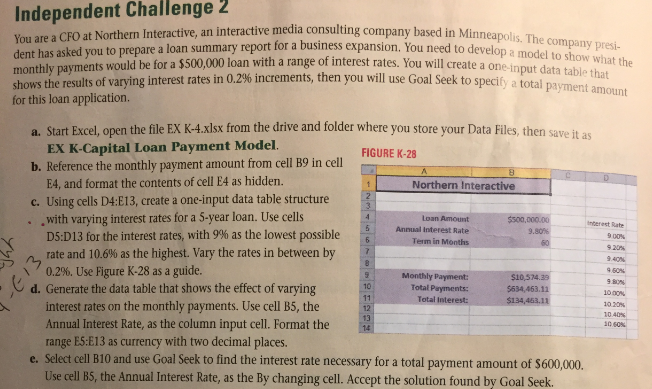
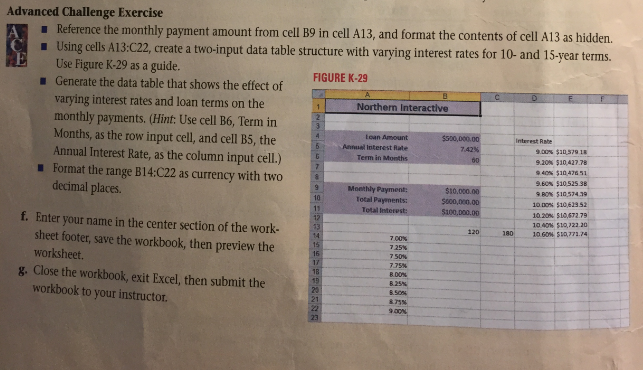
You are a CFO at Northern Interactive, an interactive media consulting company based in Minneapolis. The company president has asked you to prepare a loan summary report for a business expansion. You need to develop a model to show what the monthly payments would be for a $500,000 loan with a range of interest rates. You will create a one-input data table that shows the results of varying interest rates in 0.2% increments, then you will use Goal Seek to specify a total payment amount for this loan application. a. Start Excel, open the file EX K-4.xlsx from the drive and folder where you store your Data Files, then save it as EX K-Capital Loan Payment Model. b. Reference the monthly payment amount from cell B9 in cell E4, and format the contents of cell E4 as hidden. c. Using cells D4:E13, create a one-input data table structure - with varying interest rates for a 5-year loan. Use cells D5:D13 for the interest rates, with 9% as the lowest possible rate and 10.6% as the highest. Vary the rates in between by 0.2%. Use Figure K28 as a guide. d. Generate the data table that shows the effect of varying interest rates on the monthly payments. Use cell B5, the Annual Interest Rate, as the column input cell. Format the range ES:E13 as currency with two decimal places. e. Select cell B10 and use Goal Seek to find the interest rate necessary for a total payment amount of $600,000. Use cell BS, the Annual Interest Rate, as the By changing cell. Accept the solution found by Goal Seek. Advanced Challenge Exercise A. - Reference the monthly payment amount from cell B9 in cell A13, and format the contents of cell A13 as hidden. - Using cells A13:C22, create a two-input data table structure with varying interest rates for 10- and 15-year terms. Use Figure K-29 as a guide. - Generate the data table that shows the effect of FIGURE K-29 varying interest rates and loan terms on the monthly payments. (Hint: Use cell B6, Term in Months, as the row input cell, and cell B5, the Annual Interest Rate, as the column input cell.) - Format the range B14:C22 as currency with two decimal places. f. Enter your name in the center section of the worksheet footer, save the workbook, then preview the worksheet. g. Close the workbook, exit Excel, then submit the workbook to your instructor. You are a CFO at Northern Interactive, an interactive media consulting company based in Minneapolis. The company president has asked you to prepare a loan summary report for a business expansion. You need to develop a model to show what the monthly payments would be for a $500,000 loan with a range of interest rates. You will create a one-input data table that shows the results of varying interest rates in 0.2% increments, then you will use Goal Seek to specify a total payment amount for this loan application. a. Start Excel, open the file EX K-4.xlsx from the drive and folder where you store your Data Files, then save it as EX K-Capital Loan Payment Model. b. Reference the monthly payment amount from cell B9 in cell E4, and format the contents of cell E4 as hidden. c. Using cells D4:E13, create a one-input data table structure - with varying interest rates for a 5-year loan. Use cells D5:D13 for the interest rates, with 9% as the lowest possible rate and 10.6% as the highest. Vary the rates in between by 0.2%. Use Figure K28 as a guide. d. Generate the data table that shows the effect of varying interest rates on the monthly payments. Use cell B5, the Annual Interest Rate, as the column input cell. Format the range ES:E13 as currency with two decimal places. e. Select cell B10 and use Goal Seek to find the interest rate necessary for a total payment amount of $600,000. Use cell BS, the Annual Interest Rate, as the By changing cell. Accept the solution found by Goal Seek. Advanced Challenge Exercise A. - Reference the monthly payment amount from cell B9 in cell A13, and format the contents of cell A13 as hidden. - Using cells A13:C22, create a two-input data table structure with varying interest rates for 10- and 15-year terms. Use Figure K-29 as a guide. - Generate the data table that shows the effect of FIGURE K-29 varying interest rates and loan terms on the monthly payments. (Hint: Use cell B6, Term in Months, as the row input cell, and cell B5, the Annual Interest Rate, as the column input cell.) - Format the range B14:C22 as currency with two decimal places. f. Enter your name in the center section of the worksheet footer, save the workbook, then preview the worksheet. g. Close the workbook, exit Excel, then submit the workbook to your instructor




