







Question: - You are asked to install Microsoft SQL Express Server on your device, and create a database. - Your will have to create 4 Tables,
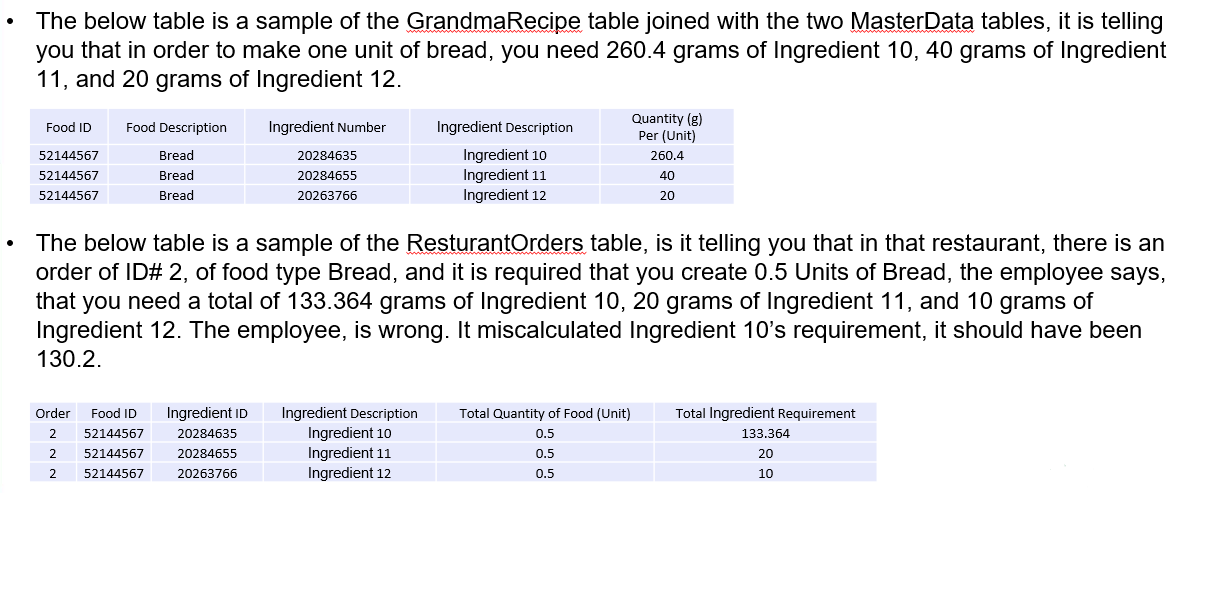
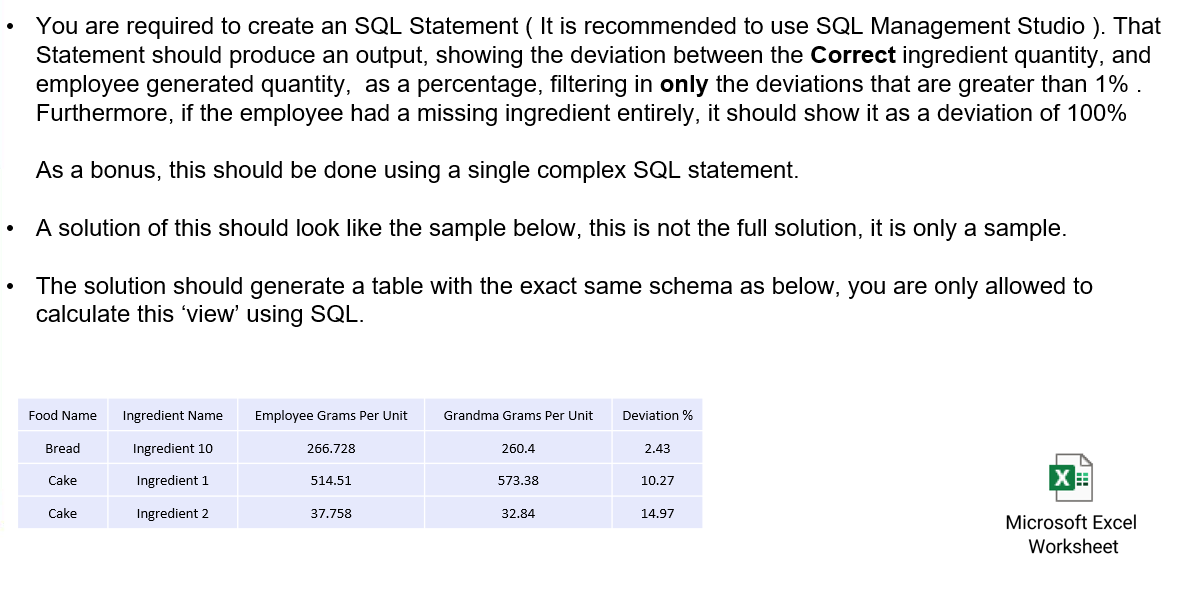
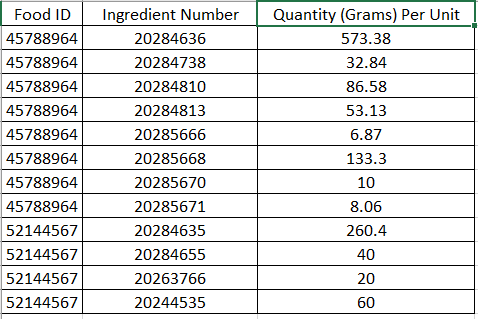
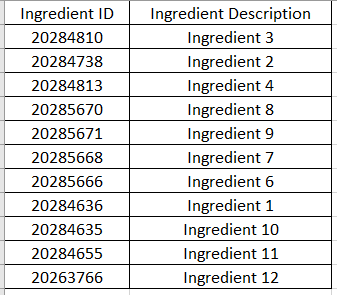
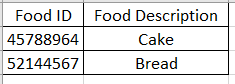
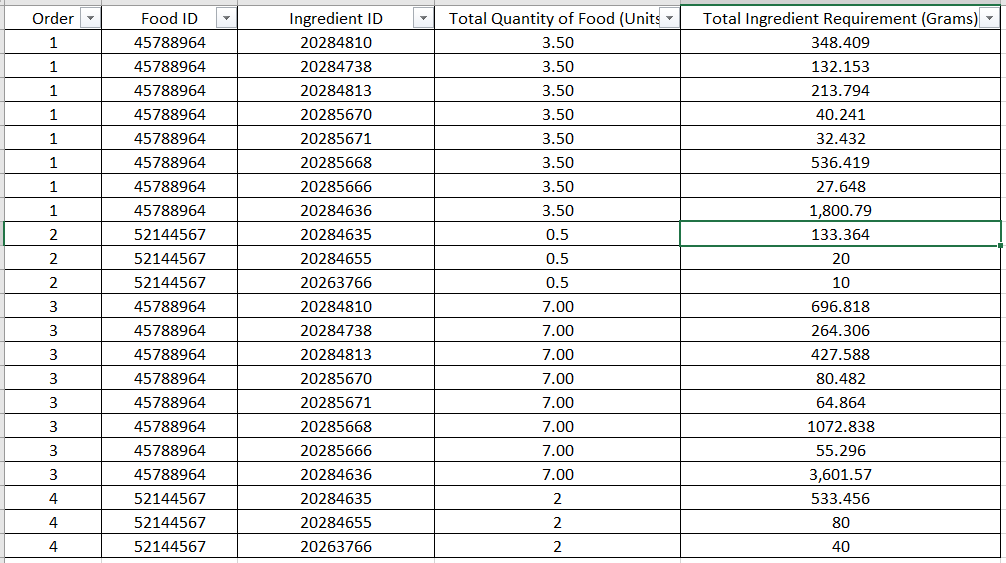
- You are asked to install Microsoft SQL Express Server on your device, and create a database. - Your will have to create 4 Tables, (GrandmaRecipe , ResturantOrders, FoodMasterData, IngredientsMasterData). - Each table is shown is a separate sheet in the attached excel file, You shall upload all 4 tables' data on the database. - You will choose primary keys as you see fit. - In the previous case, you have two tables in SQL, GrandmaRecipe and ResturantOrders. - GrandmaRecipe, contains the ingredients of certain types of food, and the required quantity of each ingredient per one Unit of that corresponding food. - A restaurant employee was given the task to manually calculate the ingedients requires to fulfill the 4 orders received by the restaurant. He created the data you see in RestaurantOrders. - This employee sometimes makes mistakes. - Each order, is defined as a certain quantity ( in Units ) for a specific type of food. - The ResturantOrders table lists all the orders, their required quantities, and breaks down the food into its ingredients, with their corresponding required total ingredient quantities. The below table is a sample of the GrandmaRecipe table joined with the two MasterData tables, it is telling you that in order to make one unit of bread, you need 260.4 grams of Ingredient 10, 40 grams of Ingredient 11 , and 20 grams of Ingredient 12. The below table is a sample of the ResturantOrders table, is it telling you that in that restaurant, there is an order of ID\# 2, of food type Bread, and it is required that you create 0.5 Units of Bread, the employee says, that you need a total of 133.364 grams of Ingredient 10, 20 grams of Ingredient 11, and 10 grams of Ingredient 12. The employee, is wrong. It miscalculated Ingredient 10's requirement, it should have been 130.2. - You are required to create an SQL Statement ( It is recommended to use SQL Management Studio ). That Statement should produce an output, showing the deviation between the Correct ingredient quantity, and employee generated quantity, as a percentage, filtering in only the deviations that are greater than 1%. Furthermore, if the employee had a missing ingredient entirely, it should show it as a deviation of 100% As a bonus, this should be done using a single complex SQL statement. - A solution of this should look like the sample below, this is not the full solution, it is only a sample. - The solution should generate a table with the exact same schema as below, you are only allowed to calculate this 'view' using SQL. \begin{tabular}{|c|c|c|} \hline Food ID & Ingredient Number & Quantity (Grams) Per Unit \\ \hline 45788964 & 20284636 & 573.38 \\ \hline 45788964 & 20284738 & 32.84 \\ \hline 45788964 & 20284810 & 86.58 \\ \hline 45788964 & 20284813 & 53.13 \\ \hline 45788964 & 20285666 & 6.87 \\ \hline 45788964 & 20285668 & 133.3 \\ \hline 45788964 & 20285670 & 10 \\ \hline 45788964 & 20285671 & 8.06 \\ \hline 52144567 & 20284635 & 260.4 \\ \hline 52144567 & 20284655 & 40 \\ \hline 52144567 & 20263766 & 20 \\ \hline 52144567 & 20244535 & 60 \\ \hline \end{tabular} \begin{tabular}{|c|c|} \hline Ingredient ID & Ingredient Description \\ \hline 20284810 & Ingredient 3 \\ \hline 20284738 & Ingredient 2 \\ \hline 20284813 & Ingredient 4 \\ \hline 20285670 & Ingredient 8 \\ \hline 20285671 & Ingredient 9 \\ \hline 20285668 & Ingredient 7 \\ \hline 20285666 & Ingredient 6 \\ \hline 20284636 & Ingredient 1 \\ \hline 20284635 & Ingredient 10 \\ \hline 20284655 & Ingredient 11 \\ \hline 20263766 & Ingredient 12 \\ \hline \end{tabular} \begin{tabular}{|c|c|} \hline Food ID & Food Description \\ \hline 45788964 & Cake \\ \hline 52144567 & Bread \\ \hline \end{tabular}
Step by Step Solution
There are 3 Steps involved in it

Get step-by-step solutions from verified subject matter experts
 Study Help