







Question: You are going to write a Python program that represents a command line version of a hexadecimal editor. This program will be similar to the
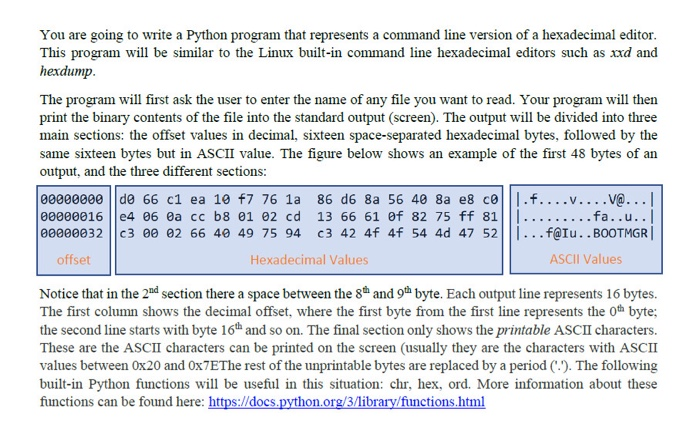
You are going to write a Python program that represents a command line version of a hexadecimal editor. This program will be similar to the Linux built-in command line hexadecimal editors such as xxd and hexdump. The program will first ask the user to enter the name of any file you want to read. Your program will then print the binary contents of the file into the standard output (screen). The output will be divided into three main sections: the offset values in decimal, sixteen space-separated hexadecimal bytes, followed by the same sixteen bytes but in ASCII value. The figure below shows an example of the first 48 bytes of an output, and the three different sections: 00000000 ||do 66 c1 ea 10 f7 76 la 86 db 8a 56 40 8a es coll.f....V....V@...|| 00000016 14 06 0a cc b8 01 02 cd 13 66 61 of 82 75 ff 81|||. . . . . . ...fa..u.. 00000032 c3 00 02 66 49 49 75 94 c3 42 4f 4f 54 4d 47 52||| ... f@u..BOOTMGR offset Hexadecimal Values ASCII Values Notice that in the 2nd section there a space between the 8th and 9th byte. Each output line represents 16 bytes. The first column shows the decimal offset, where the first byte from the first line represents the oth byte; the second line starts with byte 16h and so on. The final section only shows the printable ASCII characters. These are the ASCII characters can be printed on the screen (usually they are the characters with ASCII values between 0x20 and Ox7EThe rest of the unprintable bytes are replaced by a period C.). The following built-in Python functions will be useful in this situation: chr, hex, ord. More information about these functions can be found here: https://docs.python.org/3/library/functions.html You are going to write a Python program that represents a command line version of a hexadecimal editor. This program will be similar to the Linux built-in command line hexadecimal editors such as xxd and hexdump. The program will first ask the user to enter the name of any file you want to read. Your program will then print the binary contents of the file into the standard output (screen). The output will be divided into three main sections: the offset values in decimal, sixteen space-separated hexadecimal bytes, followed by the same sixteen bytes but in ASCII value. The figure below shows an example of the first 48 bytes of an output, and the three different sections: 00000000 ||do 66 c1 ea 10 f7 76 la 86 db 8a 56 40 8a es coll.f....V....V@...|| 00000016 14 06 0a cc b8 01 02 cd 13 66 61 of 82 75 ff 81|||. . . . . . ...fa..u.. 00000032 c3 00 02 66 49 49 75 94 c3 42 4f 4f 54 4d 47 52||| ... f@u..BOOTMGR offset Hexadecimal Values ASCII Values Notice that in the 2nd section there a space between the 8th and 9th byte. Each output line represents 16 bytes. The first column shows the decimal offset, where the first byte from the first line represents the oth byte; the second line starts with byte 16h and so on. The final section only shows the printable ASCII characters. These are the ASCII characters can be printed on the screen (usually they are the characters with ASCII values between 0x20 and Ox7EThe rest of the unprintable bytes are replaced by a period C.). The following built-in Python functions will be useful in this situation: chr, hex, ord. More information about these functions can be found here: https://docs.python.org/3/library/functions.html
Step by Step Solution
There are 3 Steps involved in it

Get step-by-step solutions from verified subject matter experts
 Study Help