







Question: You are just hired as a database security analyst. CIO asks you to implement the following database policy. The table names created in the
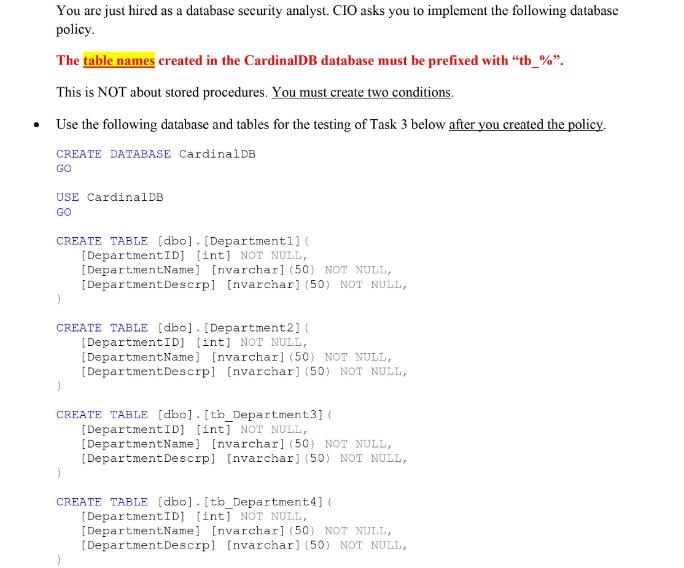
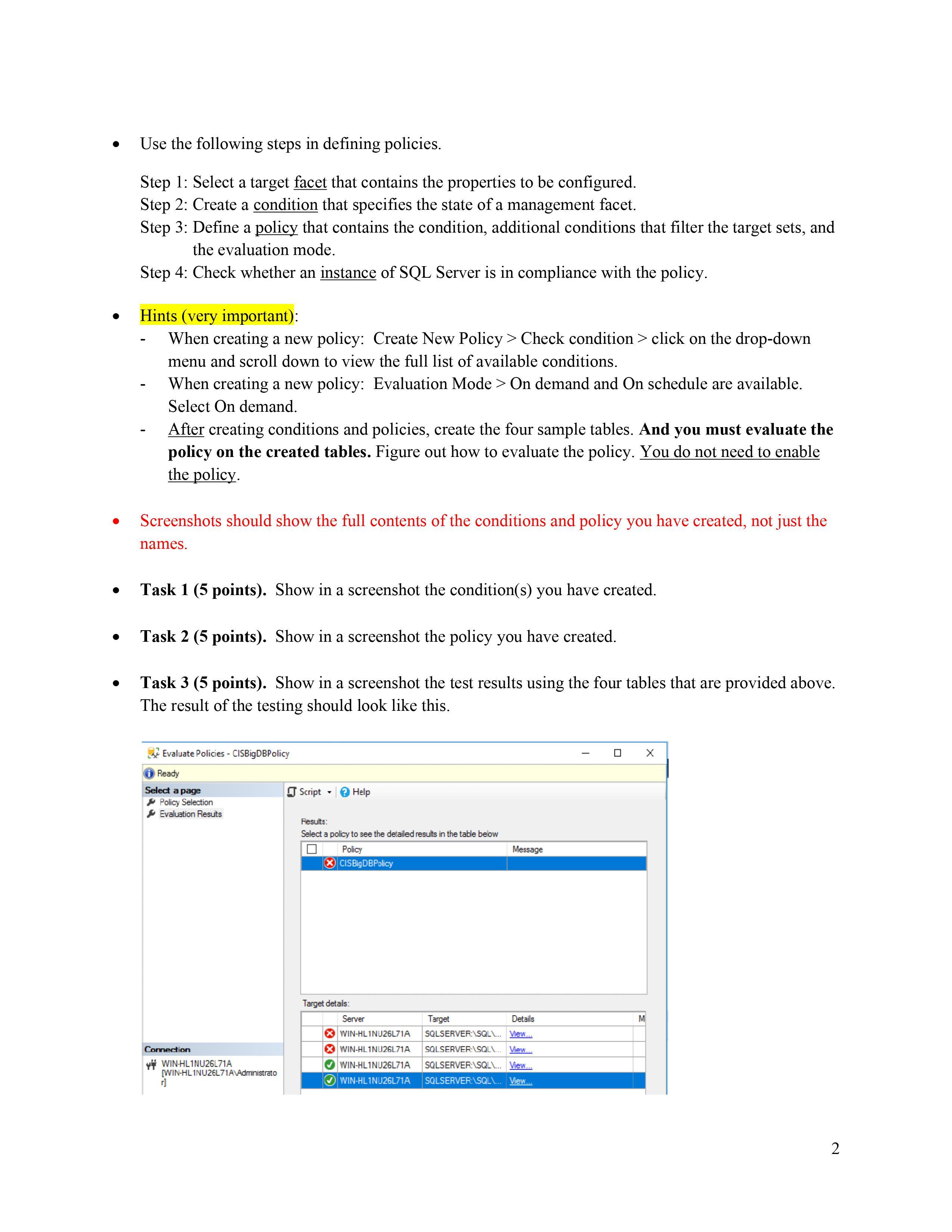
You are just hired as a database security analyst. CIO asks you to implement the following database policy. The table names created in the CardinalDB database must be prefixed with "tb_%". This is NOT about stored procedures. You must create two conditions. Use the following database and tables for the testing of Task 3 below after you created the policy. CREATE DATABASE CardinalDB GO USE CardinalDB GO CREATE TABLE [dbo]. [Department1] ( [DepartmentID] [int] NOT NULL, [Department Name] [nvarchar] (50) NOT NULL, [Department Descrp] [nvarchar] (50) NOT NULL, CREATE TABLE [dbo]. [Department2] ( [DepartmentID] [int] NOT NULL, [DepartmentName] [nvarchar] (50) NOT NULL, [Department Descrp] [nvarchar] (50) NOT NULL, } CREATE TABLE [dbo].[tb_Department3] ( [DepartmentID] [int] NOT NULL, [DepartmentName] [nvarchar] (50) NOT NULL, [Department Descrp] [nvarchar] (50) NOT NULL, CREATE TABLE [dbo].[tb_Department4] ( [DepartmentID] [int] NOT NULL, [DepartmentName] [nvarchar] (50) NOT NULL, [Department Descrp] [nvarchar] (50) NOT NULL, Use the following steps in defining policies. Step 1: Select a target facet that contains the properties to be configured. Step 2: Create a condition that specifies the state of a management facet. Step 3: Define a policy that contains the condition, additional conditions that filter the target sets, and the evaluation mode. Step 4: Check whether an instance of SQL Server is in compliance with the policy. Hints (very important): When creating a new policy: Create New Policy > Check condition > click on the drop-down menu and scroll down to view the full list of available conditions. When creating a new policy: Evaluation Mode > On demand and On schedule are available. Select On demand. After creating conditions and policies, create the four sample tables. And you must evaluate the policy on the created tables. Figure out how to evaluate the policy. You do not need to enable the policy. Screenshots should show the full contents of the conditions and policy you have created, not just the names. Task 1 (5 points). Show in a screenshot the condition(s) you have created. Task 2 (5 points). Show in a screenshot the policy you have created. Task 3 (5 points). Show in a screenshot the test results using the four tables that are provided above. The result of the testing should look like this. Evaluate Policies - CISBigDBPolicy Ready Select a page Policy Selection Evaluation Results Connection WIN-HL1NU26L71A [WIN-HL1NU26L71A\Administrato Script T Help Results: Select a policy to see the detailed results in the table below Policy XCISBigDBPolicy Target details: Server Target Details SQLSERVER:\SQL\... View... WIN-HL1NU26L71A WIN-HL1NU26L71A SQLSERVER:\SQL\... View... WIN-HL1NU26L71A SQLSERVER:\SQL\... View... WIN-HL1NU26L71A SQLSERVER:\SQL\... View... Message M X 2 Task 4 (5 points). Explain the results at Task 3. After this, delete everything you've created. 3
Step by Step Solution
3.42 Rating (158 Votes )
There are 3 Steps involved in it
To implement the policy described by the CIO you can use two conditions 1DDL Trigger 2Data user perm... View full answer

Get step-by-step solutions from verified subject matter experts
 Study Help