







Question: You are provided with HTML, and CSS files. Look at these files to understand but do not change/modify them. All your work will be done
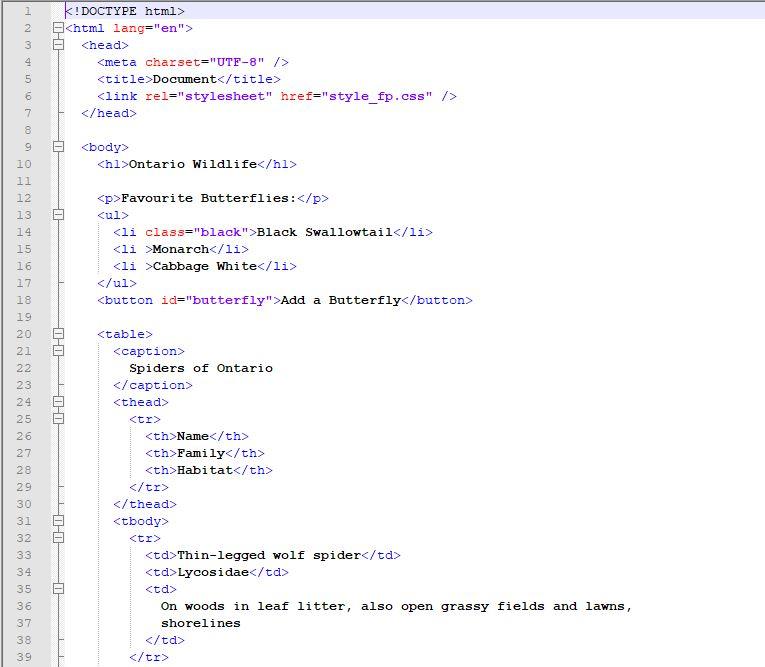
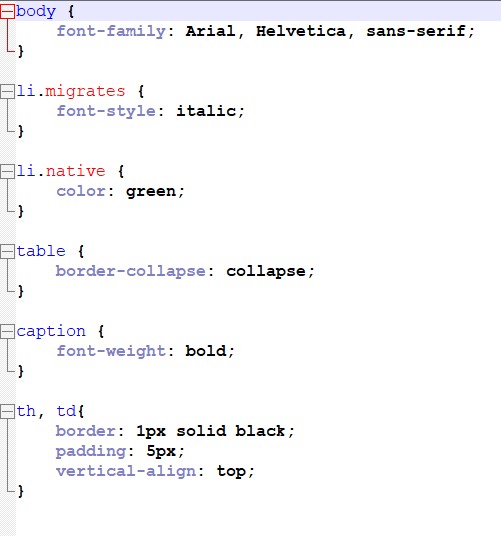
You are provided with HTML, and CSS files. Look at these files to understand but do not change/modify them. All your work will be done in JS file . Use the provided files to do the following. Add each item one at a time in a javascript file (your name_fp.js) and refresh the browser as you go to see the results. Remember to check the console for errors if things don't work. 2. Make sure that all file names will include your name, add comments to each file and link js and .css files to HTML file. (.js file will run after the page is loaded). 3. Add an event handler when the page is loaded that will change the background color of the page to any color that you like. 4. Add an event handler when the user clicks on "Add Butterfly" button, add a list item for the butterfly "Swallowtails" before the last item. Make sure that the event can only run once. 5. When the user clicks on `p` element add a list item for the butterfly "Metalmarks" located after the first of the list. 6. When the user presses the "T" replace the text in the element with the class "migrates" to contain the same text that is currently there but inside of an `a` hypertext link element with the href attribute set to "http://www.ontariobutterflies.ca/familiesymphalidae/monarch". 7. Add an event handler to the table that will check to see if `caption` element is clicked. If a '`caption ` is clicked add a spider to the table with the following information a. Name: Armed spider b. Family: Ctenidae c. Habitat: Is also called the 'banana spider' and it is occasionally found within shipments of bananas.Extra Assignment Page 2 of 2 St. Clair College of Applied Arts and Technology 8. When the user clicks on the link (created on step 4) display an alert that says "Access declined" , remove the link from the text and prevent the new page from loading. This is best done through delegation since you will be delegating and creating the ` a` element. 9. add a code that change the font style to all cells on the table to italic and the font color to any color that you like.
CoursHeroTranscribedText
1 2 Document 7 8 9 10 11 12 13 14 15 16 17 18 Ontario Wildlife Favourite Butterflies: Black Swallowtail Monarch Cabbage White Add a Butterfly 01-0 706 19 20 21 22 34 23 00 24 25 26 27 28 29 30 31 32 33 34 35 36 37 38 222 22 2 2 22233 mm mm mm mm 39 Spiders of Ontario Name Family Habitat Thin-legged wolf spider Lycosidae On woods in leaf litter, also open grassy fields and lawns, shorelines
Step by Step Solution
There are 3 Steps involved in it

Get step-by-step solutions from verified subject matter experts
 Study Help