







Question: You are required to create a spreadsheet template that can be used to calculate quarterly sales, staff commissions and bonuses. After the end of each
You are required to create a spreadsheet template that can be used to calculate quarterly sales, staff commissions and bonuses.
After the end of each quarter, the template will be used to enter sales data, calculate quarterly totals and produce statistics.
Analyse the following task requirements to determine the specifications for the spreadsheet. Once you are clear on what the task requires, create a draft spreadsheet template to meet the task requirements.
Spreadsheet requirements
Read all the task requirements before you commence the task to determine the best layout for the spreadsheet.
Your manager has asked you to prepare a spreadsheet template that can be used for each state at the end of each quarter, commencing with January 20XX.
The first step is to create a draft spreadsheet template which you will later discuss and have approved by the supervisor before making the final file. This draft will show the spreadsheet layout, headings, formatting and all required formulae. Once approved, it will be used to create a workbook containing all the 3 states.
The spreadsheet will show the following:
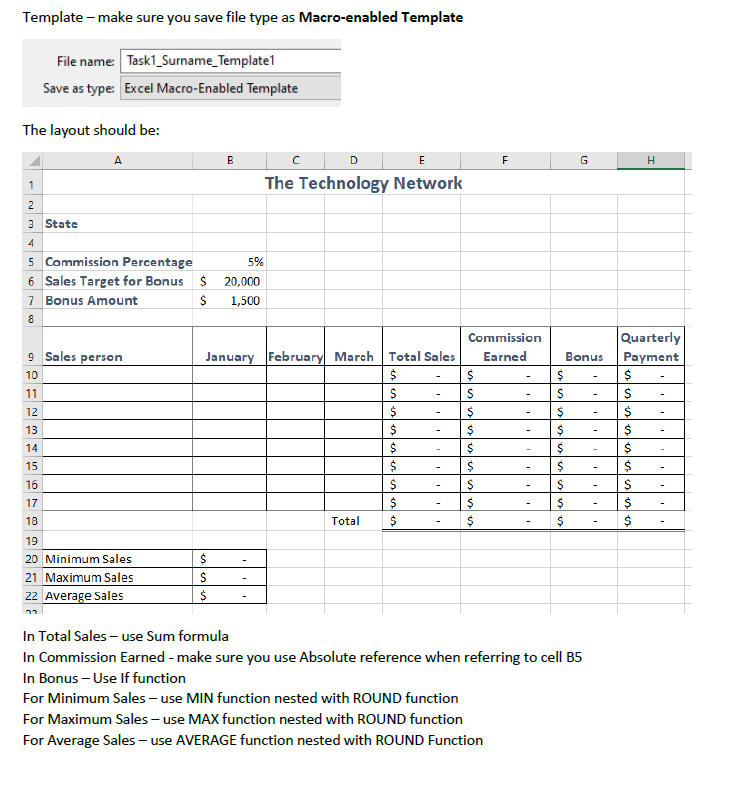
- Each state (NSW, VIC and QLD) has a separate worksheet based on the template design but stored in the same workbook.
- The name of each of the sales staff for that state. Each state has a team of 8 salespeople.
- The $ amount of sales each salesperson made in each month.
- The spreadsheet will cover the months of January, Februaryand March.
- The total $ amount of sales for the quarter for each salesperson.
- The commission earned by each salesperson for the quarter.
The sales staff are paid commissions based on the number of sales they make, and if sales exceed $20,000 a quarter, they are paid a bonus.
- Show if the salesperson earned a bonus during the quarter and the bonus amount.
Commissions and bonuses are paid quarterly.
- The total payment due to the salesperson for the quarter (commission plus bonus).
- The spreadsheet must show the following:
- Commission percentage (5%).
- Sales target for the bonus ($20,000)
- That means that if a salesperson makes sales over $20,000 in the quarter, they receive a bonus of $1,500. Use a complex function to calculate the bonus. Hint: An absolute reference or a named cell is required in the formula and you must use an IF statement.
- Bonus amount ($1,500).
- Wherever possible, your template should use the most efficient formulas and must demonstrate advanced functions such as:
- ROUND
- IF
- Absolute (or named) cell reference.
- The spreadsheet must fit on one landscape page when printed or printed to PDF format showing data. Note: Column widths may need to be adjusted when printing to PDF.
- Each workbook must have the name of the state in the headingat the top of the sheet.
- Add appropriate headings for the totals calculated.
In addition to the spreadsheet specifications listed above, your manager has requested that you include some additional calculations on the spreadsheet template, including:
- A summary of the minimum, maximum and average Total Sales for the quarter (3 months) must be included on the worksheet under the data.
- All figures in this summary must be rounded to the nearest $100 - use an appropriate formula.
Step by Step Solution
There are 3 Steps involved in it

Get step-by-step solutions from verified subject matter experts
 Study Help