



Question: You are required to create an Excel application for accountants. In this application, accountants are able to enter certain information and generate a depreciation schedule
You are required to create an Excel application for accountants. In this application, accountants are able to enter certain information and generate a depreciation schedule to be kept in the file for future adjustments. This application takes one asset with one method at a time.
Minimum Requirements (50 points): you must include the following in your Excel application:
- Include an input section for users to enter data for just ONE asset, including fields such as A) Cost of the asset, B) Year Purchased (ignore partial year), C) Salvage value, D) Number of useful years, and E) Method of depreciation,
- Include an output section for the schedule with ONLY one method displayed (do NOT display more than one method) and the following information displayed: Year, Beginning Balance of Accumulated Depreciation, Beginning Balance of the Book Value/Carrying Amount, and Depreciation Amount. The cells (except the heading) in the output section must be formulated to reflect the values entered in the input section.
- Use any of the following Excel functions ROUND, DB, DDB, SLN, SYD, VDB, IF, or any others that you can find,
- Protect the output section and any cells that are NOT used for data entry/input from alterations by users AND set GSU (upper case without the quotation marks) as the password,
- Apply different fonts, sizes, and colors to both input and output sections,
- Allow for (embed as a default) one depreciation method ONLY, e.g., Straight Line, and a fixed length of period, e.g., 10 years,
- Write up the instructions on a separate Excel worksheet about how to use your Excel program.
Bonus Requirements (20 points):
- Allows for a variety of choices in depreciation methods (e.g., DB and SLN) in the INPUT section (i.e., the output section will ONLY display the chosen method from the input section), AND/OR
- Allows for a variable length of depreciation in the INPUT section (and the output section will ONLY display for that particular length).
Turn-In Requirements:
- Save the file with your full name, i.e., last name first followed by first name with a hyphen in between and then another hyphen followed by the assignment name (e.g., Wang-TJ-Excel-I.xlsx).
- Submit the file using the following subject, Excel I, via Course Messages on Blackboard. If there are problems with sending files via Blackboard, please let me know and email the files to my GSU email account then.
- Submit your Feedback Sheet to me as well.
This is a sample result
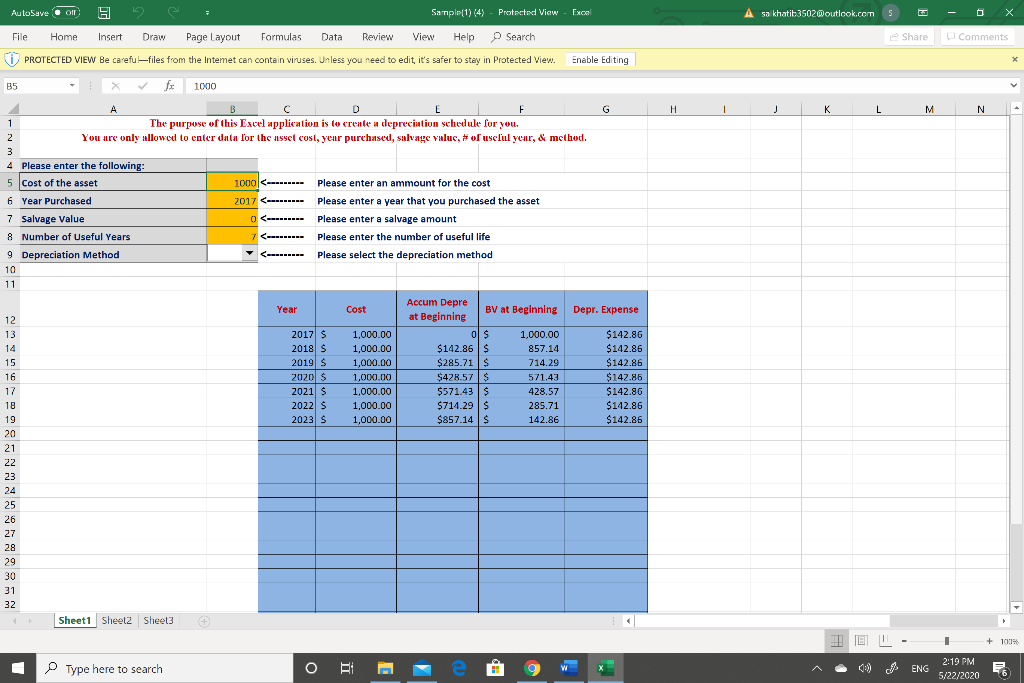
AutoSave Oll 5 Sample(1) (4) - Protected View Exco A sa khatit 3502@outlcok.com 5 CS File Home Insert Draw Page Layout Formulas Data Review View Help Search Share Comments PROTECTED VIEW Be carefu files from the Intemet can contain viruses. Unless you need to edit, it's safer to stay in Protected View. Enable Editing X B5 1000 G H J K L M N A B E F 1 The purpose of this Excel application is to create a depreciation schedule for you. 2 You are only allowed to enter data for the asset cost, year purchased, salvage valuc, # of useful year, & method. 3 4. Please enter the following 5 cost of the asset 1000
Step by Step Solution
There are 3 Steps involved in it

Get step-by-step solutions from verified subject matter experts