







Question: You are to design and code a Java application which allows the user to move words about a container. There are a number of ways
You are to design and code a Java application which allows the user to move words about a container. There are a number of ways to implement this problem, and the following is a suggestion of a recommended way. Create two classes: a class BoxWord, which represents the moveable word objects, and a JFrame driver subclasclass. I construct the word object with the following parameters: a reference to the parent, a String (the actual word), a color, a font, a width and a height. You may not need all those for a basic working program. The object should delegate a MouseMotionListener and MouseListener (interfaces) to pick up a mousePressed (word select), mouseReleased (word deselect), and mouseDragged (word moved) events. To move the words you can use the setLocation method. You can use the Component method getLocation method to find out where the word is currently located. I use an extended java.awt.Canvas to create my BoxWord class, but a JLabel might work as well.
The motion is accomplished by setting the x-coordinate location of the word to the current word x-coord location, plus the x-coord of the mouseDragged event, minus the the x-coord of the original selection location (note that a selection of a word can occur anywhere in that object). The y-coord is done similarly. The driver program has an array of String, as well as an array of BoxWord. As it loops through the array of String, it will construct the word objects and place them randomly in the driver container. The layout manager should be null, i.e. no layout manger. To have the objects apprear on the GUI you will use the setBounds method.
Add a JMeun with options to add a word JOptionPane window input. Also a double click will pop up a JOptionPane window asking if the word should be removed from the GUI. The pictures displayed below show how the WordDrag application proceeds and how its words can be moved, deleted, and added.
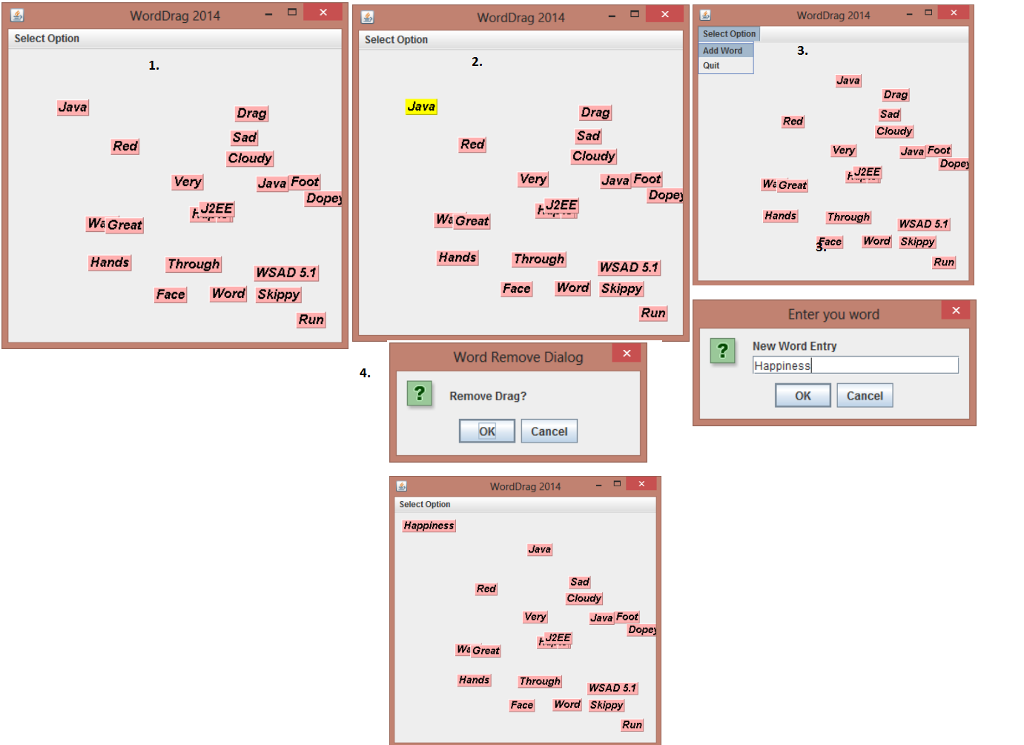
WordDrag 2014 WordDrag 2014 WordDrag 2014 Select Option Select Option Select Option 3 2. Java Drag Java Java Drag Sad Cloudy Drag Sad Cloudy Red Red Java Foot 2EE Very Java Foot Do Java Foot Wa Great J2EE W& Great W& Great Hands ThroughWSAD 5.1 Face Wor Skippy Hands Through Hands Through WSAD 5.1 WSAD 5.1 Face Word Skippy Face Word Skippy Run Run Enter you word ? New Word Entry Happines Word Remove Dialog Reoe Drag? OK Cancel OK Cancel Wor g 2014 Select Option Happiness Sad Java Foot 2EE Wa Great Hands WSAD 5.1 Face Word Skippy
Step by Step Solution
There are 3 Steps involved in it

Get step-by-step solutions from verified subject matter experts
 Study Help