







Question: You are to research and submit a project procurement plan for the Busan network. The devices you must include are routers, switches, and wireless
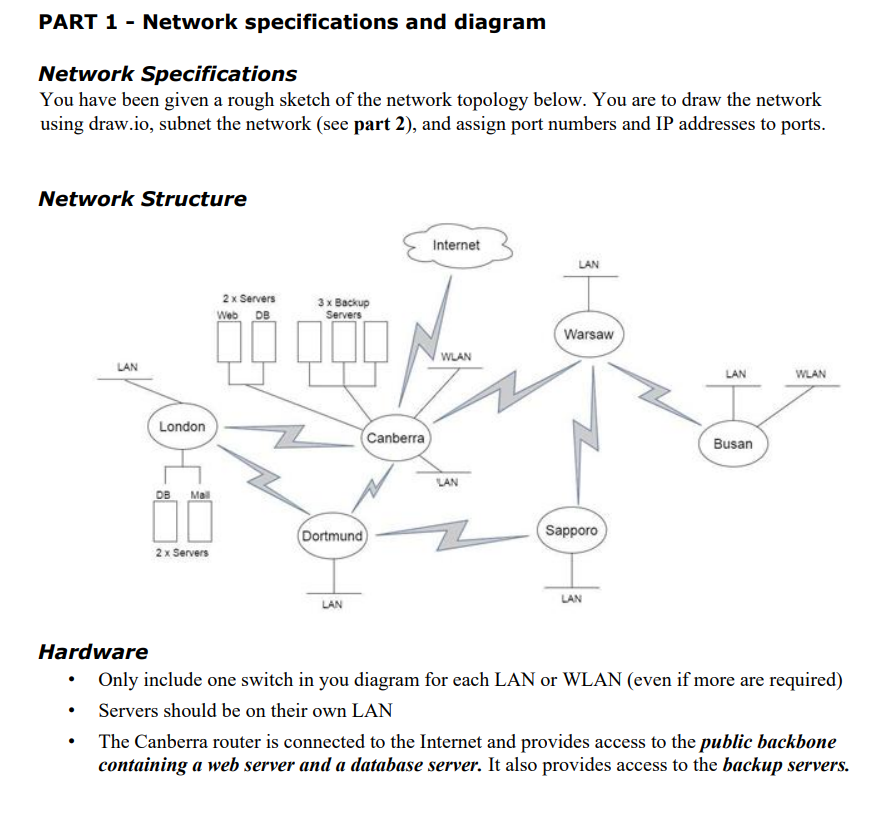
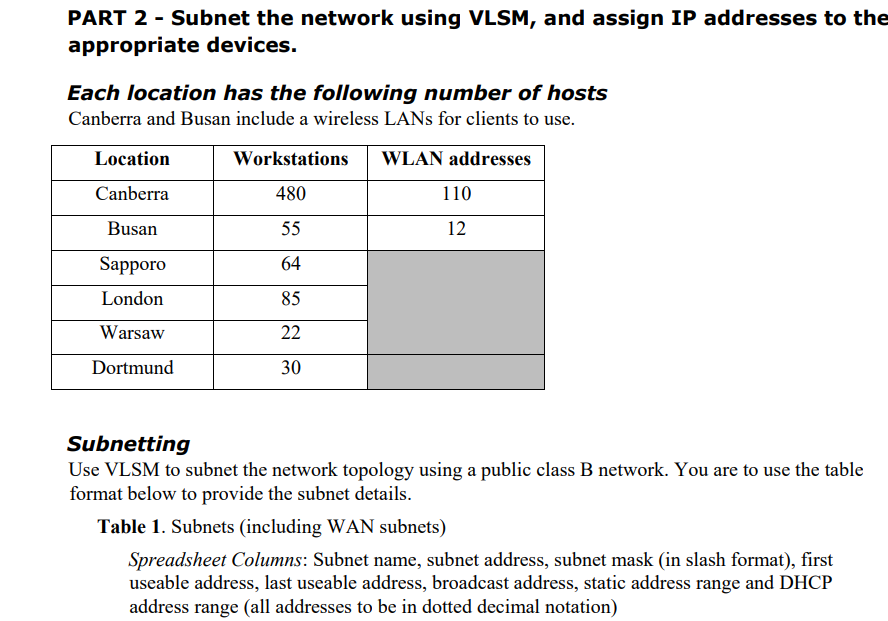
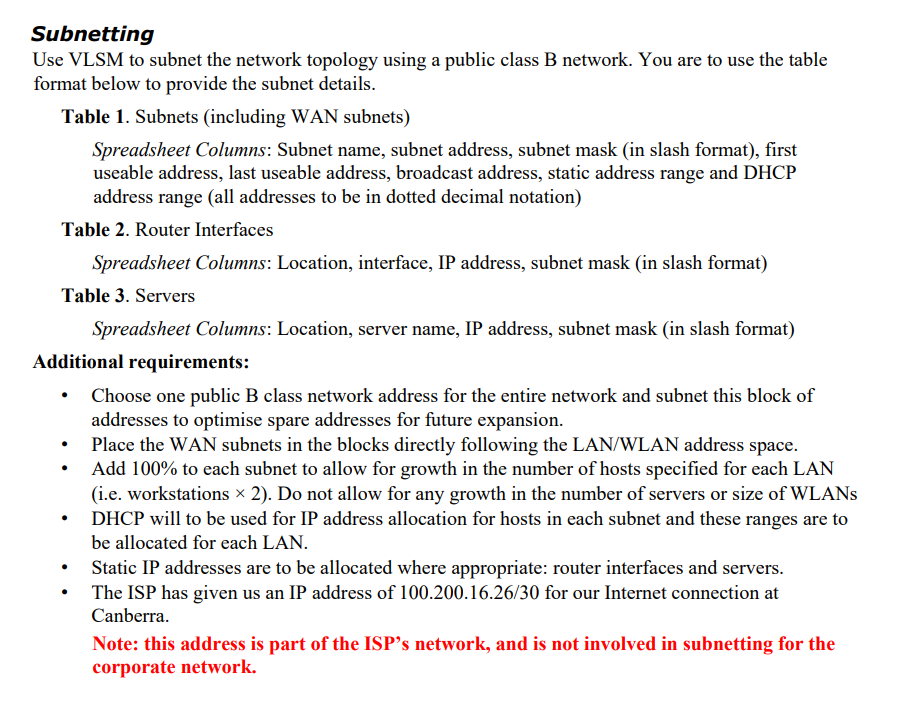
You are to research and submit a project procurement plan for the Busan network. The devices you must include are routers, switches, and wireless access points. Make sure the devices you select can handle the number of workstations required and provide a good quality of service to wired and wireless users. Devices should be enterprise-grade, not home or gaming equipment. Your project plan and final recommendations should be based on a Weighted Decision Matrix (like the WDM you did in the Procurement Practical). You are to compare four (4) devices from each category and to base the decision on reasonable and well-justified attributes. The budget for procurement is $4,000. You may exceed this if you can justify it well. Your project plan is to contain the following components: Weighted Decision Matrix - hardware resource requirements analysis Include a written justification for priorities and attributes given in the matrix Create your WDMs in Excel and copy and paste them into your Word doc . Budget . Create a well-presented table of the prices of all devices and the total cost Include hardware only, not labour Introduction This case study has been divided into three (3) components. You are to design a network, research and source appropriate devices justifying choices (feasibility, efficiency, etc.), subnet the network, assign IP addresses to the appropriate devices, Note: This is not a group project. Each student must individually complete all parts of their submission. Students must start with a new document and they must not have another person's file in their possession at any time. Students may discuss the task with each other, but each student must write their assignment independently and not show their work to other students. Note: This is not a group project. Each student must individually complete all parts of their submission. Students must start with a new document and they must not have another person's file in their possession at any time. Students may discuss the task with each other, but each student must write their assignment independently and not show their work to other students. Deliverables 1. A single Word document (.docx) - containing all parts Assignment breakdown Scenario My Network Services Inc., a data analytics company, has asked you to assess and redesign their network. They are opening a new branch in Busan, which will require new equipment. They have existing contracts and hardware to maintain fibre-optic leased line WAN links between sites. PART 1 - Network diagram PART 2 - Subnet the network and assign IP addresses to the appropriate devices PART 3 - Research and source appropriate devices justifying choices (feasibility, efficiency, etc.) with a Weighted Scoring Model (WSM) PART 1 - Network specifications and diagram Network Specifications You have been given a rough sketch of the network topology below. You are to draw the network using draw.io, subnet the network (see part 2), and assign port numbers and IP addresses to ports. Network Structure . LAN . London DB Mall 2 x Servers 2 x Servers Web DB 3x Backup Servers 000 Canberra Dortmund) LAN Internet WLAN LAN LAN Warsaw Sapporo LAN LAN Busan Hardware Only include one switch in you diagram for each LAN or WLAN (even if more are required) Servers should be on their own LAN WLAN The Canberra router is connected to the Internet and provides access to the public backbone containing a web server and a database server. It also provides access to the backup servers. PART 2 - Subnet the network using VLSM, and assign IP addresses to the appropriate devices. Each location has the following number of hosts Canberra and Busan include a wireless LANs for clients to use. WLAN addresses Location Canberra Busan Sapporo London Warsaw Dortmund Workstations 480 55 64 85 22 30 110 12 Subnetting Use VLSM to subnet the network topology using a public class B network. You are to use the table format below to provide the subnet details. Table 1. Subnets (including WAN subnets) Spreadsheet Columns: Subnet name, subnet address, subnet mask (in slash format), first useable address, last useable address, broadcast address, static address range and DHCP address range (all addresses to be in dotted decimal notation) Subnetting Use VLSM to subnet the network topology using a public class B network. You are to use the table format below to provide the subnet details. Table 1. Subnets (including WAN subnets) Spreadsheet Columns: Subnet name, subnet address, subnet mask (in slash format), first useable address, last useable address, broadcast address, static address range and DHCP address range (all addresses to be in dotted decimal notation) Table 2. Router Interfaces Spreadsheet Columns: Location, interface, IP address, subnet mask (in slash format) Table 3. Servers Spreadsheet Columns: Location, server name, IP address, subnet mask (in slash format) Additional requirements: Choose one public B class network address for the entire network and subnet this block of addresses to optimise spare addresses for future expansion. . . Place the WAN subnets in the blocks directly following the LAN/WLAN address space. Add 100% to each subnet to allow for growth in the number of hosts specified for each LAN (i.e. workstations 2). Do not allow for any growth in the number of servers or size of WLANS DHCP will to be used for IP address allocation for hosts in each subnet and these ranges are to be allocated for each LAN. Static IP addresses are to be allocated where appropriate: router interfaces and servers. The ISP has given us an IP address of 100.200.16.26/30 for our Internet connection at Canberra. Note: this address is part of the ISP's network, and is not involved in subnetting for the corporate network.
Step by Step Solution
There are 3 Steps involved in it

Get step-by-step solutions from verified subject matter experts
 Study Help