



Question: You are trying to access a course, but you do not see it in your Dashboard. You want to make sure this course is in
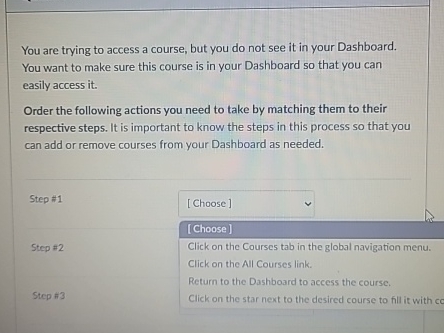
You are trying to access a course, but you do not see it in your Dashboard.
You want to make sure this course is in your Dashboard so that you can
easily access it
Order the following actions you need to take by matching them to their
respective steps. It is important to know the steps in this process so that you
can add or remove courses from your Dashboard as needed.
You are trying to access a course, but you do not see it in your Dashboard.
You want to make sure this course is in your Dashboard so that you can
easily access it
Order the following actions you need to take by matching them to their
respective steps. It is important to know the steps in this process so that you
can add or remove courses from your Dashboard as needed.
Step #
Choose
Step #
Click on the Courses tab in the global navigation menu.
Click on the All Courses link.
Return to the Dashboard to access the course.
Step #
Click on the star next to the desired course to fill it with c
Step by Step Solution
There are 3 Steps involved in it
1 Expert Approved Answer
Step: 1 Unlock

Question Has Been Solved by an Expert!
Get step-by-step solutions from verified subject matter experts
Step: 2 Unlock
Step: 3 Unlock