







Question: You can use the function capability in excel to help solve for NPV, IRR and MIRR Using these functions solve for the highlighted sections in
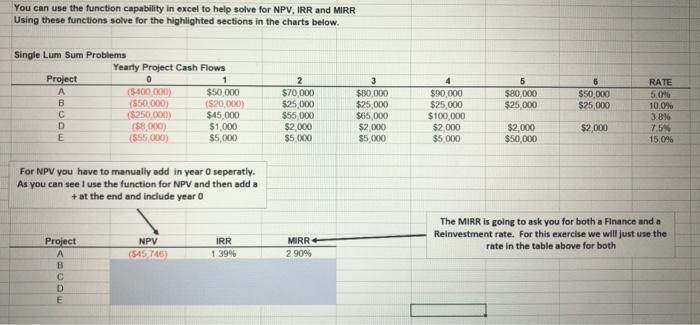
You can use the function capability in excel to help solve for NPV, IRR and MIRR Using these functions solve for the highlighted sections in the charts below. 5 Single Lum Sum Problems Yearty Project Cash Flows Project 0 1 ($400.000) $50,000 B ($50 000 ($20,000) ($250 000) $45,000 D (S8000) $1,000 E (555000) $5,000 2 $70,000 $25,000 $55,000 $2.000 $5.000 $50,000 $25,000 3 $80,000 $25,000 $65,000 $2.000 $5 000 5 $80,000 $25,000 $90,000 $25,000 $100,000 $2.000 $5,000 RATE 5.08 10.0% 3.8% 75% 15.09% $2,000 $2.000 $50,000 For NPV you have to manually add in year o seperatly. As you can see I use the function for NPV and then add a + at the end and include year o NPV ($45 TAG IRR 1.39% The MIRR is going to ask you for both a Finance and a Reinvestment rate. For this exercise we will just use the rate in the table above for both MIRR 2 90% Project A B D E
Step by Step Solution
There are 3 Steps involved in it

Get step-by-step solutions from verified subject matter experts
 Study Help