







Question: You can use the ruling method to correct an error in the journal before posting or to correct an error in the ledger after an
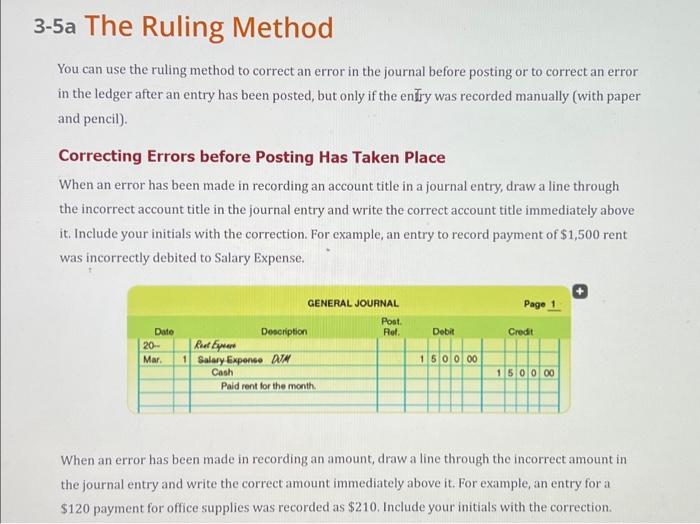
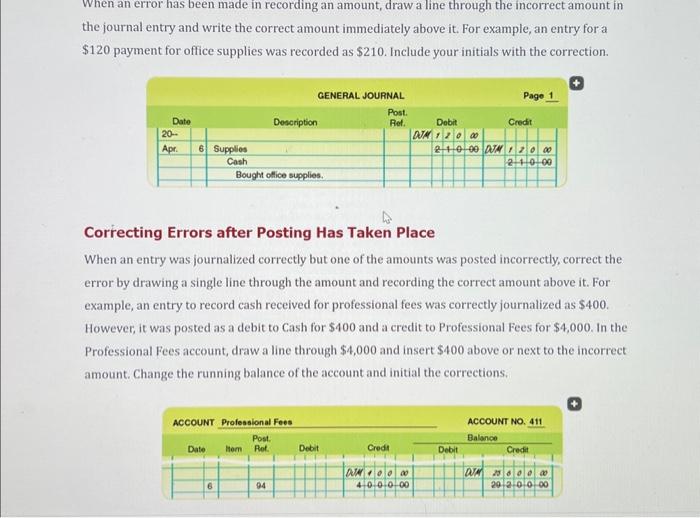
You can use the ruling method to correct an error in the journal before posting or to correct an error in the ledger after an entry has been posted, but only if the enfry was recorded manually (with paper and pencil). Correcting Errors before Posting Has Taken Place When an error has been made in recording an account title in a journal entry, draw a line through the incorrect account title in the journal entry and write the correct account title immediately above it. Include your initials with the correction. For example, an entry to record payment of $1,500 rent was incorrectly debited to Salary Expense. When an error has been made in recording an amount, draw a line through the incorrect amount in the journal entry and write the correct amount immediately above it. For example, an entry for a $120 payment for office supplies was recorded as $210. Include your initials with the correction. When an error has been made in recording an amount, draw a line through the incorrect amount in the journal entry and write the correct amount immediately above it. For example, an entry for a $120 payment for office supplies was recorded as $210. Include your initials with the correction. Correcting Errors after Posting Has Taken Place When an entry was journalized correctly but one of the amounts was posted incorrectly, correct the error by drawing a single line through the amount and recording the correct amount above it. For example, an entry to record cash received for professional fees was correctly journalized as $400. However, it was posted as a debit to Cash for $400 and a credit to Professional Fees for $4,000. In the Professional Fees account, draw a line through $4,000 and insert $400 above or next to the incorrect amount. Change the running balance of the account and initial the corrections. You can use the ruling method to correct an error in the journal before posting or to correct an error in the ledger after an entry has been posted, but only if the enfry was recorded manually (with paper and pencil). Correcting Errors before Posting Has Taken Place When an error has been made in recording an account title in a journal entry, draw a line through the incorrect account title in the journal entry and write the correct account title immediately above it. Include your initials with the correction. For example, an entry to record payment of $1,500 rent was incorrectly debited to Salary Expense. When an error has been made in recording an amount, draw a line through the incorrect amount in the journal entry and write the correct amount immediately above it. For example, an entry for a $120 payment for office supplies was recorded as $210. Include your initials with the correction. When an error has been made in recording an amount, draw a line through the incorrect amount in the journal entry and write the correct amount immediately above it. For example, an entry for a $120 payment for office supplies was recorded as $210. Include your initials with the correction. Correcting Errors after Posting Has Taken Place When an entry was journalized correctly but one of the amounts was posted incorrectly, correct the error by drawing a single line through the amount and recording the correct amount above it. For example, an entry to record cash received for professional fees was correctly journalized as $400. However, it was posted as a debit to Cash for $400 and a credit to Professional Fees for $4,000. In the Professional Fees account, draw a line through $4,000 and insert $400 above or next to the incorrect amount. Change the running balance of the account and initial the corrections
Step by Step Solution
There are 3 Steps involved in it

Get step-by-step solutions from verified subject matter experts
 Study Help