







Question: You must complete the code so that it works as follows: 1 . The code in the initialize ( ) procedure of the Gosu window
You must complete the code so that it works as follows:
The code in the initialize procedure of the Gosu window should be completed to set up cells that are connected to each other with variables joining each cell to its neighbours using references
The user should be able to left click on cells on the screen to create mazes and later in the Maze Search task we will use recursion to find a path through the maze
Each cell clicked on should turn yellow.
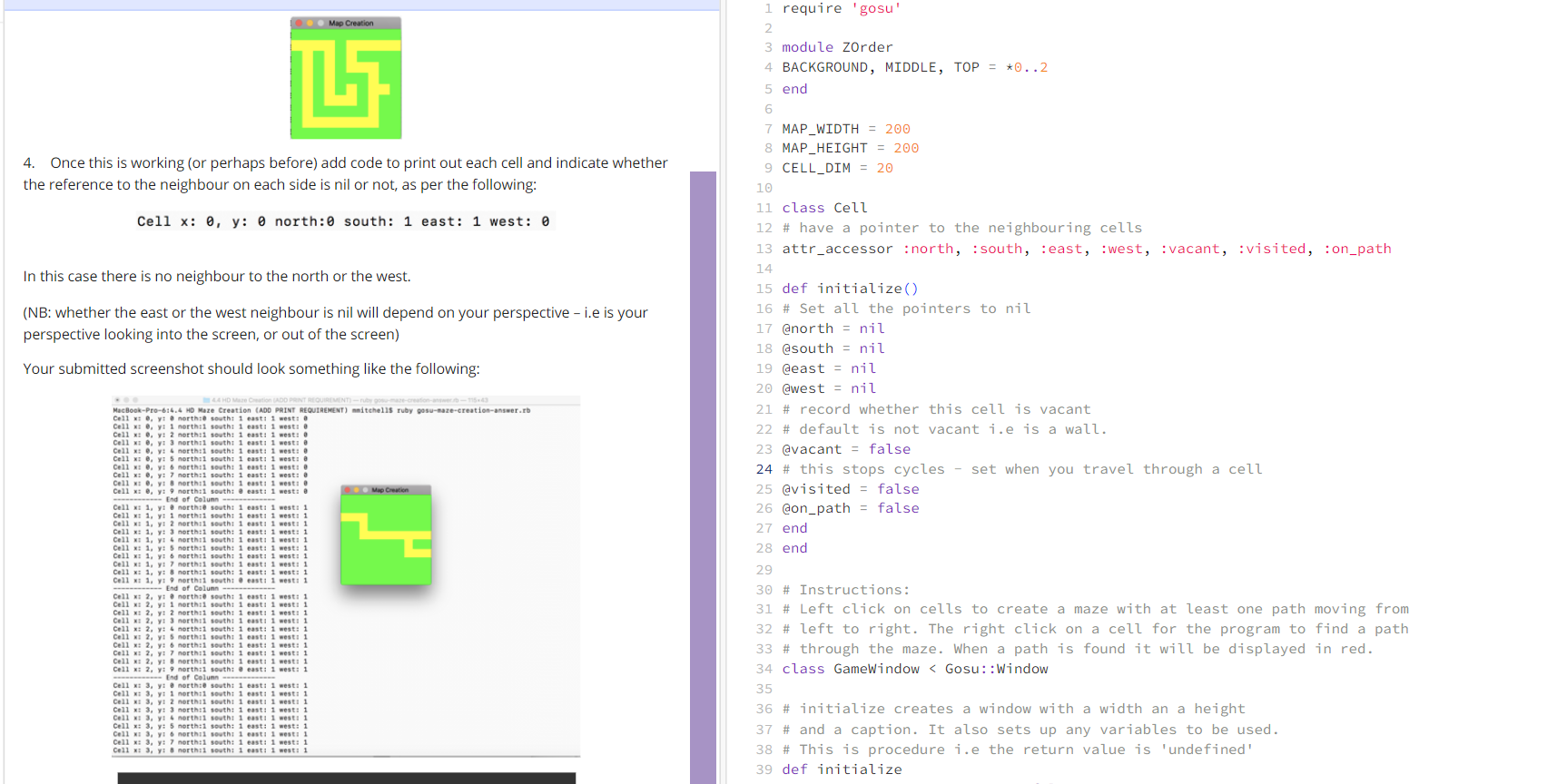
Once this is working or perhaps before add code to print out each cell and indicate whether the reference to the neighbour on each side is nil or not, as per the following:
In this case there is no neighbour to the north or the west.
NB: whether the east or the west neighbour is nil will depend on your perspective ie is your perspective looking into the screen, or out of the screen
Your submitted screenshot should look something like the following:
the code in question:
require 'gosu'
module ZOrder
BACKGROUND, MIDDLE, TOP
end
MAPWIDTH
MAPHEIGHT
CELLDIM
class Cell
# have a pointer to the neighbouring cells
attraccessor :north, :south, :east, :west, :vacant, :visited, :onpath
def initialize
# Set all the pointers to nil
@north nil
@south nil
@east nil
@west nil
# record whether this cell is vacant
# default is not vacant ie is a wall.
@vacant false
# this stops cycles set when you travel through a cell
@visited false
@onpath false
end
end
# Instructions:
# Left click on cells to create a maze with at least one path moving from
# left to right. The right click on a cell for the program to find a path
# through the maze. When a path is found it will be displayed in red.
class GameWindow Gosu::Window
# initialize creates a window with a width an a height
# and a caption. It also sets up any variables to be used.
# This is procedure ie the return value is 'undefined'
def initialize
super MAPWIDTH, MAPHEIGHT, false
self.caption "Map Creation"
@path nil
xcellcount MAPWIDTH CELLDIM
ycellcount MAPHEIGHT CELLDIM
@columns Array.newxcellcount
columnindex
# first create cells for each position
while columnindex xcellcount
row Array.newycellcount
@columnscolumnindex row
rowindex
while rowindex ycellcount
cell Cell.new
@columnscolumnindexrowindex cell
rowindex
end
columnindex
end
# now set up the neighbour links
# You need to do this using a while loop with another
# nested while loop inside.
end
# this is called by Gosu to see if should show the cursor or mouse
def needscursor?
true
end
# Returns an array of the cell x and y coordinates that were clicked on
def mouseovercellmousex mousey
if mousex CELLDIM
cellx
else
cellx mousex CELLDIMtoi
end
if mousey CELLDIM
celly
else
celly mousey CELLDIMtoi
end
cellx celly
end
# start a recursive search for paths from the selected cell
# it searches till it hits the East 'wall' then stops
# it does not necessarily find the shortest path
# Completing this function is NOT NECESSARY for the Maze Creation task
# complete the following for the Maze Search task after
# we cover Recusion in the lectures.
# But you DO need to complete it later for the Maze Search task
def searchcellx celly
deadend false
pathfound false
if cellx MAPWIDTH CELLDIM
if ARGVlength # debug
puts "End of one path x: cellxtos y: cellytos
end
cellxcelly # We are at the east wall exit
else
northpath nil
westpath nil
eastpath nil
southpath nil
if ARGVlength # debug
puts "Searching. In cell x: cellxtos y: cellytos
end
# INSERT MISSING CODE HERE!! You need to have if tests to
# check each surrounding cell. Make use of the attributes for
# cells such as vacant, visited and onpath.
# Cells on the outer boundaries will always have a nil on the
# boundary side
if columnindex
cell.west nil
else
cell.west @columnscolumnindex rowindex
end
if columnindex xcellcount
cell.west nil
else
cell.west @columnscolumnindex rowindex
end
# pick one of the possible paths that is not nil if any:
if northpath nil
path northpath
elsif southpath nil
path southpath
elsif eastpath nil
path eastpath
elsif westpath nil
path westpath
end
# A path was found:
if path nil
if ARGVlength # debug
puts "Added x: cellxtos y: cellytos
end
cellxcellyconcatpath
else
if ARGVlength # debug
puts "Dead end x: cellxtos y: cellytos
end
nil # dead end
end
end
end
# Reacts to button press
# left button marks a cell vacant
# Right button
Step by Step Solution
There are 3 Steps involved in it
1 Expert Approved Answer
Step: 1 Unlock

Question Has Been Solved by an Expert!
Get step-by-step solutions from verified subject matter experts
Step: 2 Unlock
Step: 3 Unlock
 Study Help