







Question: You should set up your FastAPI ( ) app with information to contact yourself and a description of this API. The Swagger should also reflect
You should set up your FastAPI app with information to contact yourself and a description of this API. The Swagger should also reflect all the status codes and responses that each endpoint will have.
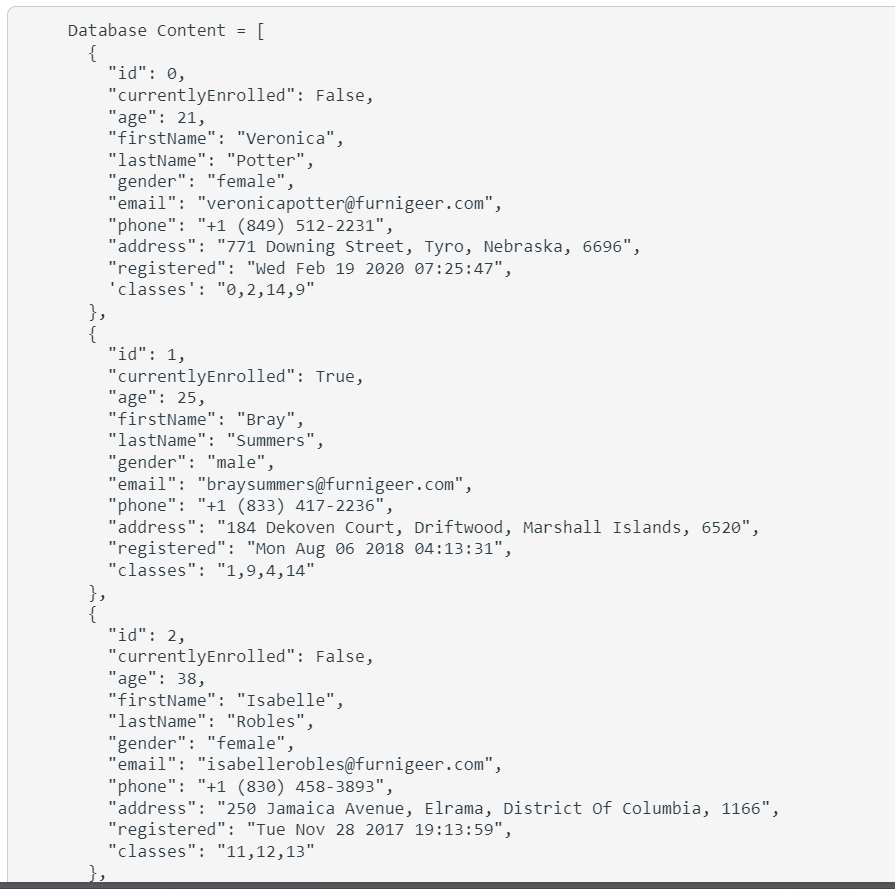
You should have one database for this project with several tables. One for Students, Classes and Tokens. Create database generators as needed to create each of these tables. The data is provided to you below. HINT: Students only have class ids stored in the column BUT when you query a student you will see that the entire class data is returned. You will need to split this column when queried and either make a database call to the class or search through a global list. Your choice.
Services
In addition to the database generators you should also have a main services that holds all the queries, insert, update and conversion functions as needed.
Modules
You should have a separate folder and file that contains all your objects that you will use throughout your API.
Remember to use BaseModel from pydantic for some of your objects. This helps streamline some aspects of objects in our API.
Also the Student should be a List Classes as the type using the typing module and importing "List"
Endpoints
You can define your own endpoints but their must be four that each serve a specific purpose. In this project you are separating CREATE and UPDATE POST methods.
GET endpoint to get one student
This method will receive a student ID in the parameters, query the database, convert and return the student data. Note that for the student classes the data is a list of class objects not just the string of class numbers.
NOTE: If your endpoints just return class ids instead of the entire class object then you will get a for that end point
GET endpoint to get all students
This method will return all students in the database. Note that for the student classes the data is a list of class objects not just the string of class numbers.
NOTE: If your endpoints just return class ids instead of the entire class object then you will get a for that end point
POST end point to modify a student
This method will accept a RequestObject of the student. Then update the data in the database. Note that the RequestObject sends the classes as a dictionary list. You will need to loop through the class list and only take out the ID of each and build a string with the ids separated by a comma.
If the student doesn't exist in the system then an error message needs to be returned.
POST end point to create a student
This method will accept a RequestObject of the student. Then add the student into the database. Note that the RequestObject sends the classes as a dictionary list. You will need to loop through the class list and only take out the ID of each and build a string with the ids separated by a comma.
If there is a student that already exists in the system with the same id then an error message needs to be returned.
Unit Tests
You should right unit tests for each of your endpoints. Remember that a usual test involves testing one aspect so you could potentially have multiple functions to test the same endpoint.
Status Codes
You should have proper status codes noted in each annotation of your endpoint. You should also throw status codes if data is missing or unauthorized access see Tokens next
Tokens
Every call to a GET or POST endpoint should check if the user passes a proper token. Otherwise a status code must be returned with a meaningful message.
Of course once you add in your tokens you will need to use the provided HTML files to test your endpoints. Make sure to modify the code to use the correct variable for student IDs along with the JSON data for the RequestObject. Remember that the student request data doesn't take on a string for the classes but a list of dictionary so the data would be classes: id: "code": "INFO "title": "Basic Programming", "description": "Basic programming class using Python"another class here etc.
Classes
id:
"code": "INFO
"title": "Basic Programming", "description": "Basic programming class using
Python."
id:
"code": "INFO
"title": "Intro to Programming", "description": "Visual programming class"
id:
"code": "INFO
"title": "Intro to Web Development", "description": "Basics of HTML and CS
S
id:
"code": "INFO
"title": "Programming I", "description": "Advanced topics of programming"
id:
"code": "INFO
"title": "Intro to Database", "description": "Basics of database design and
development class."
id:
"code": "INFO
"title": "Intro to C# "description": "Programming class using C# languag
e
id:
"code": "INFO
"title": "Intro to Java", "description": Programming class using Java lan
guage."
Database Content
id:
"currentlyEnrolled": False,
"age":
"firstName": "Veronic
Step by Step Solution
There are 3 Steps involved in it
1 Expert Approved Answer
Step: 1 Unlock

Question Has Been Solved by an Expert!
Get step-by-step solutions from verified subject matter experts
Step: 2 Unlock
Step: 3 Unlock
 Study Help