







Question: You should use JavaFx for this assignment Design and implement a GUI application that has an entry field to accept the loan amount, a drop
You should use JavaFx for this assignment
Design and implement a GUI application that has an entry field to accept the loan amount, a drop down for interest rate (3.25 to 5.00) and a drop down for years (5, 10, 15 and 30). Calculate loan payment and display the amortization schedule for the loan. The UI Design is completely up to you.
Note: Formula to calculate a mortgage double monthlyPayment = loanAmount*monthlyInterestRate / (1 - (Math.pow(1 / (1 + monthlyInterestRate), numOfYears * 12)));
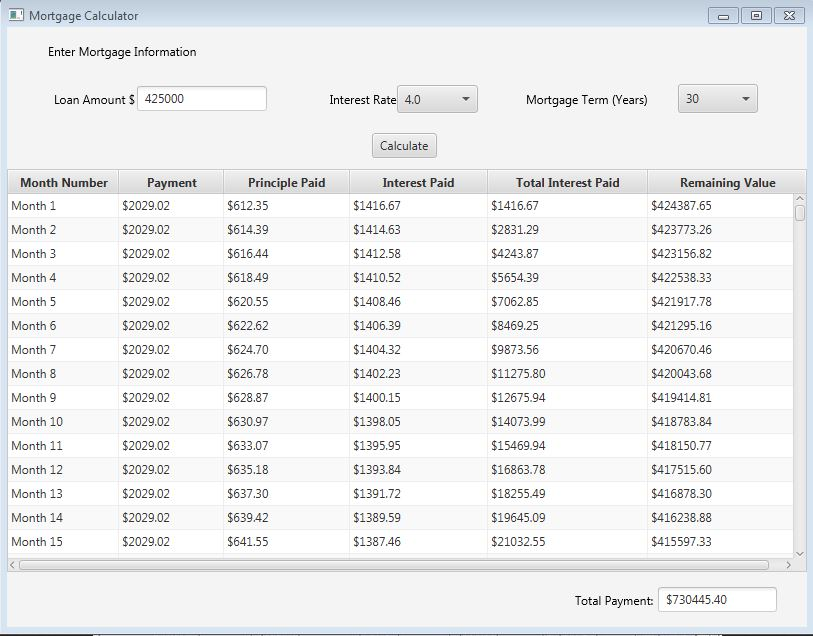
This is the code I have but I need to change to Javafx and this is the screen shot on bottom
import java.awt.*; import java.awt.event.*; import javax.swing.*; import javax.swing.border.*; import java.lang.*; public class LoanSchedule extends JApplet implements ActionListener { //Create all needed labels private JLabel jlblLoanAmount = new JLabel("Loan Amount"); private JLabel jlblNumOfYears = new JLabel("Number Of Years"); private JLabel jlblInterestRate = new JLabel("Interest Rate (Annual)"); //Create all needed text fields private JTextField jtfLoanAmount = new JTextField(10); private JTextField jtfNumOfYears = new JTextField(10); private JTextField jtfInterestRate = new JTextField(10); //Calculate button is also needed private JButton jbtCalculate = new JButton("Amortize Loan"); //...and a text area where the results will be displayed private JTextArea jtaResults = new JTextArea(); public void init() { //Panel p1 will hold the input JPanel p1 = new JPanel(); p1.setLayout(new GridLayout(3,2)); p1.add(jlblLoanAmount); p1.add(jtfLoanAmount); p1.add(jlblNumOfYears); p1.add(jtfNumOfYears); p1.add(jlblInterestRate); p1.add(jtfInterestRate); //Panel p2 will hold panel p1 and the calculate button JPanel p2 = new JPanel(); p2.setLayout(new BorderLayout()); p2.setBorder(new TitledBorder("Enter loan amount, Number of years and annual interest rate")); p2.add(p1, BorderLayout.WEST); p2.add(jbtCalculate, BorderLayout.EAST); //Action listener for the button jbtCalculate.addActionListener(this); //Make the text area scrollable and uneditable JScrollPane scrollPane = new JScrollPane(jtaResults); jtaResults.setRows(12); jtaResults.setEditable(false); //Place the two panels to the applet getContentPane().add(p2, BorderLayout.CENTER); getContentPane().add(scrollPane, BorderLayout.SOUTH); } public void actionPerformed(ActionEvent e) { if(e.getSource() == jbtCalculate) calculateLoan(); else System.out.println("you will never see this text!"); /* Because we only have one element that uses actionListener (jbtCalculate) this method should only have a call to calculate() method in it but i put the if-else statement just to show that it can handle other elements with alctiolistener. For example, if we had another button that had addActionListener attached to it we could say something like this: if(e.getSource() == jbtCalculate) { do something here; } else if(e.getSource() == jbtSomeOtherElement) { do something else here; } */ } public void calculateLoan() { int numberOfYears = Integer.parseInt(jtfNumOfYears.getText()); double loanAmount = Double.parseDouble(jtfLoanAmount.getText()); double annualInterestRate = (Double.parseDouble(jtfInterestRate.getText())) / 100; double monthlyInterestRate = annualInterestRate / 12; double numberOfMonths = numberOfYears * 12; double monthlyPayment = loanAmount * (monthlyInterestRate / (1 - Math.pow(1 + monthlyInterestRate, - numberOfMonths))); double totalPayment = monthlyPayment * numberOfMonths; double balance = loanAmount; double interest; double principal; jtaResults.append("Payment#\t" + "Interest\t" + "Principal\t" + "Balance "); for(int i = 0; i
Mortgage Calculator Enter Mortgage Information Loan Amount S 425000 30 Interest Rate 4.0 Mortgage Term ears Calculate Principle Paid onth Number Payment Interest Paid Total Interest Paid Remaining Value Month 1 $2029.02 S612.35 41667 41667 $424387.65 $2029.02 $614.39 $1414.63 $2831.29 $423773.26 Month 2 Month 3 S2029.02 $61644 $1312.58 24387 $423156.82 $2029.02 $618.49 $1410.52 $5654.39 $422538.33 Month 4 $421917.78 $8469.25 $2029.02 $622.62 $1406.39 $421295.16 Month 6 $420670.46 $11275.80 $2029.02 $626.78 $1402.23 $420043.68 Month 8 $12675.94 $419414.81 $418783.84 Month 10 $1398.05 $14073.99 $2029.02 $630.97 S2029.02 $633.07 $1395.95 Month 11 $15469.94 $418150.77 $16863.78 $417515.60 $2029.02 $635.18 $1393.84 Month 12 S2029.02 $637.30 139172 255A9 $416878.30 Month 13 $1389.59 Month 14 $2029.02 $63942 $19645.09 $416238.88 $1387.46 $415597.33 Month 15 $21032.55 Total payment $730445.40
Step by Step Solution
There are 3 Steps involved in it

Get step-by-step solutions from verified subject matter experts
 Study Help