







Question: You will be provided the base class, InventoryItem, in a file you can download from Blackboard called inventory _ item.py . You will create 3
You will be provided the base class, InventoryItem, in a file you can download from Blackboard called inventoryitem.py You will create subclass files for each of the item categories.
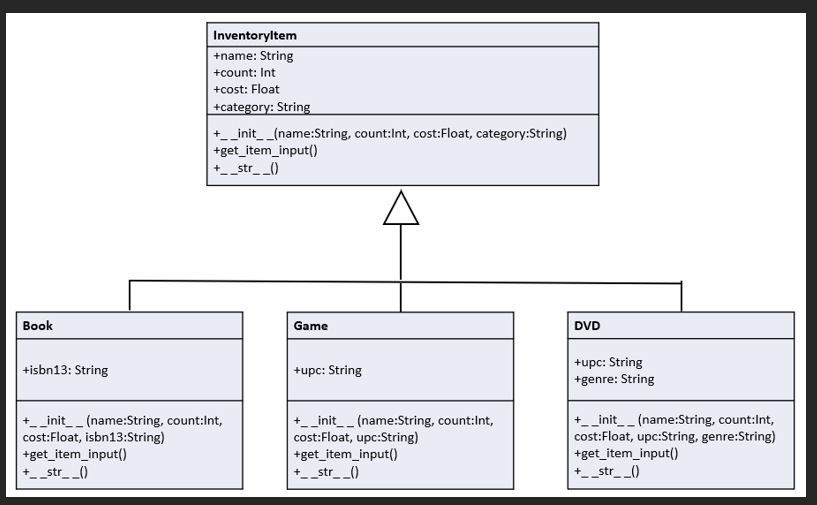
In Trish's swap shop, every item she sells has an item name, item count, unit price, and a category.
For books, she wants to be able to track the ISBN code. That is a digit code used by barcode readers.
For games, she wants to track the UPC Code. The UPC code is a digit code.
For DVDs she wants to track the UPC Code and specify a genre for the DVD The genre will be a string.
As the software developer working on her inventory system, you've decided on the following objectoriented design for these itemYou will create six files, one for your superclass provided to you on Blackboard one for each of your subclasses, and two for two different main modules:
inventoryitem.py
This class is nearly identical to the one you created for Lab Problem
Notice that in the getiteminput method, the user is NOT asked to enter a category. That will get filled in by the subclasses when the specific object is created.
book.py
Create a file named book.py and define a class named Book that inherits from InventoryItem. The Book class has one additional public instance variable, a string called isbn
Define an init method that takes four default arguments, three from InventoryItem and one additional one named isbn
o Call the superclass init method to initialize the superclass instance variables. When calling the superclass dunder init, set the category to "Book".
o Then initialize the isbn instance variable.
Define a getiteminput method that takes no arguments. This method will override the method in the superclass. This method will get user input to fill in all the Book objects attributes.
o You should call the superclass's getiteminput method to fill in the name, count, and cost instance variables first before writing additional code to fill in the isbn instance variable.
o Make sure to include data validation to ensure for isbn the user enters a string with characters that is all digits.
Define a str method that will return a string that includes this object's data. When a Book object is printed, it should appear like this:
Science Book
Count: Cost:
Category: Book
ISBN:
Wherever possible, your program should call the super function to access methods from the base class to avoid copying code from the base class module.
game.py
Create a file named game.py and define a class named Game that inherits from InventoryItem. The Game class has one additional public instance variables, a string called upc.
Just as you did with the Book class, override the superclass init getiteminput, and str methods to perform appropriate actions for this class.
o Make sure the init method sets the category for this object to be "Game".
o Make sure your getiteminput method does data validation to ensure the UPC entered by the user is a string with digits.
If this object is created directly, here's what it should look like:
Monopoly
Count: Cost:
Category: Game
UPC:
Wherever possible, your program should call the super function to access methods from the base class to avoid copying code from the base class module.
dvdpy
Create a file named dvdpy and define a class named DVD that inherits from InventoryItem. The DVD class has two additional public instance variables, a string called upc and a string called genre.
Perform similar actions here as you did with the Game class. The category should be set to DVD
If this object is created directly, here's what it should look like:
Fifth Element
Count: Cost:
Category: DVD
UPC:
Genre: Sci Fi
To test the work you did for creating subclasses, you are going to create TWO different main programs.
LabPapy
Create a file named LabPapy This file will be the main module that holds the main program.
In the main module, create objects with the following information:
Object Type Item Name Item Count Unit Cost ISBN UPC Genre
Book Python Now
Book Even More Python
Game Uno
DVD Barbie Comedy
DVD The Piano Drama
After creating these objects, print the objects directly.
o In our class, "print directly" means do NOT call str in the code, but just print the object, and Python will automatically call str when converting the object to a string.s:
Step by Step Solution
There are 3 Steps involved in it
1 Expert Approved Answer
Step: 1 Unlock

Question Has Been Solved by an Expert!
Get step-by-step solutions from verified subject matter experts
Step: 2 Unlock
Step: 3 Unlock
 Study Help