







Question: You will create a word processing document and create a psuedocode solution to the following problem. The code in the pseudocode on the following page
You will create a word processing document and create a psuedocode solution to the following problem.
The code in the pseudocode on the following page contains two methods, main() and retrieveProdName(num n). The main() method calls the retrieveProdName() method using a number read from the users input at the keyboard. This psudocode design was implemented in Java, and deployed to the customers machines. But ocationally the program throws an InvalidPIDException and crashes. This is very disturbing to the customer, and they are demanding a fix. Your job is fix this problem.
First study the code to see how it work and determine where the exception can be thrown. Then copy the main() pseudocode (no need to copy the retrieveProdName() method as you will not be changing it) and apply a fix. The fix will consist of your using try and catch blocks to catch the exception. When the exception is caught print out a "Invalid Product Code, please try again" message, and then allow the program to continue normally.
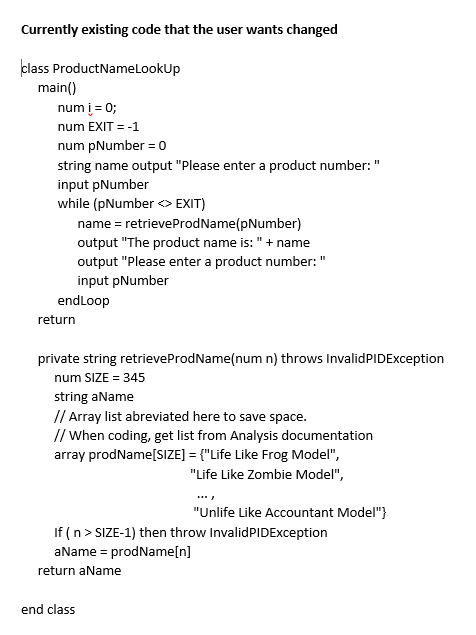
Currently existing code that the user wants changed class ProductNameLookup main() num i = 0 num EXIT=-1 num pNumber = 0 string name output "Please enter a product number:" input pNumber while (pNumber EXIT) name = retrieveprodName(pNumber) output "The product name is:" + name output "Please enter a product number:" input pNumber endLoop return private string retrieveProdName(num n) throws InvalidPIDException num SIZE = 345 string aName // Array list abreviated here to save space // When coding, get list from Analysis documentation array prodName[SIZE] = {"Life Like Frog Model", "Life Like Zombie Model", "Unlife Like Accountant Model" If (n > SIZE-1) then throw InvalidPIDException aName = prodName[n] return aName end class
Step by Step Solution
There are 3 Steps involved in it

Get step-by-step solutions from verified subject matter experts
 Study Help