



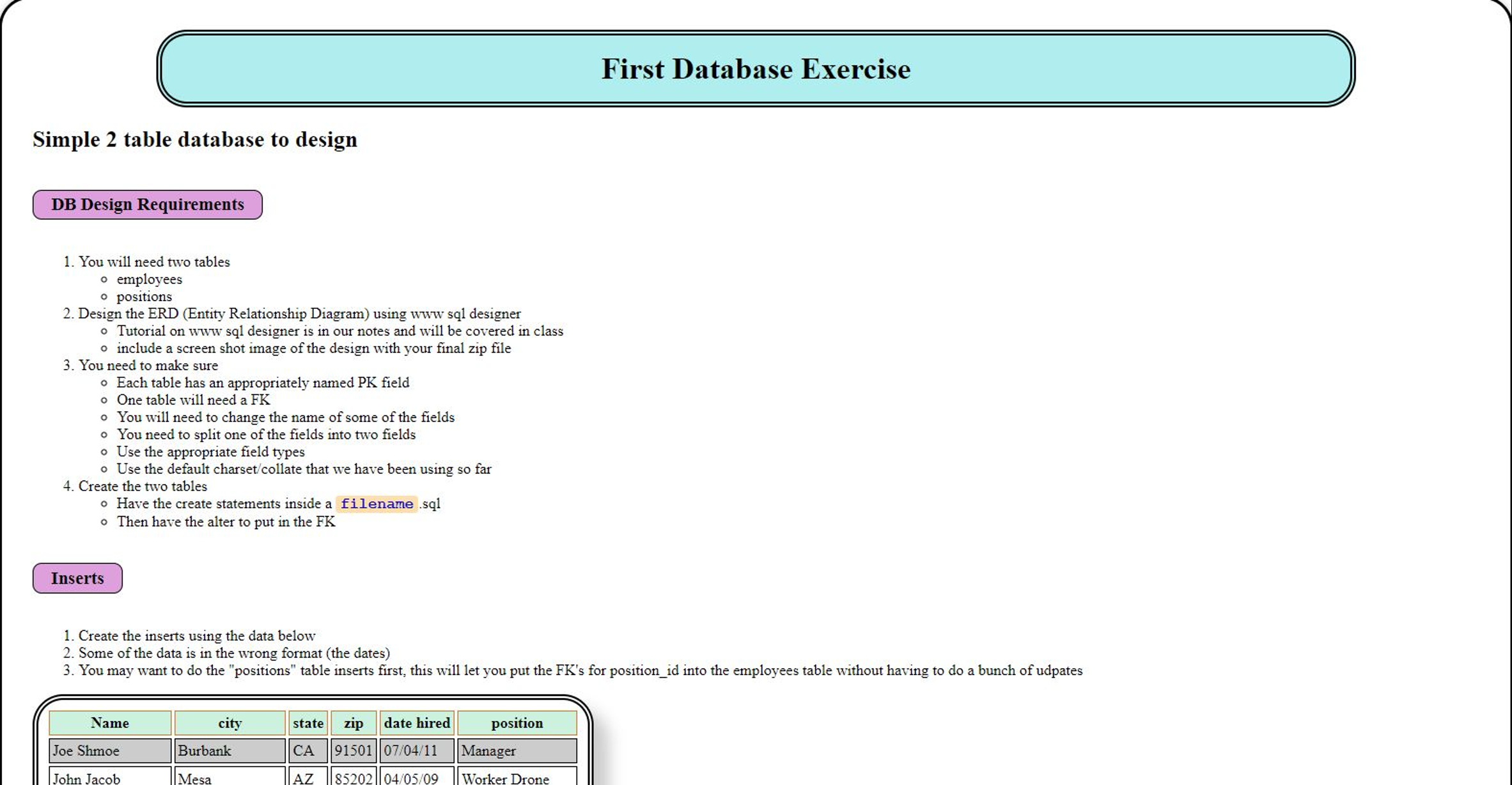
Question: You will need two tables @ employees @ positions Design the ERD ( Entity Relationship Diagram ) using www sq 1 designer Tutorial on www
You will need two tables
@ employees
@ positions
Design the ERD Entity Relationship Diagram using www sq designer
Tutorial on www sql designer is in our notes and will be covered in class
include a screen shot image of the design with your final zip file
You need to make sure
Each table has an appropriately named PK field
One table will need a FK
You will need to change the name of some of the fields
You need to split one of the fields into two fields
Use the appropriate field types
Use the default charsetcollate that we have been using so far
Create the two tables
Have the create statements inside a filename sq
Then have the alter to put in the FK
Create the inserts using the data below
Some of the data is in the wrong format the dates
You may want to do the "positions" table inserts first, this will let you put the FKs for positionid into the employees table without having to do a bunch of udpates tableNamecity,state,zip,date hired,positionJoe Shmoe,Burbank,CAManagerJohn Jacob,Mesa,AZWorker DroneSally Struthers,Mesa,AZCEOMichelle Smith,Pasadena,CAManagerJohn Smith,Mesa,AZWorker DronePaul LynnMesa,AZWorker DroneNatasha Romanof,Burbank,CASpecialistSam Hill,Mesa,AZWorker DroneStan Lee,Burbank,CAManagerBruce Banner,Mesa,AZWorker DroneMichiru Kagemori,Chandler,AZWorker DroneShirou Ogami,New Anima City,AZSpecialistNazuna Hiwatashi,Scottsdale,AZWorker DroneAlan Sylvasta,Foutain Hills,AZCEOMarie Itami,Phoenix,AZSpecialistBarbaray Rose,New Anima City,AZManagerAmalia True,San Jose,CASpecialistPenance Adair,San Jose,CAWorker DroneMaladie Jones,San Jose,CAHuman ResourcesHugo Swan,Burbank,CAManager
NOTE: Remember that the FROM portion of your query is the tough part. You will need to set up one JOIN for the two tables.
Create an UPDATE Ouerv to fix the spelling on "Foutain Hills" NOTE: Remember that the FROM portion of your query is the tough part. You will need to set up one JOIN for the two tables.
Create an UPDATE Query to fix the spelling on "Foutain Hills"
Query that Selects ALL FIELDs except the PKs from the two tables should have results
Queries that select ALL FIELDS except the PKs but:
only selects those with a Position of Manager
only selects "Worker Drone" from AZ
only selects "Manager" from "Pasadena"
Query that lists every worker from "Mesa" sorted by last name
Queries that aggregate group data for totals, these can NOT use all fields
Query that counts the number of "Manager"s by state. GROUP BY state This one can NOT use all fields.
Query that gives counts the number of workers by position, by state group by position and state Again, can only validly include a few fields state and position name, and the value
You will need to use where and and count to do the above queries.
Zip the following into a zip file called myfirstdb.zip or whatever is appropriate
Image of ERD from screen shot
one or more sql files that contain
Your two CREATE TABLE statements and the ALTER to add the FK They MUST WORK.
INSERTS for your two tables in the order you want me to run them, again they MUST WORK
The SELECT Queries and UPDATE query
Step by Step Solution
There are 3 Steps involved in it
1 Expert Approved Answer
Step: 1 Unlock

Question Has Been Solved by an Expert!
Get step-by-step solutions from verified subject matter experts
Step: 2 Unlock
Step: 3 Unlock