







Question: You will write a function called as character_finder which will find the number of existence of as specific character in a text file. The function
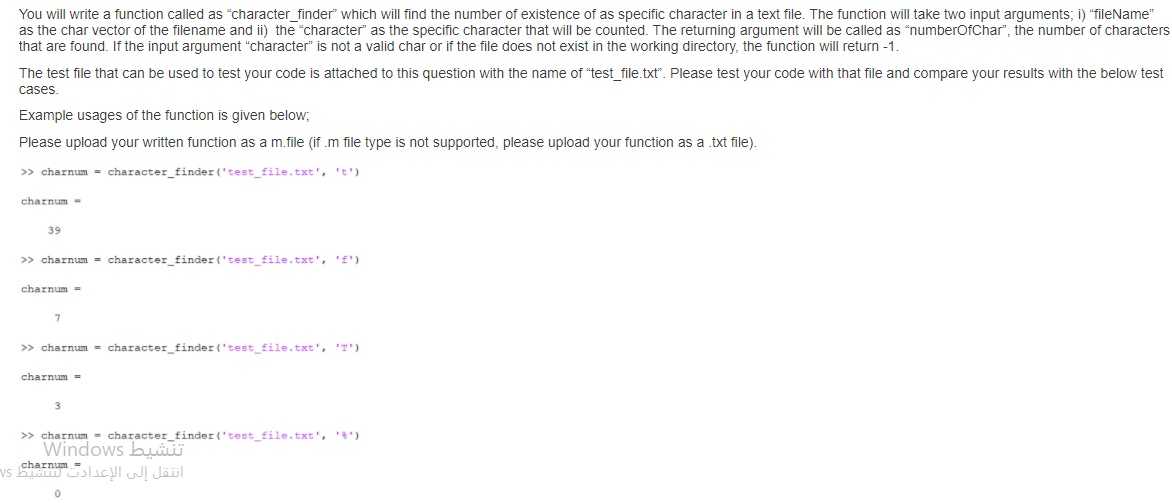
You will write a function called as "character_finder" which will find the number of existence of as specific character in a text file. The function will take two input arguments; i) "fileName" as the char vector of the filename and ii) the character" as the specific character that will be counted. The returning argument will be called as numberOfChar", the number of characters that are found. If the input argument "character is not a valid char or if the file does not exist in the working directory, the function will return -1. The test file that can be used to test your code is attached to this question with the name of "test_file.txt". Please test your code with that file and compare your results with the below test cases. Example usages of the function is given below; Please upload your written function as a m.file (if.m file type is not supported, please upload your function as a txt file) >> charnum = character_finder('test_file.txt', 't') charnum - 39 >> charnum = character_finder('test_file.txt', 'E') charnum = >> charnum = character_finder('test_file.txt', 'T') charnum - >> charnum = character_finder('test_file.txt','*') Windows Vs charnum You will write a function called as "character_finder" which will find the number of existence of as specific character in a text file. The function will take two input arguments; i) "fileName" as the char vector of the filename and ii) the character" as the specific character that will be counted. The returning argument will be called as numberOfChar", the number of characters that are found. If the input argument "character is not a valid char or if the file does not exist in the working directory, the function will return -1. The test file that can be used to test your code is attached to this question with the name of "test_file.txt". Please test your code with that file and compare your results with the below test cases. Example usages of the function is given below; Please upload your written function as a m.file (if.m file type is not supported, please upload your function as a txt file) >> charnum = character_finder('test_file.txt', 't') charnum - 39 >> charnum = character_finder('test_file.txt', 'E') charnum = >> charnum = character_finder('test_file.txt', 'T') charnum - >> charnum = character_finder('test_file.txt','*') Windows Vs charnum
Step by Step Solution
There are 3 Steps involved in it

Get step-by-step solutions from verified subject matter experts
 Study Help