







Question: Your participation involves creating an employee database and tables from MySQL workbench. You will use this database in Assignment #9 to update, delete and select
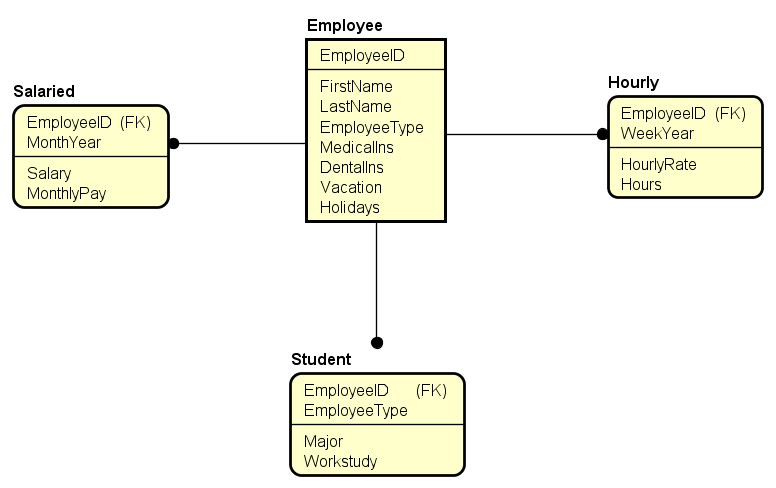
Your participation involves creating an employee database and tables from MySQL workbench. You will use this database in Assignment #9 to update, delete and select data into Java from MySQL.
Once you have installed MySQL and MySQL workbench, login to your MYSQL DBMS through the MySQL workbench interface. Create your database emp to hold the employee payroll information.
Click on the database, so it is in scope and create the 4 database tables with all columns, data types, primary keys and foreign keys. You should create the data structures for all of the 4 tables in the attached physical ERD.
Once the tables/indexes are in the DB, create the following 7 insert statements to populate all 4 tables. NOTE: You must insert the rows in the proper order based on the referential integrity of the primary and foreign keys. If you try to insert out of order, it will display data integrity errors.
2 INSERT statements: Batman data for all of the columns in the employee and hourly tables.
2 INSERT statements: WonderWoman data for all of the columns in the employee and salaried tables.
3 INSERT statements: your data in the employee, student and either the (hourly or salaried) tables.
After you have created the data structures and data, you should save ALL of your work in two separate files:
employeeDDL.sql = data definition sql (e.g. create table, ., )
employeeDML.sql = data manipulation sql (such as INSERT INTO)
Employee EmployeelD Hourly FirstName LastName EmployeeType Medicallns Dentallns Vacation Holidays Salaried EmployeelD (FK) MonthYear EmployeelD (FK) WeekYear Salary MonthlyPay HourlyRate Hours Student EmployeelD (FK) EmployeeType Major Workstudy
Step by Step Solution
There are 3 Steps involved in it

Get step-by-step solutions from verified subject matter experts
 Study Help