







Question: Your program will consist of two files: NumbersMain.java and Numbers.java. These files are described in detail below. When your program is ready for submission, place
 Your program will consist of two files: NumbersMain.java and Numbers.java. These files are described in detail below. When your program is ready for submission, place these two files into a single compressed folder called Assignment6 and uploaditusing the Assignment 6 link on Canvas.Make sure that your code conforms to the conventions covered in class, that is:Indent your code consistently; be consistent with the placement of curly braces. Give meaningful names to methods and variables in your code. Follow Java's naming conventions about the format of ClassNames, methodAndVariableNames, and CONSTANT_NAMES. Localize variables whenever possible --that is, declare them in the smallest scope in which they are needed.
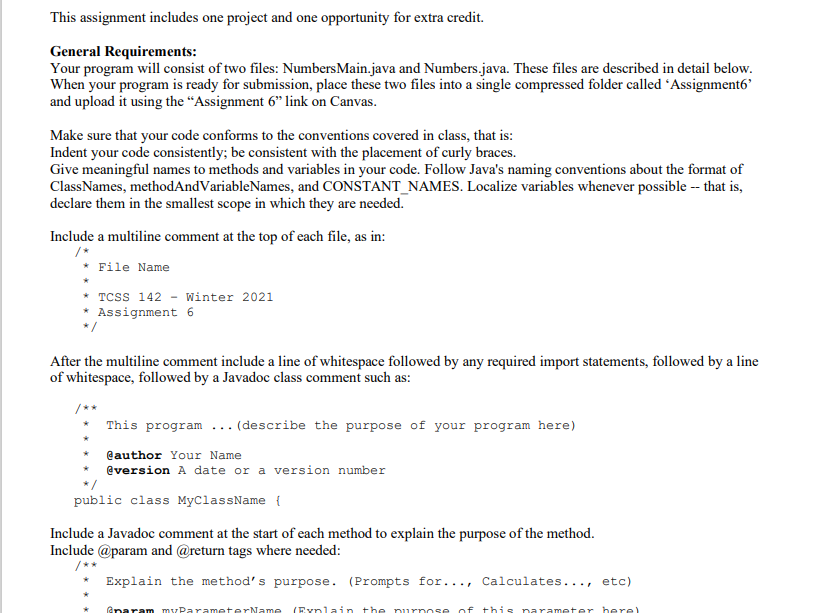
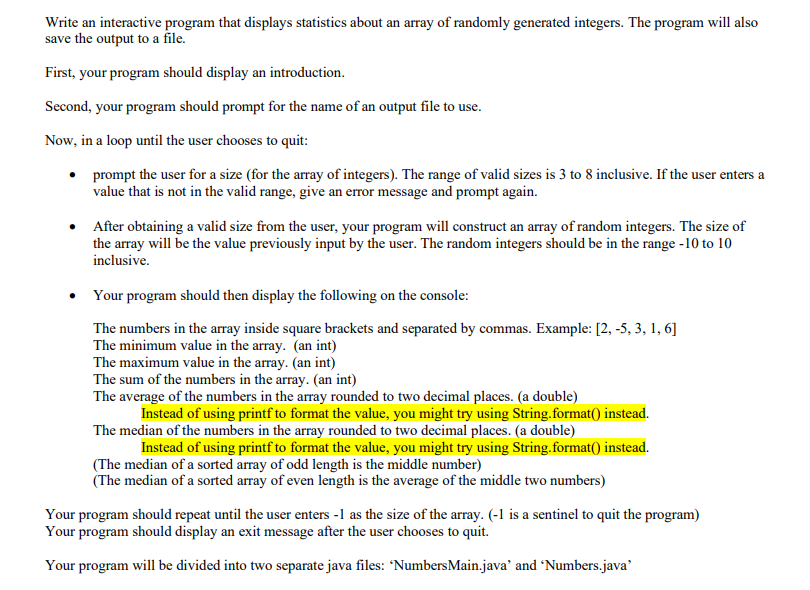
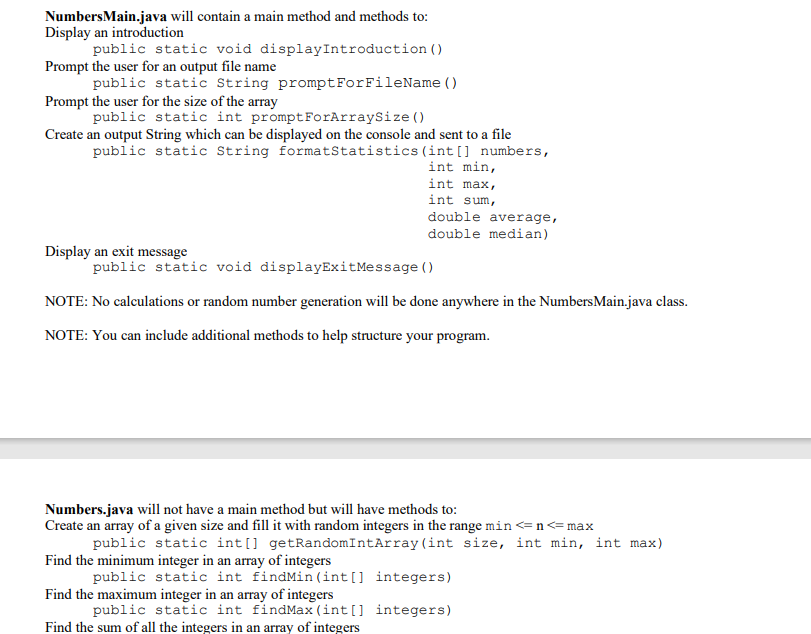
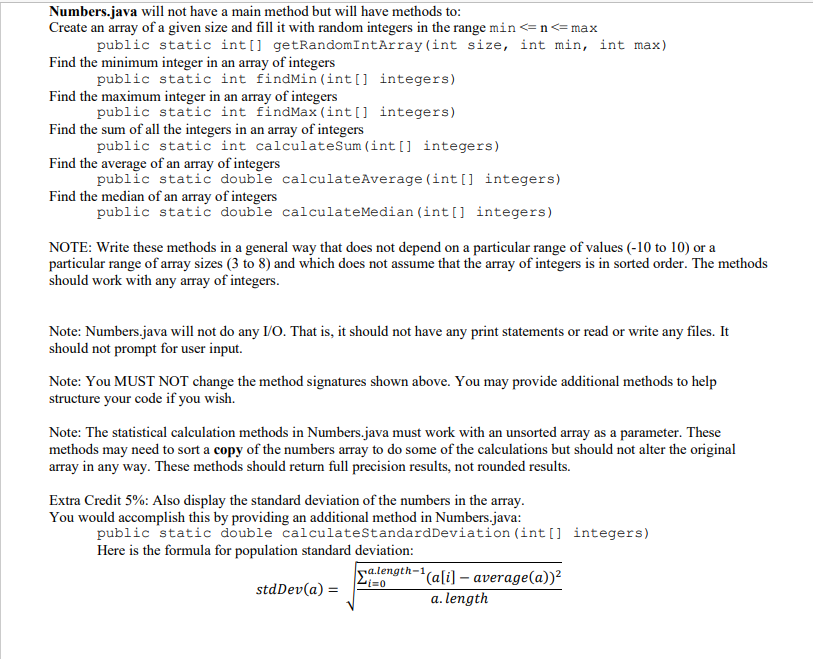
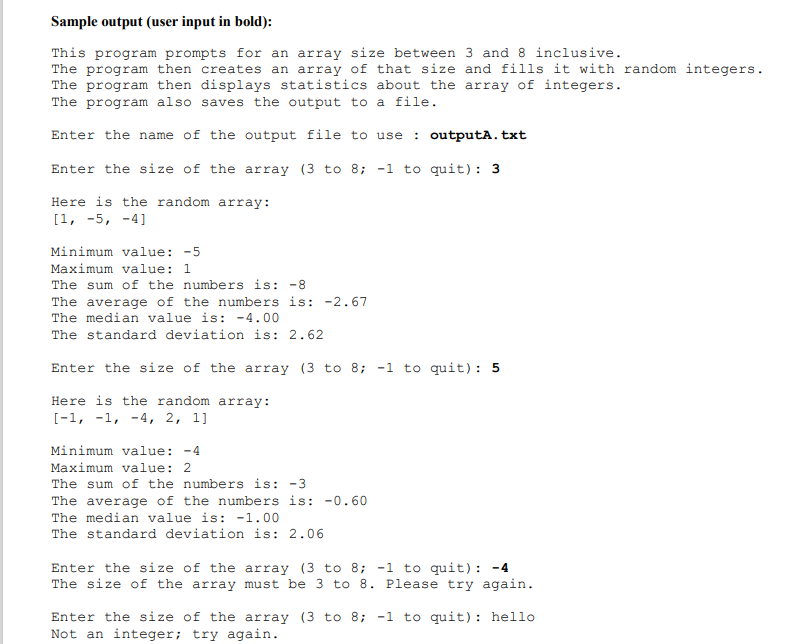
This assignment includes one project and one opportunity for extra credit. General Requirements: Your program will consist of two files: Numbers Main.java and Numbers.java. These files are described in detail below. When your program is ready for submission, place these two files into a single compressed folder called Assignment' and upload it using the Assignment 6" link on Canvas. Make sure that your code conforms to the conventions covered in class, that is: Indent your code consistently; be consistent with the placement of curly braces. Give meaningful names to methods and variables in your code. Follow Java's naming conventions about the format of ClassNames, methodAndVariableNames, and CONSTANT_NAMES. Localize variables whenever possible -- that is, declare them in the smallest scope in which they are needed. Include a multiline comment at the top of each file, as in: * File Name * TCSS 142 - Winter 2021 * Assignment 6 */ After the multiline comment include a line of whitespace followed by any required import statements, followed by a line of whitespace, followed by a Javadoc class comment such as: This program ... (describe the purpose of your program here) @author Your Name @version A date or a version number public class MyClassName { Include a Javadoc comment at the start of each method to explain the purpose of the method. Include @param and @return tags where needed: Explain the method's purpose. (Prompts for..., Calculates..., etc) anaram mu ParameterName lain the nurse of this rarameter berel Write an interactive program that displays statistics about an array of randomly generated integers. The program will also save the output to a file. First, your program should display an introduction. Second, your program should prompt for the name of an output file to use. Now, in a loop until the user chooses to quit: prompt the user for a size (for the array of integers). The range of valid sizes is 3 to 8 inclusive. If the user enters a value that is not in the valid range, give an error message and prompt again. After obtaining a valid size from the user, your program will construct an array of random integers. The size of the array will be the value previously input by the user. The random integers should be in the range -10 to 10 inclusive. Your program should then display the following on the console: The numbers in the array inside square brackets and separated by commas. Example: [2,-5, 3, 1, 6] The minimum value in the array. (an int) The maximum value in the array. (an int) The sum of the numbers in the array. (an int) The average of the numbers in the array rounded to two decimal places. (a double) Instead of using printf to format the value, you might try using String.format() instead. The median of the numbers in the array rounded to two decimal places. (a double) Instead of using printf to format the value, you might try using String.format() instead. (The median of a sorted array of odd length is the middle number) (The median of a sorted array of even length is the average of the middle two numbers) Your program should repeat until the user enters - 1 as the size of the array. (-1 is a sentinel to quit the program) Your program should display an exit message after the user chooses to quit. Your program will be divided into two separate java files: Numbers Main.java' and Numbers.java NumbersMain.java will contain a main method and methods to: Display an introduction public static void displayIntroduction () Prompt the user for an output file name public static String prompt ForFileName() Prompt the user for the size of the array public static int promptForArraysize() Create an output String which can be displayed on the console and sent to a file public static String formatStatistics (int[] numbers, int min, int max, int sum, double average, double median) Display an exit message public static void displayExitMessage() NOTE: No calculations or random number generation will be done anywhere in the Numbers Main.java class. NOTE: You can include additional methods to help structure your program. Numbers.java will not have a main method but will have methods to: Create an array of a given size and fill it with random integers in the range min
Step by Step Solution
There are 3 Steps involved in it

Get step-by-step solutions from verified subject matter experts
 Study Help