







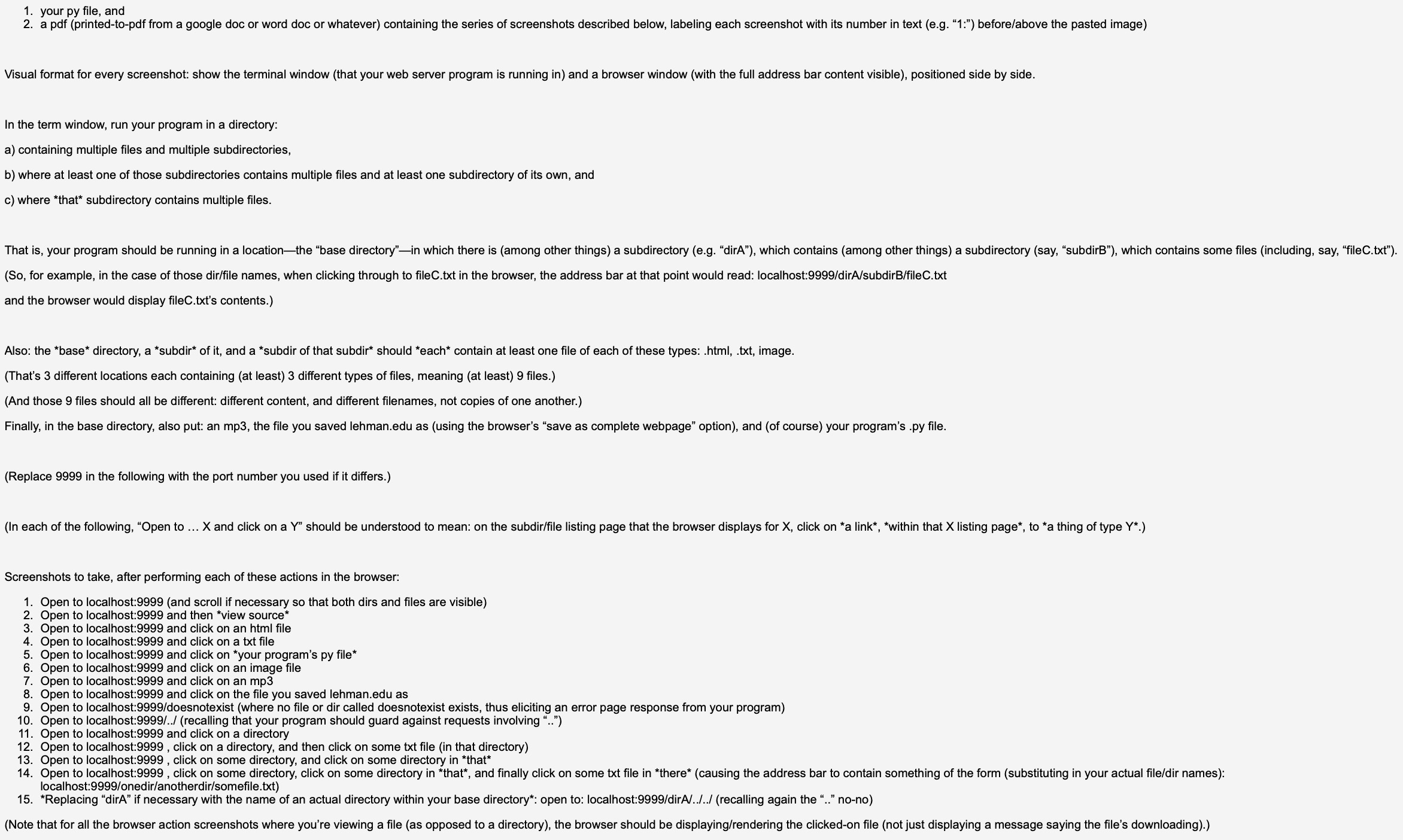
Question: your py file, and a pdf ( printed - to - pdf from a google doc or word doc or whatever ) containing the series
your py file, and
a pdf printedtopdf from a google doc or word doc or whatever containing the series of screenshots described below, labeling each screenshot with its number in text eg: beforeabove the pasted image
Visual format for every screenshot: show the terminal window that your web server program is running in and a browser window with the full address bar content visible positioned side by side.
In the term window, run your program in a directory:
a containing multiple files and multiple subdirectories,
b where at least one of those subdirectories contains multiple files and at least one subdirectory of its own, and
c where that subdirectory contains multiple files. So for example, in the case of those dirfile names, when clicking through to fileC.txt in the browser, the address bar at that point would read: localhost:dirAsubdirBfileCtxt and the browser would display fileC.txts contents.
Also: the "base" directory, a "subdir of it and a "subdir of that subdir should contain at least one file of each of these types: htmltxt image.
Thats different locations each containing at least different types of files, meaning at least files.
And those files should all be different: different content, and different filenames, not copies of one another.
Finally, in the base directory, also put: an mp the file you saved
lehman.edu as using the browser's "save as complete webpage" option and of course your program's py file.
Replace in the following with the port number you used if it differs.
In each of the following, "Open to and click on a should be understood to mean: on the subdirfile listing page that the browser displays for click on "within that listing page to a thing of type
Screenshots to take, after performing each of these actions in the browser:
Open to localhost:and scroll if necessary so that both dirs and files are visible
Open to localhost: and then view source
Open to localhost: and click on an tml file
Open to localhost: and click on a txt file
Open to localhost: and click on your program's py file
Open to localhost: and click on an image file
Open to localhost: and click on an mp
Open to localhost: and click on the file you saved
lehman.edu as
Open to localhost:doesnotexist where no file or dir called doesnotexist exists, thus eliciting an error page response from your program
Open to localhost:recalling that your program should guard against requests involving
Open to localhost: and click on a directory
Open to localhost: click on a directory, and then click on some txt file in that directory
Open to localhost: click on some directory, and click on some directory in localhost:onediranotherdirsomefiletxt
"Replacing "dirA" if necessary with the name of an actual directory within your base directory": open to: localhost:dirArecalling again the nono
Step by Step Solution
There are 3 Steps involved in it
1 Expert Approved Answer
Step: 1 Unlock

Question Has Been Solved by an Expert!
Get step-by-step solutions from verified subject matter experts
Step: 2 Unlock
Step: 3 Unlock
 Study Help