







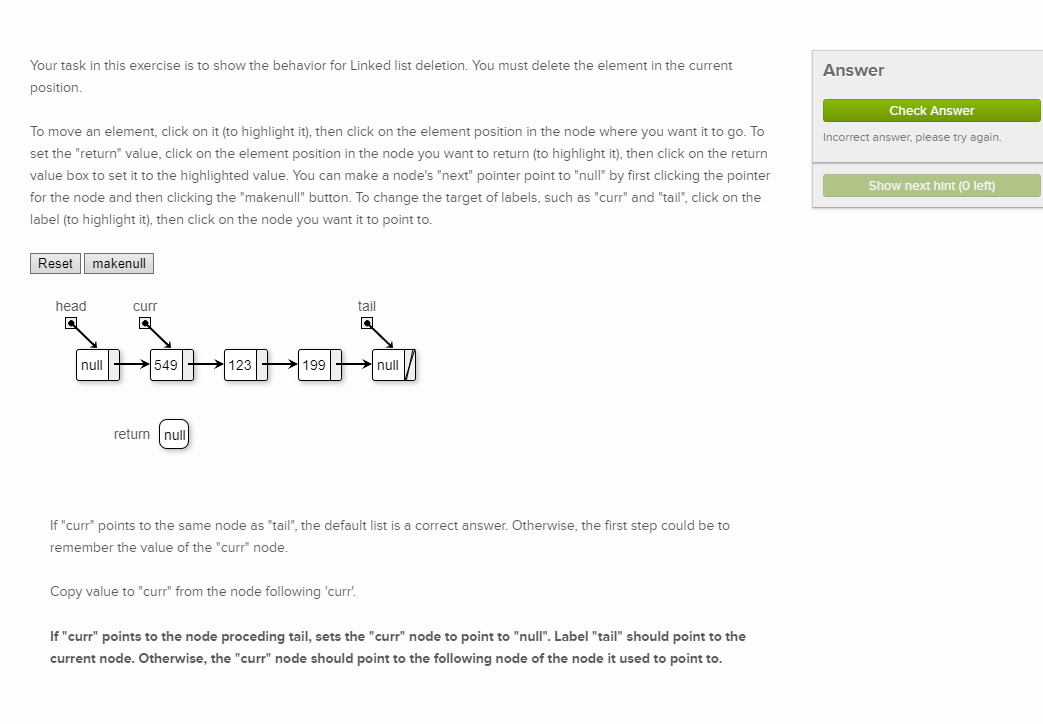
Question: Your task in this exercise is to show the behavior for Linked list deletion. You must delete the element in the current position. To move
Your task in this exercise is to show the behavior for Linked list deletion. You must delete the element in the current
position.
To move an element, click on it to highlight it then click on the element position in the node where you want it to go To
set the "return" value, click on the element position in the node you want to return to highlight it then click on the return
value box to set it to the highlighted value. You can make a node's "next" pointer point to "null" by first clicking the pointer
for the node and then clicking the "makenull" button. To change the target of labels, such as "curr" and "tail", click on the
label to highlight it then click on the node you want it to point to
Reset
Answer
Check Answer
Incorrect answer, please try again.
Show next hint left
If "curr" points to the same node as "tail", the default list is a correct answer. Otherwise, the first step could be to
remember the value of the "curr" node.
Copy value to "curr" from the node following 'curr'.
If "curr" points to the node proceding tail, sets the "curr" node to point to "null". Label "tail" should point to the
current node. Otherwise, the "curr" node should point to the following node of the node it used to point to Your task in this exercise is to show the behavior for Linked list deletion. You must delete the element in the current position.
To move an element, click on it to highlight it then click on the element position in the node where you want it to go To set the "return" value, click on the element position in the node you want to return to highlight it then click on the return value box to set it to the highlighted value. You can make a node's "next" pointer point to "null" by first clicking the pointer for the node and then clicking the "makenull" button. To change the target of labels, such as "curr" and "tail", click on the label to highlight it then click on the node you want it to point to
Step by Step Solution
There are 3 Steps involved in it
1 Expert Approved Answer
Step: 1 Unlock

Question Has Been Solved by an Expert!
Get step-by-step solutions from verified subject matter experts
Step: 2 Unlock
Step: 3 Unlock
 Study Help