







Question: You're given a orders table and the columns in the orders table are shown below: INPUT TABLE begin{tabular}{|l|} hline orders Order_Id INT Type
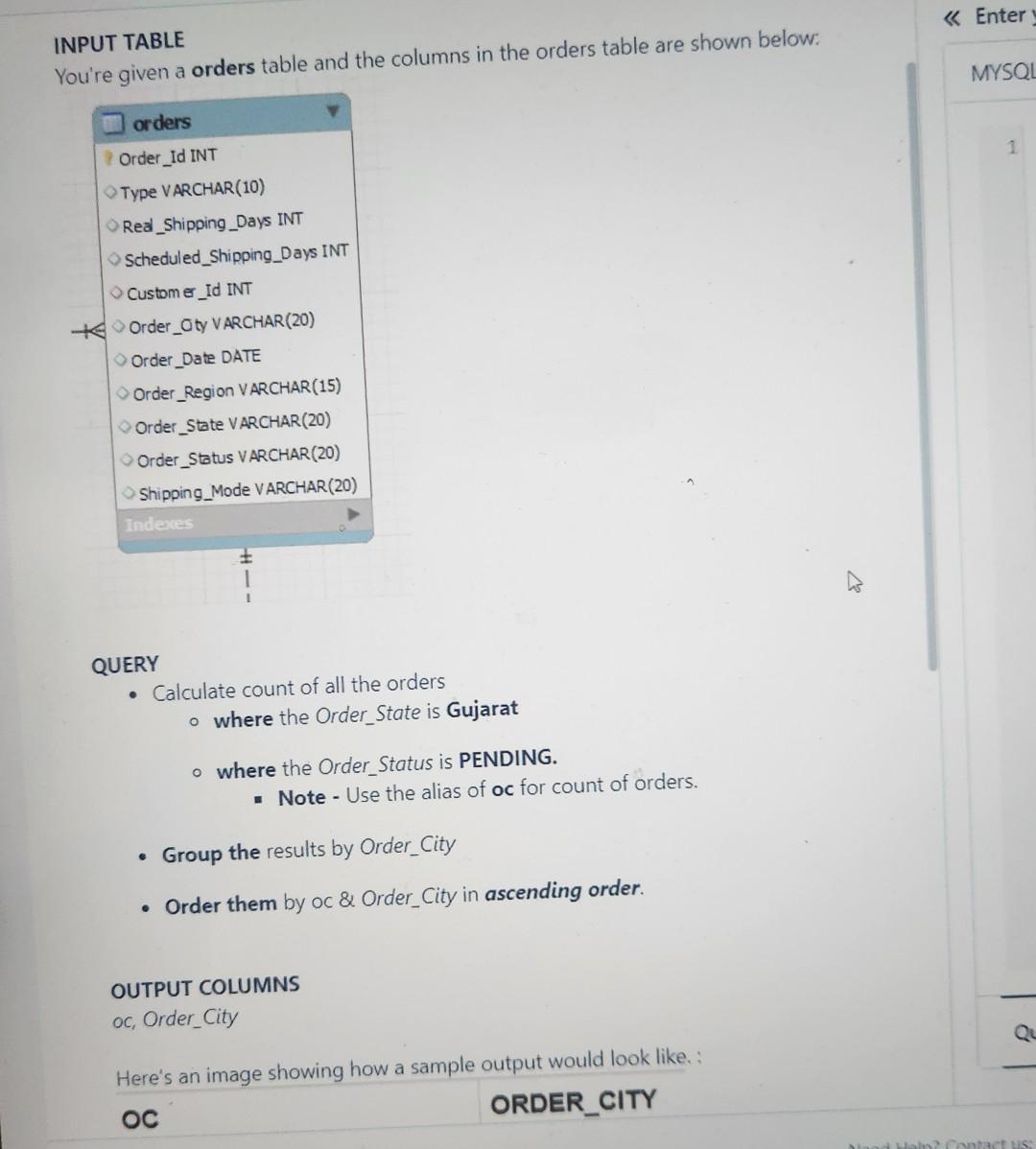
You're given a orders table and the columns in the orders table are shown below: INPUT TABLE \begin{tabular}{|l|} \hline orders \\ Order_Id INT \\ Type VARCHAR(10) \\ Red_Shipping_Days INT \\ Scheduled_Shipping_Days INT \\ Custom__Id INT \\ Order_oty VARCHAR(20) \\ Order_Date DATE \\ Order_Region VARCHAR(15) \\ Order_State VARCHAR(20) \\ Order_Status VARCHAR(20) \\ Shipping_Mode VARCHAR(20) \\ Indec__ \\ \hline \end{tabular} QUERY - Calculate count of all the orders - where the Order_State is Gujarat where the Order_Status is PENDING. - Note - Use the alias of oc for count of orders. - Group the results by Order_City - Order them by oc \& Order_City in ascending order
Step by Step Solution
There are 3 Steps involved in it

Get step-by-step solutions from verified subject matter experts
 Study Help