



Question: Youve been tasked to create a crossword puzzle web page. The first step is to create the layout of the crossword puzzle table, including the
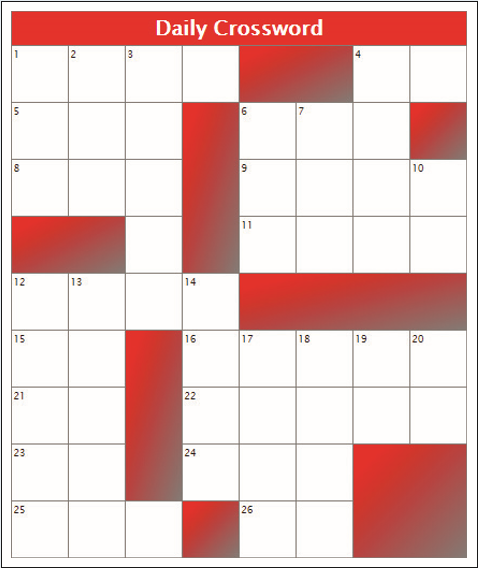
Youve been tasked to create a crossword puzzle web page. The first step is to create the layout of the crossword puzzle table, including the numbering of the clues and the shading of the blank spaces. Figure 649 shows a preview of the completed table.
Within the page body insert a table element and add a table header row group containing one row. Within that row insert a table heading cell that spans 8 columns and contains the text Daily Crossword.
Add the table body section and within the table body, create the layout of the crossword puzzle subject to the following conditions:
The table will contain 9 rows and 8 columns.
Within each row will be a number of table data cells. If the cell is a blank cell shown in Figure 649, assign it the class name blank. If a blank cell covers multiple rows and/or columns, make that cell a spanning cell and adjust the number of cells in subsequent rows and columns accordingly to preserve the table layout.
Several cells contain numbers that will be used as crossword puzzle clues. Number the appropriate cells from 1 up to 26 to match the layout in Figure 649.
Open code6-2_table.css and create the following style rules for the indicated elements:
For the table element: Add a 20 pixel margin around the table and collapse the table borders.
For the th element nested within the table row of the table header row group: Set the font color to white, the background color to red, and the font size to 1.5em. Add a 1 pixel solid gray border around the element.
For every td element: Set the width and height to 50 pixels, the font size to 0.7em, the border to a 1 pixel solid gray, and align the text with the top-left corner of the cell.
For every td element of the blank class: Change the background to a linear gradient going toward the bottom-right corner of the element and transitioning from red to gray.
Daily Crossword Daily Crossword
Step by Step Solution
There are 3 Steps involved in it

Get step-by-step solutions from verified subject matter experts