







Question: = zyBooks My library CSE 102. Algorithmic Thinking and Programming home > > ? Help/FAQ e Jonathan Pataq e zyBooks catalog 3.14: REQUIRED LAB 3D:
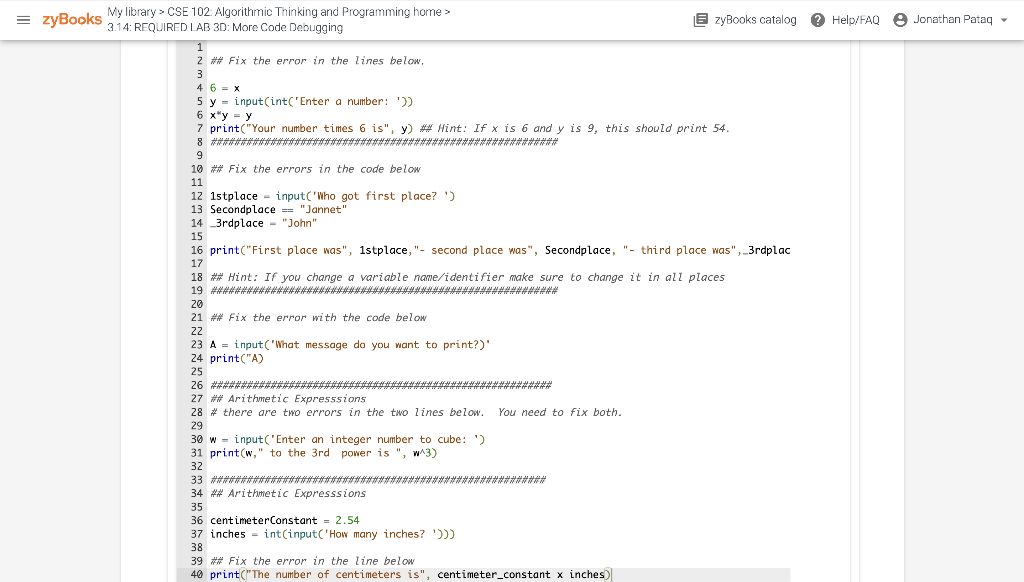
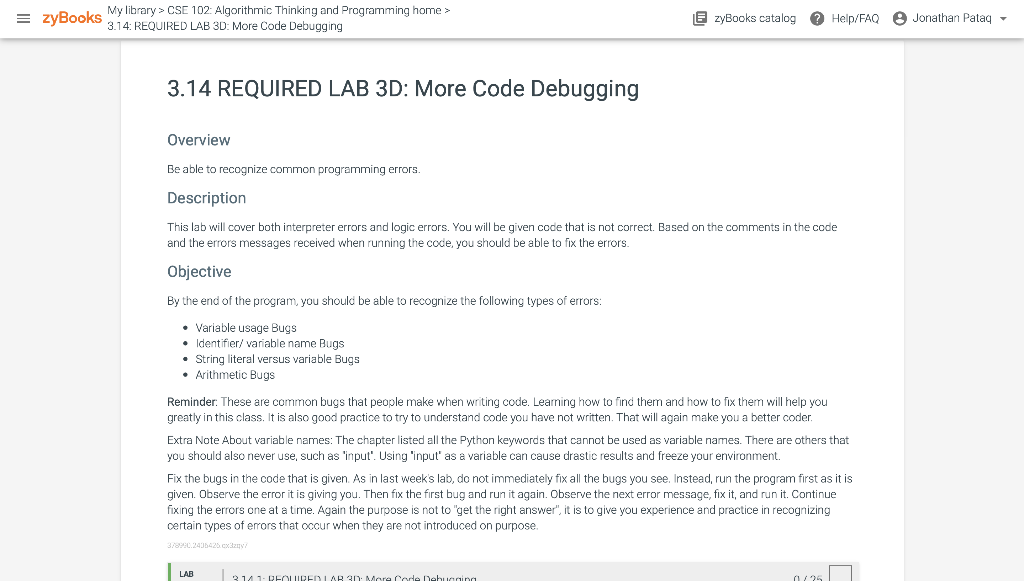
= zyBooks My library CSE 102. Algorithmic Thinking and Programming home > > ? Help/FAQ e Jonathan Pataq e zyBooks catalog 3.14: REQUIRED LAB 3D: More Code Debugging 1 2 ## Fix the error in the lines below, 3 4 6 = x 5 y = input(int('Enter a number: ')) 6 x y = y * 7 print("Your number times 6 is", y) ## Hint: If x is 6 and y is 9, this should print 54. 8 ###**************************************************** 9 10 ## Fix the errors in the code below 11 12 1stplace - input('Who got first place?') 13 Secondplace == "Jannet" 14_3rdplace - "John" - "" 15 16 print("First place was", 1stplace, "- second place was", Secondplace, "- third place was", _3rdplac , , 17 18 ## Hint: If you change a variable name/identifier make sure to change it in all places 19 **************************WWWWWWWWWWWWWWWWWWWWWWWWW***** 20 21 ** Fix the error with the code below 22 23 A = input('What message do you want to print?)' 24 print("A) 25 26 ******************* ***************** 27 ## Arithmetic Expressions 28 # there are two errors in the two lines below. You need to fix both. . 29 30 w - input('Enter an integer number to cube: ') 31 print(w," to the 3rd power is ", W13) 32 33 **************** ###################### 34 ** Arithmetic Expressions 35 36 centimeterConstant = 2.54 37 inches = int(input('How many inches? ')))) 38 39 ** Fix the error in the line below 40 print("The number of centimeters is", centimeter_constant x inches) = zyBooks My library > CSE 102: Algorithmic Thinking and Programming home > 3.14: REQUIRED LAB 3D: More Code Debugging EzyBooks catalog Help/FAQ Jonathan Pataq 3.14 REQUIRED LAB 3D: More Code Debugging Overview Be able to recognize common programming errors. Description This lab will cover both interpreter errors and logic errors. You will be given code that is not correct. Based on the comments in the code and the errors messages received when running the code, you should be able to fix the errors. Objective By the end of the program, you should be able to recognize the following types of errors: Variable usage Bugs Identifier/ variable name Bugs String literal versus variable Bugs Arithmetic Bugs Reminder: These are common bugs that people make when writing code. Learning how to find them and how to fix them will help you greatly in this class. It is also good practice to try to understand oode you have not written. That will again make you a better coder. Extra Note About variable names: The chapter listed all the Python keywords that cannot be used as variable names. There are others that you should also never use, such as 'input'. Using 'input' as a variable can cause drastic results and freeze your environment. Fix the bugs in the code that is given. As in last week's lab, do not immediately fix all the bugs you see. Instead, run the program first as it is given. Observe the error it is giving you. Then fix the first bug and run it again. Observe the next error message, fix it, and run it. Continue fixing the errors one at a time. Again the purpose is not to get the right answer", it is to give you experience and practice in recognizing certain types of errors that occur when they are not introduced on purpose 378230.2436426x2 LAB 3142 nina
Step by Step Solution
There are 3 Steps involved in it

Get step-by-step solutions from verified subject matter experts
 Study Help