







Question: 4. Excel steps for hypothesis testing for the Owens Lawn Care example are as follows: a. In an Excel spreadsheet, enter Welles in cell A3,
4. Excel steps for hypothesis testing for the Owens Lawn Care example are as follows:
a. In an Excel spreadsheet, enter Welles in cell A3, and Atkins in cell B3. Then enter the data for Welles starting in cell A4 and the data for Atkins starting in cell B4. This is the data input.
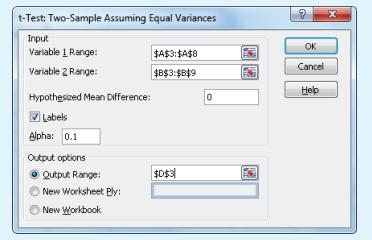
b. Select Data Analysis and t-Test: Two-Sample Assuming Equal Variances. Click OK.
c. For Input select A3:A8 as the input range for Variable 1 Range and B3:B9 as the input range for Variable 2 Range.
d. Enter 0 as the Hypothesized Mean Difference, check the Labels box, enter 0.1 for Alpha and D3 for the Output Range.
e. Click OK. The p-value (0.5245) is part of the output. Note: values may be slightly different due to rounding
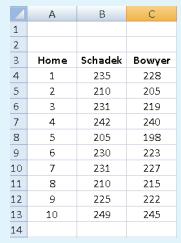
For the Nickel Savings and Loan example, enter the data as shown below:
t-Test: Two-Sample Assuming Equal Variances Input Variable 1 Range: Variable 2 Range: Hypothesized Mean Difference: Labels Alpha: 0.1 Output options Qutput Range: New Worksheet Ply: New Workbook OK $A$3:$A$8 Cancel $B$3:$B$9 Help 0 $0$3 x
Step by Step Solution
There are 3 Steps involved in it

Get step-by-step solutions from verified subject matter experts
 Study Help