







Question: Figure 13-31 is an SSD for the use case Check out books in the university library system. Do the following: a. Develop a first-cut sequence
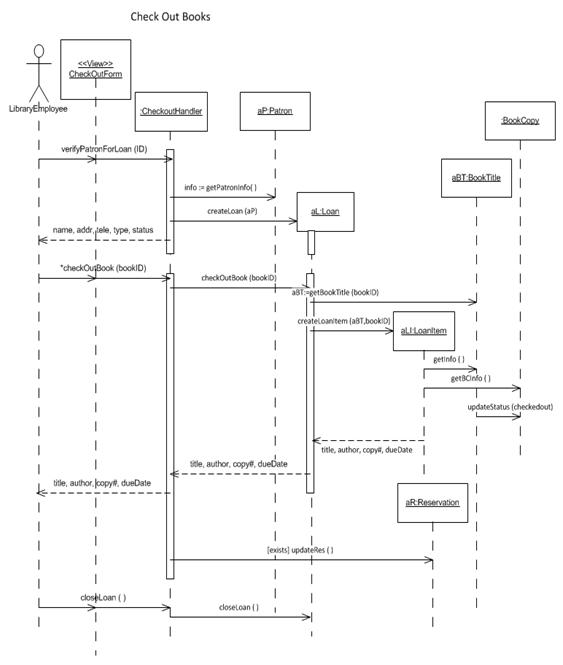
Figure 13-31 is an SSD for the use case Check out books in the university library system. Do the following:
a. Develop a first-cut sequence diagram that only includes the actor and problem domain classes.
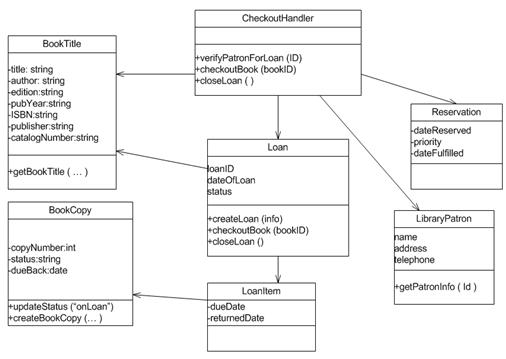
b. Develop a design class diagram based on your solution. Be sure to include your controller class.
University Library System
This case is a simplified version of a new system for the University Library. Of course, the library system must keep track of books. Information is maintained both about book titles and the individual book copies. Book titles maintain information about title, author, publisher, and catalog number. Individual copies maintain copy number, edition, publication year, ISBN, book status (whether it is on the shelf or loaned out), and date due back in.
The library also keeps track of its patrons. Because it is a university library, there are several types of patrons, each with different privileges. There are faculty patrons, graduate student patrons, and undergraduate student patrons. Basic information about all patrons is name, address, and telephone number. For faculty patrons, additional information is office address and telephone number. For graduate students, information such as graduate program and advisor information is maintained. For undergraduate students, program and total credit hours are maintained.
The library also keeps information about library loans. A library loan is a somewhat abstract object. A loan occurs when a patron approaches the circulation desk with a stack of books to check out. Over time a patron can have many loans. A loan can have many physical books associated with it. (And a physical book can be on many loans over a period of time. Information about past loans is kept in the database.) So, in this case, an association class should probably be created for loaned books.
If a patron wants a book that is already checked out, the patron can put that title on reserve. This is another class that does not represent a concrete object. Each reservation is for only one title and one patron. Information such as date reserved, priority, and date fulfilled is maintained. When a book is fulfilled, the system associates it with the loan on which it was checked out.
Patrons have access to the library information to search for book titles and to see whether a book is available. A patron can also reserve a title if all copies are checked out. When patrons bring books to the circulation desk, a clerk checks out the books on a loan. Clerks also check books in. When books are dropped in the return slot, clerks check in the books. Stocking clerks keep track of the arrival of new books.
The managers in the library have their own activities. They will print reports of book titles by category. They also like to see (online) all overdue books. When books get damaged or destroyed, managers delete information about book copies. Managers also like to see what books are on reserve.
Class Diagram and Use Case Diagram for the University Library System.
Check Out Books < > CheckQutForm LibraryEhployee CheckoutHandler aP Patron BookCopy verifyPatronForLoan (ID) aBT BookTitle info getPatroninfol) createloan (aP) al Loan name, addr, ele, type, status *checkOuBook (bookID) checkOutBook (bookiD) a81:agetBookTitle (bookiD) createloanitem (aBT,bookiD) allLoanitem getinfo () getBCinfo () updatestatus (checkedout) title, author, copy, dueDate| Stle, author, copy, dueDate title, author. jcopyt, dueDate aR:Reservation fexists) updateRes ( closeLoan () dloseloan ()
Step by Step Solution
3.42 Rating (155 Votes )
There are 3 Steps involved in it

Get step-by-step solutions from verified subject matter experts
Document Format (2 attachments)

1811_60b8c12188d56_735015.pdf
180 KBs PDF File

1811_60b8c12188d56_735015.docx
120 KBs Word File
 Study Help