







Question: Create the GUI in Fig. 14.1 (you do not have to provide functionality). Figure 14.1 Calculator GUI 4 1 9, 6. 3. 2.
Figure 14.1
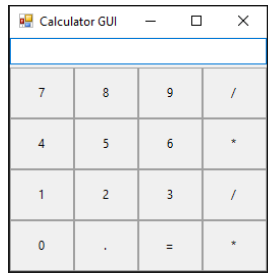
Calculator GUI 4 1 9, 6. 3. 2.
Step by Step Solution
★★★★★
3.53 Rating (170 Votes )
There are 3 Steps involved in it
1 Expert Approved Answer
Step: 1 Unlock

a Set the Forms Text to Calculator GUI b Create a Text ... View full answer
Question Has Been Solved by an Expert!
Get step-by-step solutions from verified subject matter experts
Step: 2 Unlock
Step: 3 Unlock
 Study Help