







Question: In this example we will show how to use all the formulae listed in this chapter and we will demonstrate how to use the Data
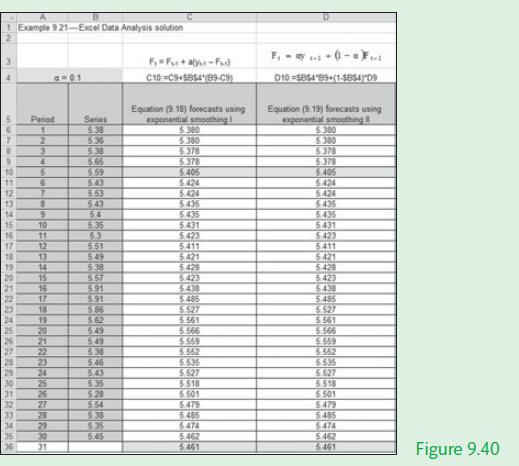
In this example we will show how to use all the formulae listed in this chapter and we will demonstrate how to use the Data Analysis > Exponential Smoothing to undertake the analysis. Figures 9.40 and 9.41 illustrate the Excel solution with a smoothing constant of α = 0.1 using equations (9.18), (9.19), (9.20), and (9.21), and the Excel Data Analysis > Exponential Smoothing solution.
Equations




1 Example 9.21-Excel Data Analysis solution B 6 14 15 16 17 16 19 20 21 22 23 24 25 26 27 28 29 30 31 32 33 34 Period 1 2 3 4 5 9 7 8 6 10 11 12 13 14 15 16 17 18 19 20 21 22 23 24 25 92 27 28 29 LOND 35 30 36 31 Series 5.38 5.65 5.59 5.43 5.53 543 54 5.35 53 5.51 5.49 5.38 5.57 5.91 591 5.86 5.62 5.49 5.49 5.38 5.46 5.43 SC'S 5.28 5.54 5.38 5.35 5:45 C10-C9+$85489-C9) Equation (9.18) forecasts using exponential smoothing 5.300 5.380 5.378 5.378 5.405 5.424 6424 5.435 5.435 5.431 5.423 5.411 5.421 5.428 5.423 5.438 5.485 5.527 5.561 995 9 695 9 5.552 5.535 5.527 6.518 5.501 5.479 5.485 5.474 5.462 5.461 F - ay 1-1- -(-0-1 010-$85489-(1-585409 Equation (9.19) forecasts using exponential smoothing 5.380 5.300 5.378 5.378 5.405 5.424 6.424 SCP'S 5435 5431 5423 5.411 5.421 5.428 5423 5.438 5.485 5.527 1999 5.566 6999 5.552 5535 5.527 5.518 6.501 5479 5485 5474 5.462 5.461 Figure 9.40
Step by Step Solution
3.51 Rating (158 Votes )
There are 3 Steps involved in it
Excel solution x Cell B4 Period Cells A6A36 Series Cells B6B35 Forecast data Cell C6 Cell C7 Forecast data Cell D6 Cell D7 Value Values Values Formula B6 Formula C6B4B6C6 Copy formula down C7C36 Formu... View full answer

Get step-by-step solutions from verified subject matter experts
 Study Help