







Question: Provide a line-by-line explanation for the PostScript code in Figure 4.14. Figure 4.14 % procedure to draw pie slice %arguments graylevel, start angle, finish angle
Figure 4.14
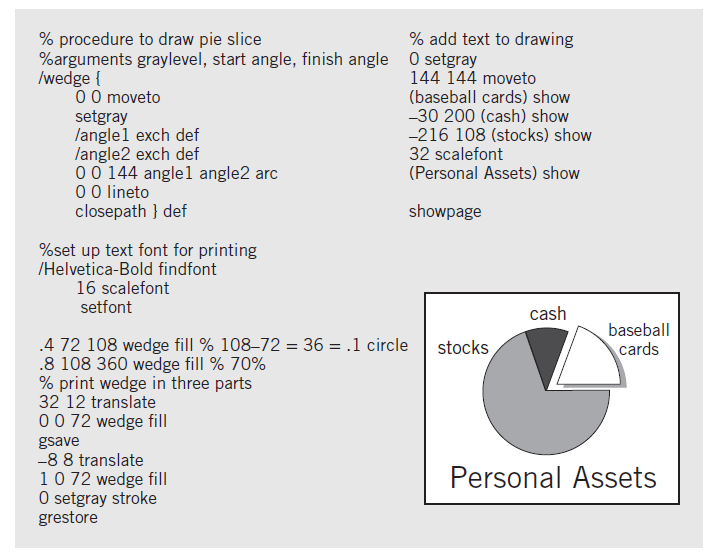
% procedure to draw pie slice %arguments graylevel, start angle, finish angle /wedge { 0 0 moveto setgray langlel exch def langle2 exch def 00 144 anglel angle2 arc 0 0 lineto closepath } def % add text to drawing 0 setgray 144 144 moveto (baseball cards) show -30 200 (cash) show -216 108 (stocks) show 32 scalefont (Personal Assets) show showpage %set up text font for printing /Helvetica-Bold findfont 16 scalefont setfont cash baseball cards .4 72 108 wedge fill % 10872 = 36 = .1 circle .8 108 360 wedge fill % 70% % print wedge in three parts stocks %3D 32 12 translate 00 72 wedge fill gsave -88 translate 10 72 wedge fill O setgray stroke grestore Personal Assets
Step by Step Solution
3.50 Rating (170 Votes )
There are 3 Steps involved in it
wedge def define a procedure named wedge to draw a wedge 0 0 moveto set cursor at xy 00 setgray read... View full answer

Get step-by-step solutions from verified subject matter experts
Document Format (2 attachments)

1806_60b8c1213c3ad_721329.pdf
180 KBs PDF File

1806_60b8c1213c3ad_721329.docx
120 KBs Word File
 Study Help