







Question: Make the following simple changes to Program 16.5: (i) Move the box so that it is behind the sphere, but still visible, (ii) Change the
Make the following simple changes to Program 16.5:
(i) Move the box so that it is behind the sphere, but still visible,
(ii) Change the background color from black to light blue,
(iii) Modify the properties and position of the light source.
Program 16.5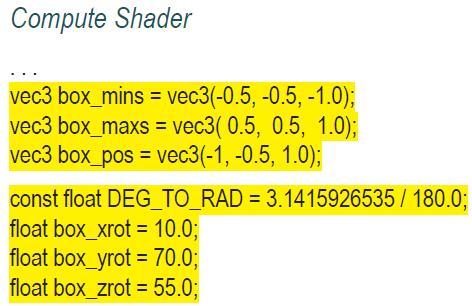
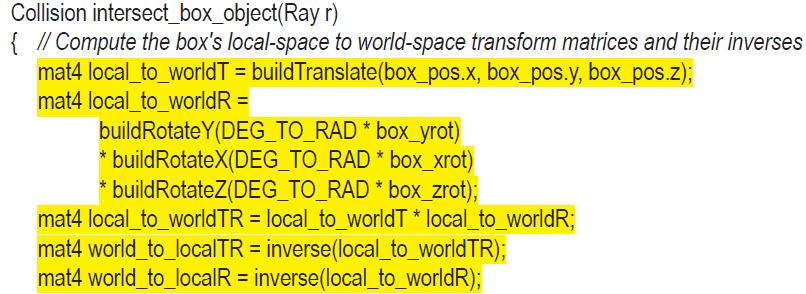
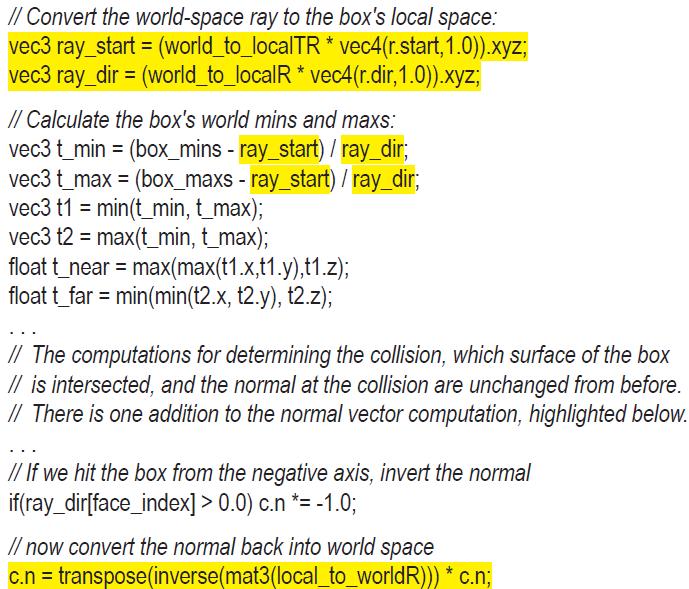
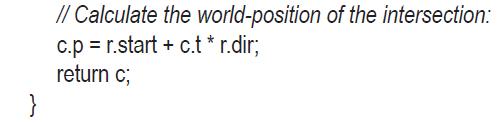
Compute Shader vec3 box_mins = vec3(-0.5, -0.5, -1.0); vec3 box_maxs = vec3( 0.5, 0.5, 1.0); vec3 box_pos = vec3(-1, -0.5, 1.0); const float DEG_TO_RAD = 3.1415926535/ 180.0; float box_xrot = 10.0; float box_yrot = 70.0; float box_zrot = 55.0;
Step by Step Solution
★★★★★
3.38 Rating (148 Votes )
There are 3 Steps involved in it
1 Expert Approved Answer
Step: 1 Unlock

Question Has Been Solved by an Expert!
Get step-by-step solutions from verified subject matter experts
Step: 2 Unlock
Step: 3 Unlock
 Study Help