







Question: Modify Program 14.2 to gradually decrease the alpha value of an object, causing it to progressively fade out and eventually disappear. Program 14.2 JOGL/Java application
Modify Program 14.2 to gradually decrease the alpha value of an object, causing it to progressively fade out and eventually disappear.
Program 14.2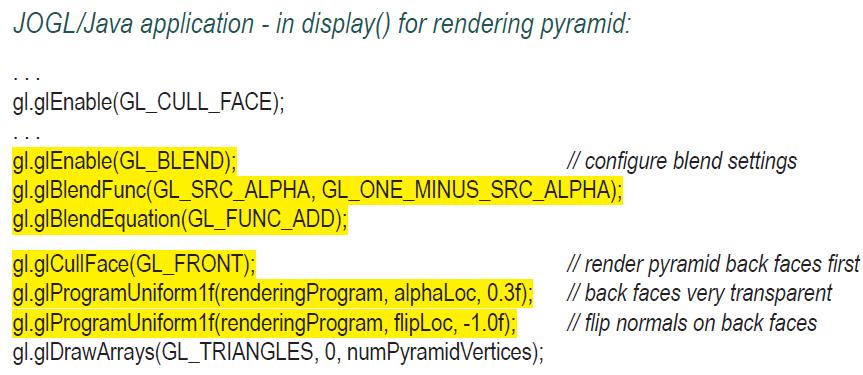
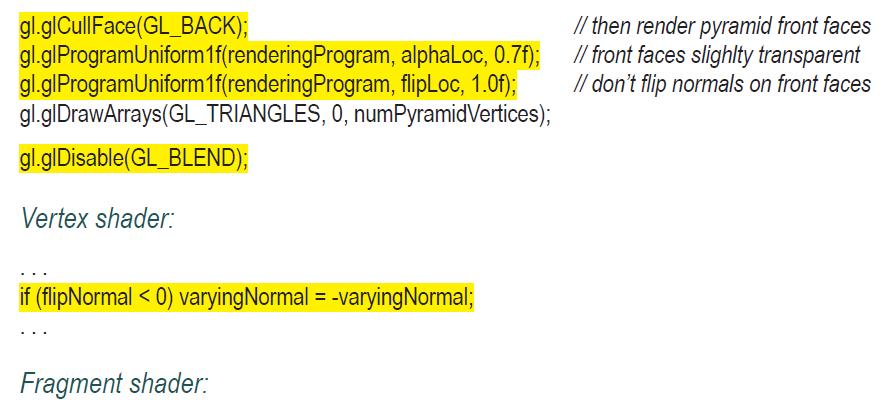

JOGL/Java application - in display() for rendering pyramid: gl.glEnable(GL_CULL_FACE); gl.glEnable(GL_BLEND); gl.glBlendFunc(GL_SRC_ALPHA, GL_ONE_MINUS_SRC_ALPHA); gl.glBlendEquation (GL_FUNC_ADD); gl.glCullFace(GL_FRONT); gl.glProgramUniform1f(rendering Program, alphaLoc, 0.3f); Program, flipLoc, -1.0f); gl.glProgramUniform1f(rendering gl.glDrawArrays(GL_TRIANGLES, 0, numPyramidVertices); // configure blend settings // render pyramid back faces first // back faces very transparent // flip normals on back faces
Step by Step Solution
3.36 Rating (162 Votes )
There are 3 Steps involved in it

Get step-by-step solutions from verified subject matter experts
 Study Help