







Question: Modify Program 14.9 to incorporate the zooming, smoothing, turbulence, and logistic steps described in prior sections. Observe the changes in the resulting dissolve effect. Program
Modify Program 14.9 to incorporate the zooming, smoothing, turbulence, and logistic steps described in prior sections. Observe the changes in the resulting dissolve effect.
Program 14.9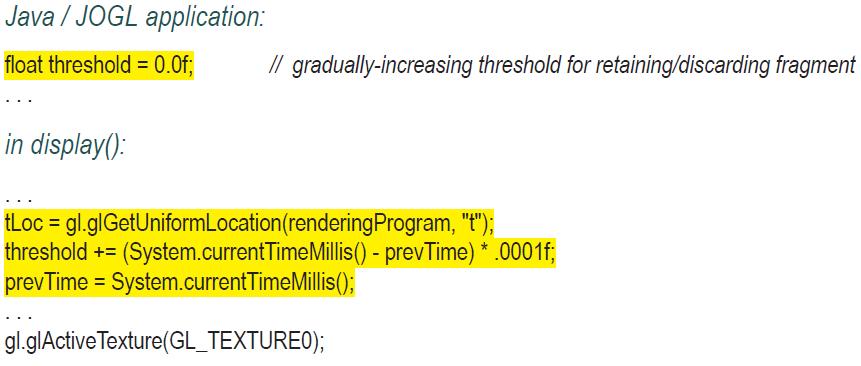
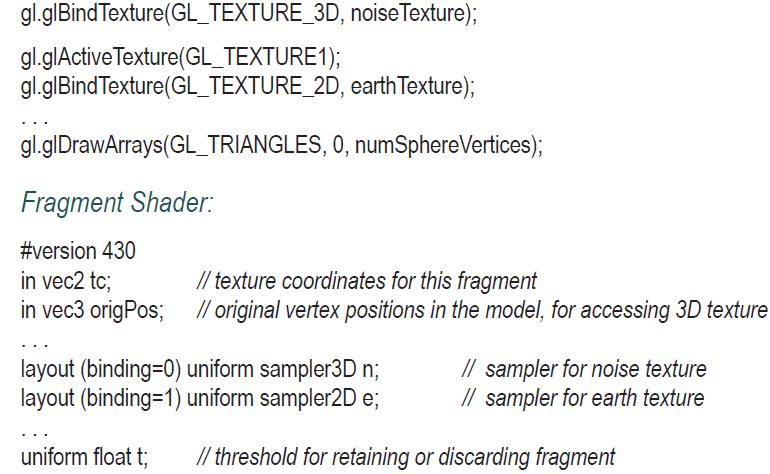
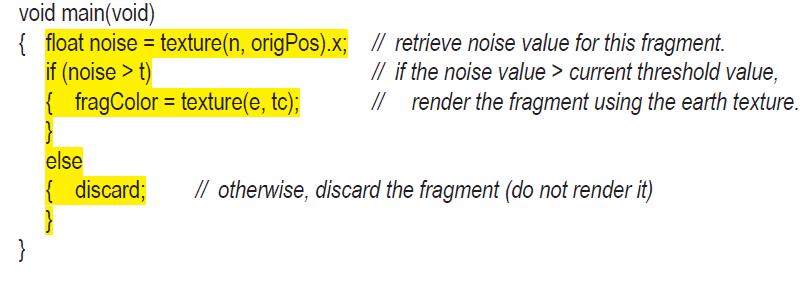
Java/JOGL application: float threshold = 0.0f; // gradually-increasing threshold for retaining/discarding fragment in display(): tLoc = gl.glGetUniformLocation (renderingProgram, "t"); threshold += (System.current TimeMillis() - prevTime) *.0001f; prevTime System.currentTimeMillis(); = gl.glActive Texture(GL_TEXTUREO);
Step by Step Solution
★★★★★
3.52 Rating (152 Votes )
There are 3 Steps involved in it
1 Expert Approved Answer
Step: 1 Unlock

Question Has Been Solved by an Expert!
Get step-by-step solutions from verified subject matter experts
Step: 2 Unlock
Step: 3 Unlock
 Study Help