







Question: Modify Program 2.5 so that the vertex shader includes one of the buildRotate() functions from Program 3.1 and applies it to the points comprising the
Modify Program 2.5 so that the vertex shader includes one of the buildRotate() functions from Program 3.1 and applies it to the points comprising the triangle. This should cause the triangle to be rotated from its original orientation. You don’t need to animate the rotation.
Program 2.5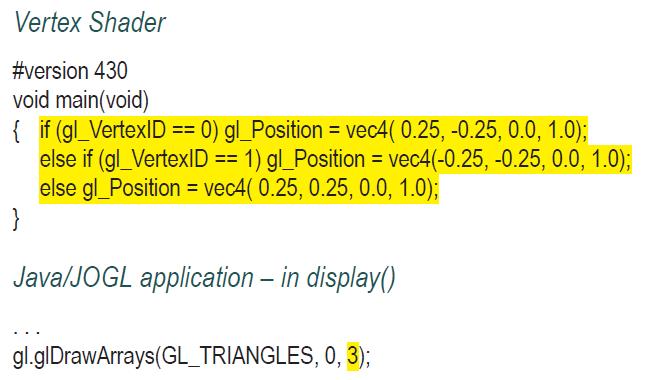
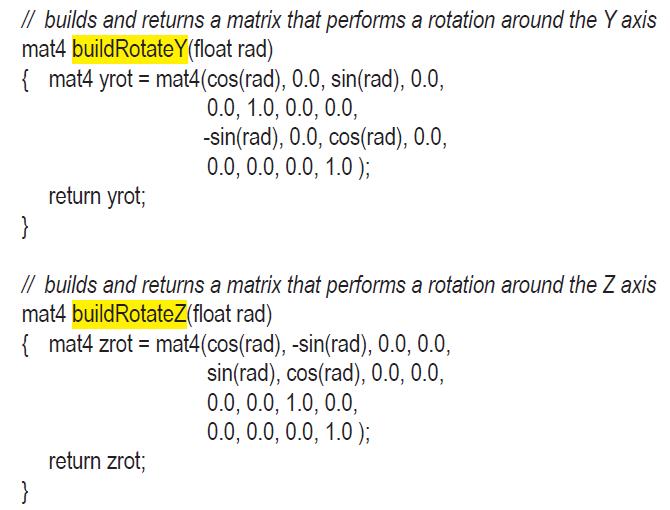
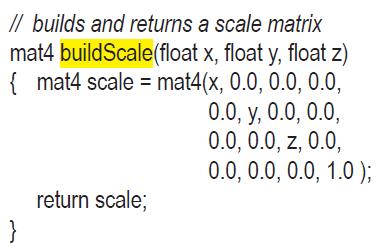
Program 3.1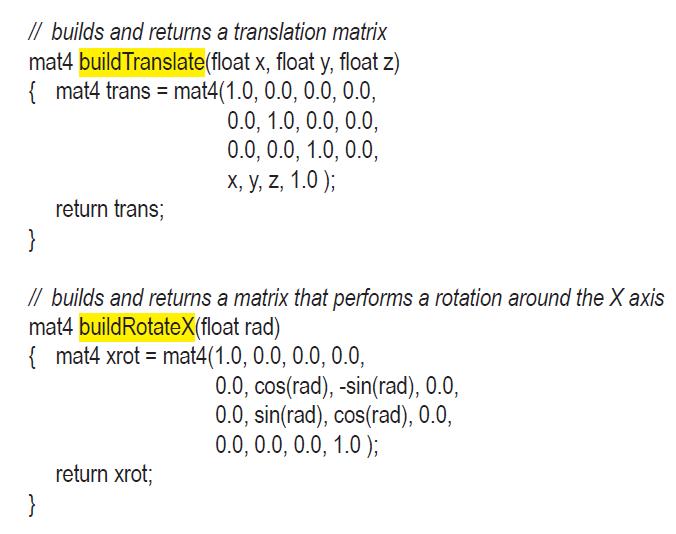
Vertex Shader #version 430 void main(void) { if (gl_VertexID == 0) gl_Position = vec4( 0.25, -0.25, 0.0, 1.0); else if (gl_VertexID == 1) gl_Position vec4(-0.25, -0.25, 0.0, 1.0); else gl_Position = vec4(0.25, 0.25, 0.0, 1.0); = } Java/JOGL application - in display() gl.glDrawArrays(GL_TRIANGLES, 0, 3);
Step by Step Solution
3.39 Rating (158 Votes )
There are 3 Steps involved in it
To modify the vertex shader from Program 25 to include a rotation using the buildRotateZ function fr... View full answer

Get step-by-step solutions from verified subject matter experts
 Study Help