







Question: Modify Program 2.5 to include the error-checking modules shown in Program 2.3. After you have that working, try inserting various errors into the shaders and
Modify Program 2.5 to include the error-checking modules shown in Program 2.3. After you have that working, try inserting various errors into the shaders and observing both the resulting behavior and the error messages generated.
Program 2.3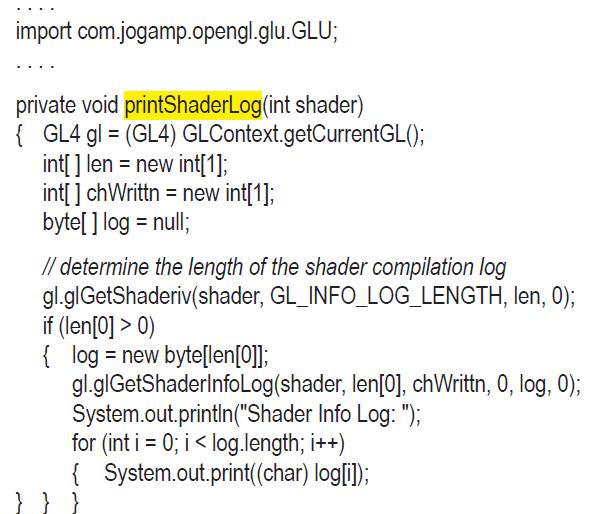
![void printProgramLog(int prog) {GL4 gl= (GL4) int[] len = new int[1]; GLContext.getCurrentGL(); int[]](https://dsd5zvtm8ll6.cloudfront.net/images/question_images/1701/6/6/7/633656d6331ce8fc1701667631949.jpg)
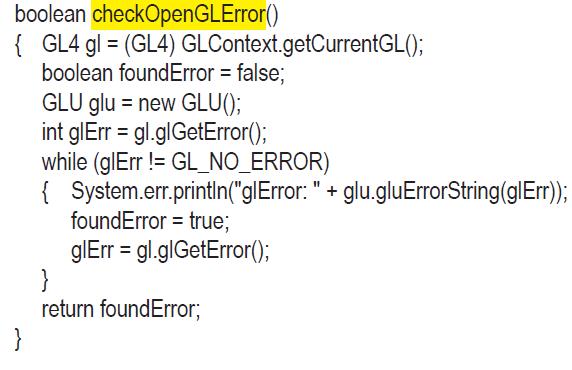
Program 2.5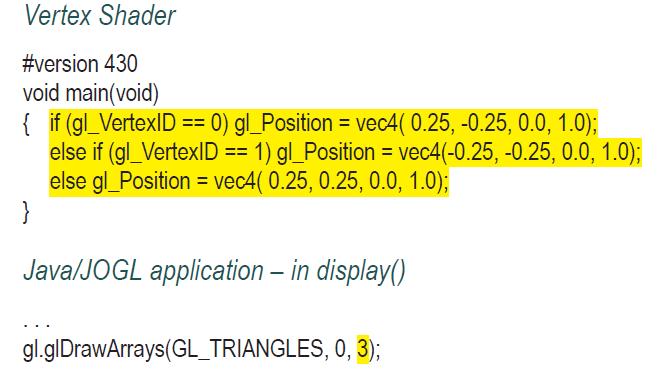
import com.jogamp.opengl.glu.GLU; private void printShaderLog(int shader) { GL4 gl= (GL4) GLContext.getCurrentGL(); int[] len = new int[1]; int[] chWrittn = new int[1]; byte[] log = null; // determine the length of the shader compilation log gl.gl GetShaderiv(shader, GL_INFO_LOG_LENGTH, len, 0); if (len[0] > 0) { log = new byte[len[0]]; gl.glGetShaderInfoLog(shader, len[0], chWrittn, 0, log, 0); System.out.println("Shader Info Log: "); for (int i= 0; i
Step by Step Solution
3.47 Rating (170 Votes )
There are 3 Steps involved in it
Here is the stepbystep breakdown to complete the task of adding errorchecking to Program 25 using the methods from Program 23 Step 1 Add Error Checkin... View full answer

Get step-by-step solutions from verified subject matter experts
 Study Help