







Question: Use the Ch08_AviaCo database shown in Figure P8.35 to work Problems 3546. Modify the MODEL table to add the attribute and insert the values shown
Use the Ch08_AviaCo database shown in Figure P8.35 to work Problems 35–46.
Modify the MODEL table to add the attribute and insert the values shown in the following table.

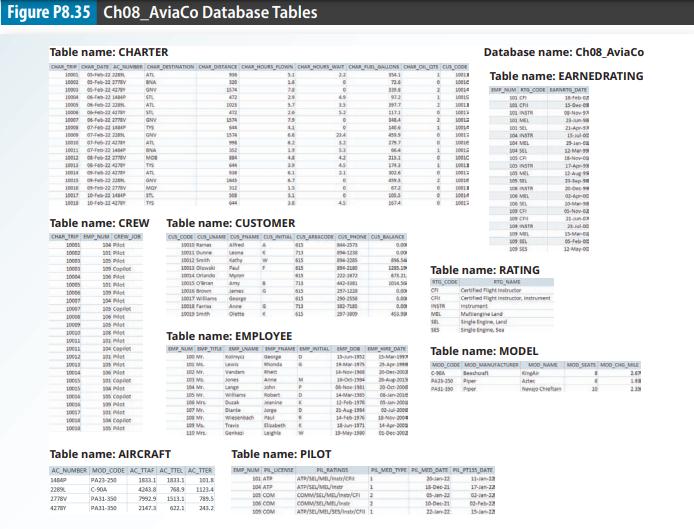
Table P8.35 Attribute and Values for Problem 35 Attribute Name MOD_WAIT_CHG Attribute Description Waiting charge per hour for each model Attribute Type Numeric Attribute Values $100 for C-90A $50 for PA23-250 $75 for PA31-350
Step by Step Solution
3.53 Rating (160 Votes )
There are 3 Steps involved in it
Certainly Here is the full SQL code that includes both the creation of the new attribute MODWAITCHG ... View full answer

Get step-by-step solutions from verified subject matter experts
 Study Help