







Question: Provide a complete program that displays this Hello World message: Note these label characteristics: (1) a raised bevel border, (2) italics, (3) a large font
Provide a complete program that displays this Hello World message:
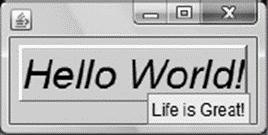
Note these label characteristics:
(1) a raised bevel border,
(2) italics, (3) a large font size (30 points),
(4) a tool tip that says “Life is Great!” Use this program skeleton as a starting point:
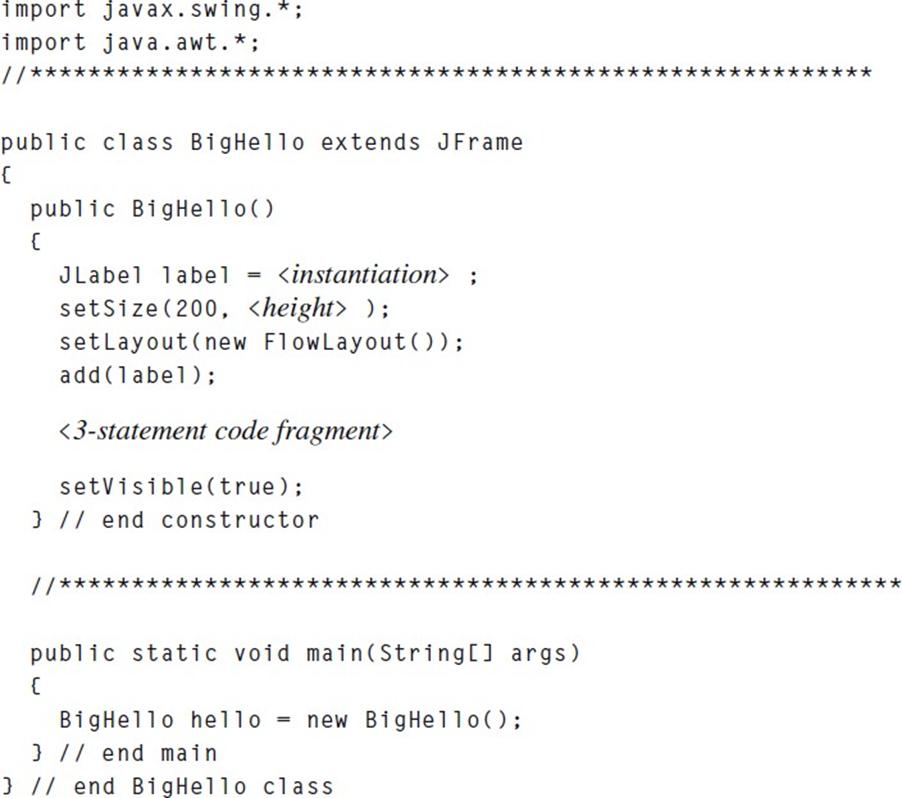
To figure out how to do this, in Java’s API, look up the setFont, setBorder, and setToolTipText methods that JLabel inherits from JComponent. For the setFont argument, use Component’s getFont to get the default font, and then alter it by using Font’s two-parameter deriveFont method in which the first parameter specifies an italic font style and the second parameter specifies a 30-point size. Use JComponent’s setBorder method, and for its Border argument, use the appropriate class method from the BorderFactory class.
X Hello World! Life is Great!
Step by Step Solution
3.43 Rating (156 Votes )
There are 3 Steps involved in it
Based on the provided instructions and program skeleton you want to create a Java Swing application that displays a Hello World message with specific ... View full answer

Get step-by-step solutions from verified subject matter experts
 Study Help