







Question: Based on the dangling-else discussion in Exercise 3.27, modify the following code to produce the output shown. Use proper indentation techniques. You must not make
Based on the dangling-else discussion in Exercise 3.27, modify the following code to produce the output shown. Use proper indentation techniques. You must not make any additional changes other than inserting braces and changing the code’s indentation. We’ve eliminated the indentation from the following code to make the problem more challenging.
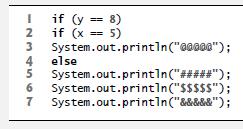
a) Assuming that x = 5 and y = 8, the following output is produced:

b) Assuming that x = 5 and y = 8, the following output is produced:

c) Assuming that x = 5 and y = 8, the following output is produced:

d) Assuming that x = 5 and y = 7, the following output is produced.

Exercise 3.27
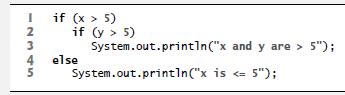
The Java compiler always associates an else with the immediately preceding if unless told to do otherwise by the placement of braces ({ and }). This behavior can lead to what is referred to as the dangling-else problem. The indentation of the nested statement
 5");">
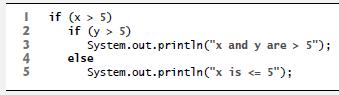
appears to indicate that if x is greater than 5, the nested if statement determines whether y is also greater than 5. If so, the statement outputs the string "x and y are > 5". Otherwise, it appears that if x is not greater than 5, the else part of the if…else outputs the string "x is
 5"); is">
in which the body of the first if is a nested if…else. The outer if statement tests whether x is greater than 5. If so, execution continues by testing whether y is also greater than 5. If the second condition is true, the proper string—"x and y are > 5"—is displayed. However, if the second condition is false, the string "x is Equally bad, if the outer if statement’s condition is false, the inner if…else is skipped and nothing is displayed. For this exercise, add braces to the preceding code snippet to force the nested if…else statement to execute as it was originally intended.
if (y == 8) if (x == 5) System.out.println("00000"); 4 5 System.out.println("#####"); 6 System.out.println("$$$$$"); 7 System.out.println("&&&&&"); I 2 3 else
Step by Step Solution
3.38 Rating (145 Votes )
There are 3 Steps involved in it
PART 1 Proper Braces and Indentation Given the following code if y 8 if x 5 Systemoutprintln else Sy... View full answer

Get step-by-step solutions from verified subject matter experts
 Study Help