







Question: Modify Listing 20.6, MultipleBallApp.java to assign a random radius between 2 and 20 when a ball is created. When the - button is clicked, one
Modify Listing 20.6, MultipleBallApp.java to assign a random radius between 2 and 20 when a ball is created. When the - button is clicked, one of largest balls is removed.
Listing
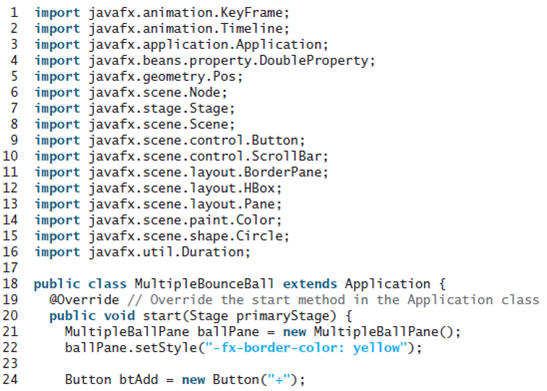
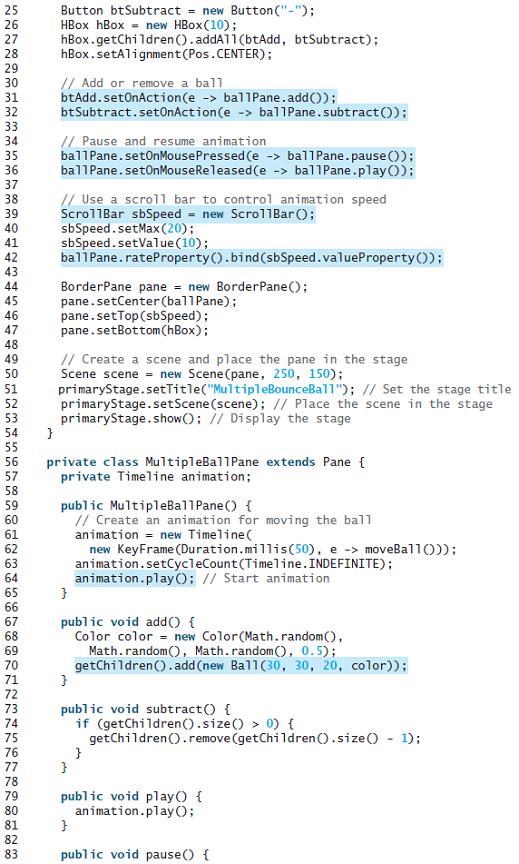
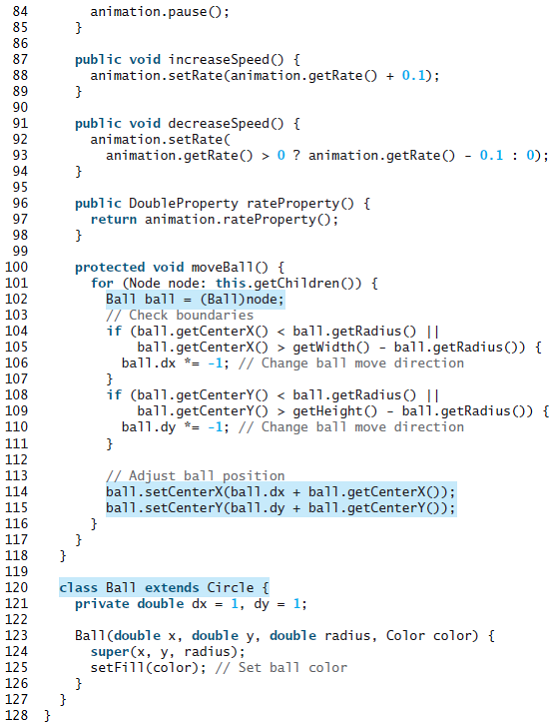
1 import javafx.animation.KeyFrame; 2 import javafx.animation.Timeline; 3 import javafx.application.Application; 4 import javafx.beans.property.DoubleProperty; 5 import javafx.geometry.Pos; 6 import javafx.scene.Node; 7 import javafx.stage.Stage; 8 import javafx.scene.Scene; 9 import javafx.scene.control.Button; 10 import javafx.scene.control.Scrol1Bar; 11 import javafx.scene.layout.BorderPane; 12 import javafx.scene.layout.HBox; 13 import javafx.scene.layout.Pane; 14 import javafx.scene.paint.Color; 15 import javafx.scene.shape.Circle; 16 import javafx.util.Duration; 17 18 public class MultipleBounceBall extends Application { 19 @Override // Override the start method in the Application class 20 public void start(Stage primaryStage) { 21 22 23 24 MultipleBallPane ballPane = new MultipleBallPane(); bal1Pane.setStyle("-fx-border-color: yellow"); Button btAdd = new Button("+"); 25 Button btSubtract = new Button("-"); - new HBox(10)%; hBox.getChildren ().addA11(btAdd, btSubtract); hBox.setAlignment (Pos.CENTER); 26 27 28 29 // Add or remove a ball btAdd.setOnAction(e -> ballPane.add()); btSubtract.set0nAction(e -> ballPane.subtract(0); 30 31 32 33 // Pause and resume animation ballPane.setOnMousePressed (e -> ballPane.pause()); ballPane.setOnMouseReleased(e -> bal1Pane.play()); 34 35 36 37 // Use a scrol1 bar to control animation speed Scrol1Bar sbSpeed = new ScrollBar(); sbSpeed.setMax(20); sbSpeed.setValue (10); ballPane.rateProperty().bind(sbSpeed.valueProperty()); 38 39 40 41 42 43 BorderPane pane = new BorderPane(); pane.setCenter (bal1Pane); pane.setTop(sbSpeed); pane.setBottom (hBox); 44 45 46 47 48 // Create a scene and place the pane in the stage Scene scene = new Scene(pane, 250, 150); primaryStage.setTitle("MultipleBounceBall"); // Set the stage title primaryStage.setScene(scene); // Place the scene in the stage primaryStage.show(); // Display the stage 49 50 51 52 53 54 55 56 private class MultipleBallPane extends Pane { private Timeline animation; 57 58 59 public MultipleBallPane() { // Create an animation for moving the ball animation = new Timeline( new KeyFrame (Duration.millis(50), e -> moveBal10)); animation.setCycleCount(Timeline.INDEFINITE); animation.play(); // Start animation 60 61 62 63 64 65 66 public void add() { Color color = new Color(Math.random(), Math.random(), Math.random(), 0.5); getChildren().add (new Ball(30, 30, 20, color)); 67 68 69 70 71 72 public void subtract() { if (getChildren().size() > 0) { getChildren().remove (getChildren().size() 73 74 75 1); 76 77 78 79 public void play() { animation.play(0; 80 81 82 83 public void pause() {
Step by Step Solution
3.47 Rating (157 Votes )
There are 3 Steps involved in it
Program Plan Step 1 The java program creates the two priority queues these queues are ... View full answer

Get step-by-step solutions from verified subject matter experts
 Study Help