







Question: Revise Programming Exercise 12.16 to replace a string in a file with a new string for all files in the specified directory using the command:java
Revise Programming Exercise 12.16 to replace a string in a file with a new string for all files in the specified directory using the command:java Exercise12_22 dir oldString newString
Listing
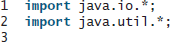
![void main(String[] args) throws Exception { // Check command line parameter usage](https://dsd5zvtm8ll6.cloudfront.net/si.experts.images/questions/2022/11/636a72dd80f76_605636a72dd70bf4.jpg)
import java.io.*; 2 import java.util.*; 4 public class ReplaceText { public static void main(String[] args) throws Exception { // Check command line parameter usage if (args.length != 4) { System.out.printn( "Usage: java ReplaceText sourceFile targetFile oldStr newStr"); System.exit(1); check command usage 8. 10 11 12 13 // Check if source file exists File sourceFile - new File(args[0]); if (!sourceFile.exists()) { System.out.println("Source file " + args[0] + " does not exist"); System.exit(2); 14 15 16 source file exists? 17 18 19 // Check if target file exists File targetFile = new File(args[1]); if (targetFile.exists()) { System.out.printIn("Target file " + args[1] + System.exit(3); 20 21 22 target file exists? already exists"); 23 24 25 26 27 try ( // Create input and output files Scanner input = new Scanner(sourceFile); PrintWriter output = new PrintWriter(targetFile); try-with-resources 28 29 create a Scanner create a PrintWriter 30 31 while (input.hasNext()) { String sl = input.nextline(); String s2 = s1.replaceAl1 (args [2], args[3]); output.println(s2); 32 has next? 33 read a line 34 35 36 37 38 39
Step by Step Solution
3.47 Rating (180 Votes )
There are 3 Steps involved in it
Program plan Import the required packages into the program Create a class Exercise1422 to replace th... View full answer

Get step-by-step solutions from verified subject matter experts
 Study Help