







Question: The following three tables store information on students, assigned exercises, and exercise submission in LiveLab. LiveLab is an automatic grading system for grading programming exercises.
The following three tables store information on students, assigned exercises, and exercise submission in LiveLab. LiveLab is an automatic grading system for grading programming exercises.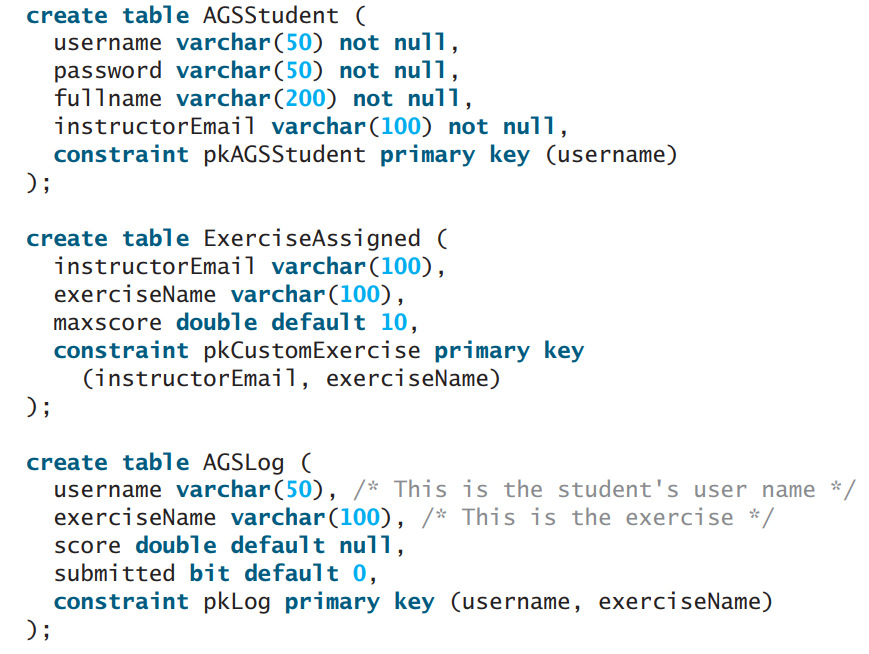
The AGSStudent table stores the student information. The ExerciseAssigned table assigns the exercises by an instructor. The AGSLog table stores the grading results. When a student submits an exercise, a record is stored in the AGSLog table. However, there is no record in AGSLog if a student did not submit the exercise.Write a program that adds a new record for each student and an assigned exercise to the student in the AGSLog table if a student has not submitted the exercise. The record should have 0 on score and submitted. For example, if the tables contain the following data in AGSLog before you run this program, the AGSLog table now contains the new records after the program runs.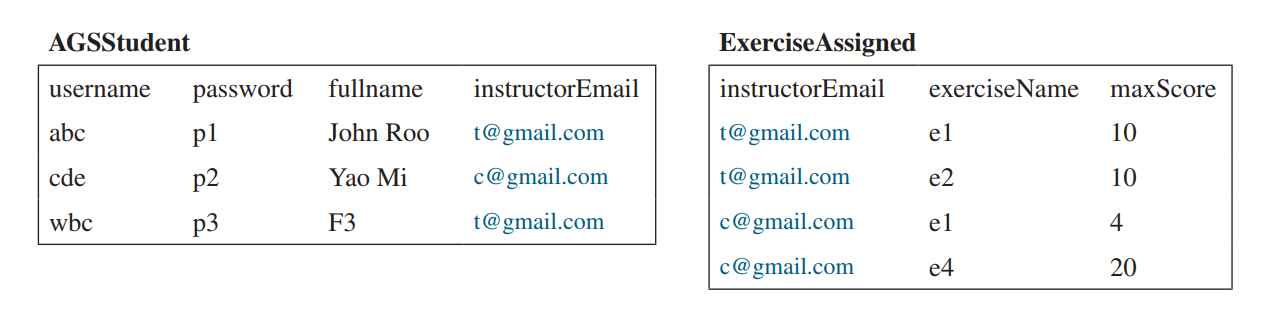
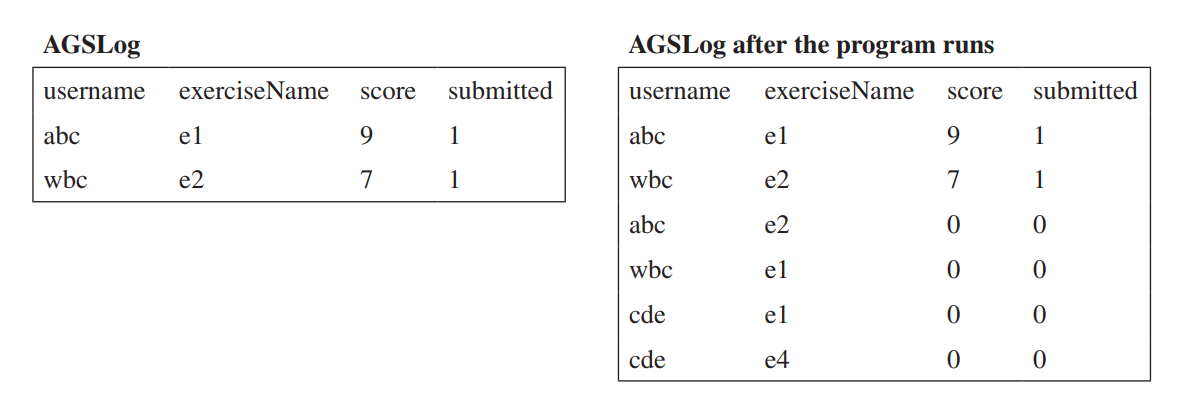
create table AGSStudent ( username varchar(50) not null, password varchar(50) not null, fullname varchar(200) not null, instructorEmail varchar(100) not null, constraint pkAGSStudent primary key (username) ); create table ExerciseAssigned ( instructorEmail varchar(100), exerciseName varchar(100), maxscore double default 10, constraint pkCustomExercise primary key (instructorEmail, exerciseName) ); create table AGSLog username varchar (50), /* This is the student's user name */ exerciseName varchar(100), /* This is the exercise *, score double default null, submitted bit default 0, constraint pkLog primary key (username, exerciseName) ); ExerciseAssigned instructorEmail AGSStudent password fullname instructorEmail exerciseName maxScore username abc pl John Roo t@gmail.com t@gmail.com el 10 cde p2 Yao Mi c@gmail.com t@gmail.com e2 10 wbc p3 F3 t@gmail.com c@gmail.com el 4 c@gmail.com e4 20
Step by Step Solution
3.41 Rating (160 Votes )
There are 3 Steps involved in it
Program Plan Create a new class UpdatingAGSLog Create a method intitDataBase initDataBase method will create a connection with the database and create a statement with the connection Create an inner c... View full answer

Get step-by-step solutions from verified subject matter experts
 Study Help