



Question: (a) Modify the Millers Tax Computation program in Figure 1.2 to include a tax deduction for educator expenses. (b) Next modify the program to account
(a) Modify the Millers’ Tax Computation program in Figure 1.2 to include a tax deduction for educator expenses.
(b) Next modify the program to account for a growing family. In particular, instead of having two personal exemptions hard-coded in the Tax Computation formula for “Personal exemptions,” create a parameter for “Number of exemptions.” Refer to that parameter in the Tax Computation formula for “Personal exemptions.”
(c) Suppose Rob has educator expenses of $200, and the couple now has one child. Compute their updated estimated tax per quarter.
Figure 1.2
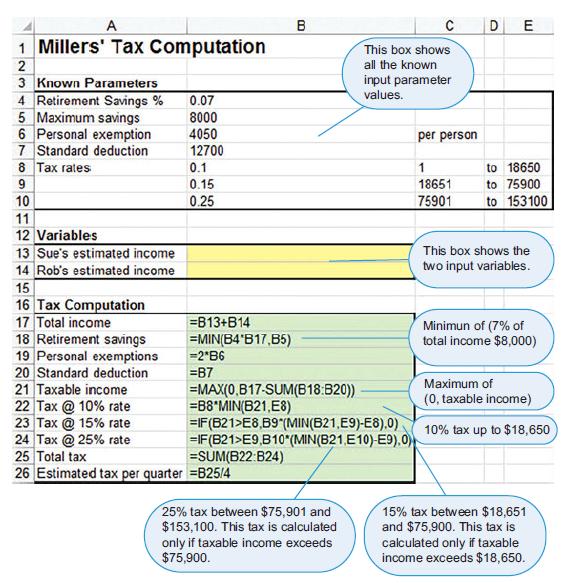
A B DE 1 Millers' Tax Computation This box shows all the known 3 Known Parameters 4 Retirement Savings % 5 Maximum savings 6 Personal exemption 7 Standard deduction 8 Tax rates input parameter values. 0.07 8000 4050 per person 12700 0.1 1 to 18650 9 0.15 18651 to 75900 10 0.25 75901 to 153100 11 12 Variables 13 Sue's estimated income 14 Rob's estimated income 15 16 Tax Computation 17 Total income 18 Retirement savings 19 Personal exemptions 20 Standard deduction 21 Taxable income 22 Tax @ 10% rate 23 Tax @ 15% rate 24 Tax @ 25% rate 25 Total tax 26 Estimated tax per quarter =B25/4 This box shows the two input variables. =B13+B14 =MIN(B4'B17,85) =2*B6 Minimun of (7% of total income $8,000) =B7 Maximum of (0, taxable income) =MAX(0.B17-SUM(B18:B20)) =B8*MIN(B21,E8) =IF(621>E8,89"(MIN(B21,E9)-E8).0) =IF(B21>E9,B10"(MIN(B21.E10)-E9),0) =SUM(B22:B24) 10% tax up to $18,650 15% tax between $18,651 and $75,900. This tax is calculated only if taxable income exceeds $18,650. 25% tax between $75,901 and $153,100. This tax is calculated only if taxable income exceeds $75,900.
Step by Step Solution
3.57 Rating (161 Votes )
There are 3 Steps involved in it
Part a Part b Part c plaintext 3 Known Parameters 4 ... View full answer

Get step-by-step solutions from verified subject matter experts