



Question: For our drug cost example (see the file named Offsetcost.xlsx from Chapter 22, The OFFSET function,), format the worksheet so that all Phase 1 costs
For our drug cost example (see the file named Offsetcost.xlsx from Chapter 22, “The OFFSET function,”), format the worksheet so that all Phase 1 costs are displayed in red, all Phase 2 costs are displayed in green, and all Phase 3 costs are displayed in purple.
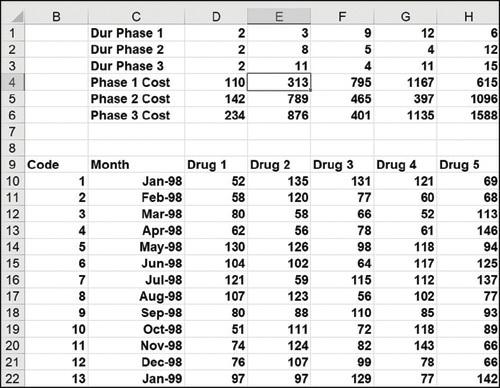
123456700 o 8 9 Code 10 11 12 13 14 15 16 17 B 18 19 20 21 22 1 23456700 a 8 9 10 11 12 13 C Dur Phase 1 Dur Phase 2 Dur Phase 3 Phase 1 Cost Phase 2 Cost Phase 3 Cost Month Jan-98 Feb-98 Mar-98 Apr-98 May-98 Jun-98 Jul-98 Aug-98 Sep-98 Oct-98 Nov-98 Dec-98 Jan-99 D 222 110 142 234 Drug 1 52 58 80 62 130 104 121 107 80 51 74 76 97 E 38 11 313 789 876 Drug 2 135 120 58 56 126 102 59 123 88 111 124 107 97 F 954 795 465 401 Drug 3 131 77 66 78 98 64 115 56 110 72 82 99 129 G 12 4 11 1167 397 1135 Drug 4 121 60 52 61 118 117 112 102 85 118 143 78 77 H 6 12 15 615 1096 1588 Drug 5 69 68 113 146 123788887 94 93 89 66 66
Step by Step Solution
3.52 Rating (166 Votes )
There are 3 Steps involved in it
The procedures below can be used to style the worksheet so that Phase 1 expenses are shown in red ... View full answer

Get step-by-step solutions from verified subject matter experts