







Question: In this exercise, you complete a program that uses the Square class shown in Figure 15-6 in the chapter. Follow the instructions for starting C++
In this exercise, you complete a program that uses the Square class shown in Figure 15-6 in the chapter. Follow the instructions for starting C++ and viewing the Introductory13.cpp file, which is contained in either the Cpp8\Chap15\Introductory13 Project folder or the Cpp8\Chap15 folder. (Depending on your C++ development tool, you may need to open this exercise’s project/solution file first.) Enter the Square class definition from Figure 15-6 in the Introductory13 Square.h file. Next, complete the Introductory13.cpp file by entering the appropriate instructions. Use the comments as a guide. Test the program appropriately.
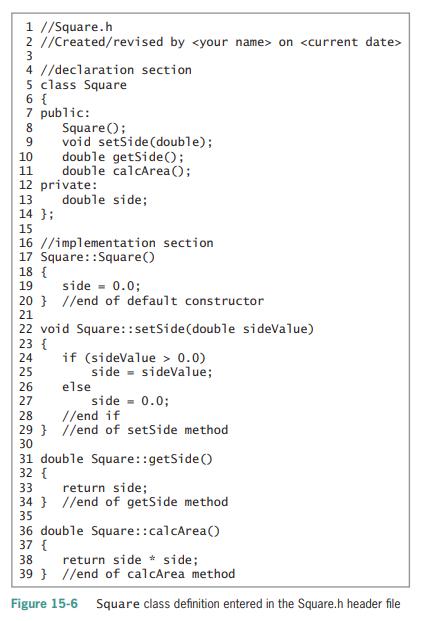
1 //Square.h 2 //Created/revised by on 3 4 //declaration section 5 class Square 6 { 7 public: Square(); void setSide (double); double getSide(); double calcArea(); 8 10 11 12 private: double side; 14 }; 13 15 16 //implementation section 17 Square::Square() 18 { 19 side - 0.0; 20 } //end of default constructor 21 22 void Square::setSide(double sideValue) 23 { if (sideValue > 0.0) side - sideValue; else side = 0.0; //end if 27 28 29 } //end of setSide method 30 31 double Square::getSide() 32 { 33 return side; 34 } //end of getSide method 35 36 double Square::calcArea() 37 { 38 return side * side; 39 } //end of calcArea method Figure 15-6 Square class definition entered in the Square.h header file S6700 222 20
Step by Step Solution
3.48 Rating (158 Votes )
There are 3 Steps involved in it
include using namespace std class Square private d... View full answer

Get step-by-step solutions from verified subject matter experts
 Study Help