







Question: In this exercise, you will modify the savings account program shown earlier in Figure 9-18. Follow the instructions for starting C++ and viewing the Intermediate20.cpp
In this exercise, you will modify the savings account program shown earlier in Figure 9-18. Follow the instructions for starting C++ and viewing the Intermediate20.cpp file, which is contained in either the Cpp8\Chap09\Intermediate20 Project folder or the Cpp8\Chap09 folder. (Depending on your C++ development tool, you may need to open this exercise’s project/solution file first.) Modify the program to allow the user to enter the minimum and maximum interest rates, as shown in Figure 9-40. Test the program appropriately.
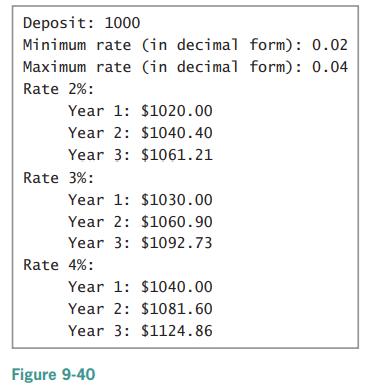
Deposit: 1000 Minimum rate (in decimal form): 0.02 Maximum rate (in decimal form): 0.04 Rate 2%: Year 1: $1020.00 Year 2: $1040.40 Year 3: $1061.21 Rate 3%: Year 1: $1030.00 Year 2: $1060.90 Year 3: $1092.73 Rate 4%: Year 1: $1040.00 Year 2: $1081.60 Year 3: $1124.86 Figure 9-40
Step by Step Solution
3.40 Rating (175 Votes )
There are 3 Steps involved in it
The program takes 3 inputs from the user deposit minimum interest rate and maximum interest rat... View full answer

Get step-by-step solutions from verified subject matter experts
 Study Help